Unlock a world of possibilities! Login now and discover the exclusive benefits awaiting you.

- Qlik Community
- :
- All Forums
- :
- QlikView
- :
- Dimension Limits - Top 80%
- Subscribe to RSS Feed
- Mark Topic as New
- Mark Topic as Read
- Float this Topic for Current User
- Bookmark
- Subscribe
- Mute
- Printer Friendly Page

- Mark as New
- Bookmark
- Subscribe
- Mute
- Subscribe to RSS Feed
- Permalink
- Report Inappropriate Content
Dimension Limits - Top 80%
Can someone tell me why when I use the Dimension Limit 80% of Relative Total Using Largest Value, the lowest value is included?
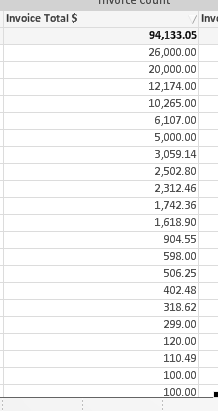
Below are all my values sorted Descending (this is the first expression and I only have one Dimension)
and this is what I get when I set the dimension limit to accumulate to 80% of Relative Total Using Largest Value

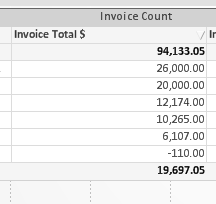
shouldn't the record with a total of $5000 come next?
- « Previous Replies
-
- 1
- 2
- Next Replies »

 Gysbert_Wassena
- Mark as New
- Bookmark
- Subscribe
- Mute
- Subscribe to RSS Feed
- Permalink
- Report Inappropriate Content
Can you post a Qlikview document that demonstrates the problem?
talk is cheap, supply exceeds demand
 Colin-Albert
- Mark as New
- Bookmark
- Subscribe
- Mute
- Subscribe to RSS Feed
- Permalink
- Report Inappropriate Content
What is the sort order on your chart set to?
I would try sorting by Y-Value - descending

 sunny_talwar
- Mark as New
- Bookmark
- Subscribe
- Mute
- Subscribe to RSS Feed
- Permalink
- Report Inappropriate Content
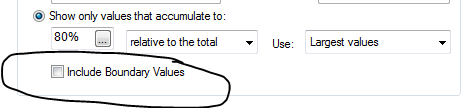
Try selecting the "Include Boundary Values" and see if that helps.
Best,
Sunny
- Mark as New
- Bookmark
- Subscribe
- Mute
- Subscribe to RSS Feed
- Permalink
- Report Inappropriate Content
Sorry I can't post the document, confidential info.
- Mark as New
- Bookmark
- Subscribe
- Mute
- Subscribe to RSS Feed
- Permalink
- Report Inappropriate Content
When I select include Boundary Values, the record totaling $5000 is added to the results but the -110 still shows up.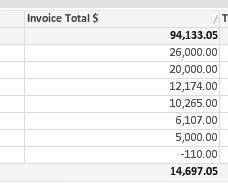
- Mark as New
- Bookmark
- Subscribe
- Mute
- Subscribe to RSS Feed
- Permalink
- Report Inappropriate Content
You can't sort by y-values in a straight table (x & y don't exist). I tried sorting my dimension with first priority descending by the same expression formula and that didn't change anything.
- Mark as New
- Bookmark
- Subscribe
- Mute
- Subscribe to RSS Feed
- Permalink
- Report Inappropriate Content
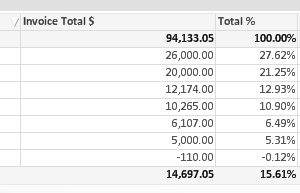
I added a % of total column and this is confusing me even more. You reach 80% at the 10,265 line, so why are the other 3 included? Is it sorting individual records and taking the top 80% before aggregation and then including records that aren't in the 80% in the aggregated result?
Every day I work in QV I wish I was working in Tableau again.
sunny_talwar
- Mark as New
- Bookmark
- Subscribe
- Mute
- Subscribe to RSS Feed
- Permalink
- Report Inappropriate Content
May be you want to restrict negative values in your expression, because negative value potentially reduces the total to be under 80%
{<Invoice = {'>0'}>}

 antoniotiman
- Mark as New
- Bookmark
- Subscribe
- Mute
- Subscribe to RSS Feed
- Permalink
- Report Inappropriate Content
Hi Jessica,
I have already noticed this behaviour due to values < 0.
You don't use Dimension limits.
You use expression
If(RangeSum(Above(Sum(Sales),0,RowNo()))/Sum(TOTAL Sales) <= 0.8,Sum(Sales))
Dimension Product
Regards,
Antonio
- « Previous Replies
-
- 1
- 2
- Next Replies »