Unlock a world of possibilities! Login now and discover the exclusive benefits awaiting you.

- Qlik Community
- :
- All Forums
- :
- QlikView
- :
- Re: Dimension Limits
- Subscribe to RSS Feed
- Mark Topic as New
- Mark Topic as Read
- Float this Topic for Current User
- Bookmark
- Subscribe
- Mute
- Printer Friendly Page

 NareshGuntur
- Mark as New
- Bookmark
- Subscribe
- Mute
- Subscribe to RSS Feed
- Permalink
- Report Inappropriate Content
Dimension Limits
I have a table
LOAD * INLINE [
F1, F2, F3
a1, 1, 6
a2, 2, 5
a3, 3, 4
a4, 4, 3
a5, 5, 2
a6, 6, 1
];
and my chart gives me this
| F1 | sum(F2-F3) |
|---|---|
| 0 | |
| a1 | -5 |
| a2 | -3 |
| a3 | -1 |
| a4 | 1 |
| a5 | 3 |
| a6 | 5 |
and I wanted to get only negative values
| F1 | if(sum(F2-F3)<0,sum(F2-F3)) |
|---|---|
| a1 | -5 |
| a2 | -3 |
| a3 | -1 |
and I wanted to get the smallest 2, basically -5 and -3 and so I applied for Dimension Limits.
and I don't get any data
| F1 | if(sum(F2-F3)<0,sum(F2-F3)) |
|---|---|
Attached is the qvw.
Accepted Solutions

 sunny_talwar
- Mark as New
- Bookmark
- Subscribe
- Mute
- Subscribe to RSS Feed
- Permalink
- Report Inappropriate Content
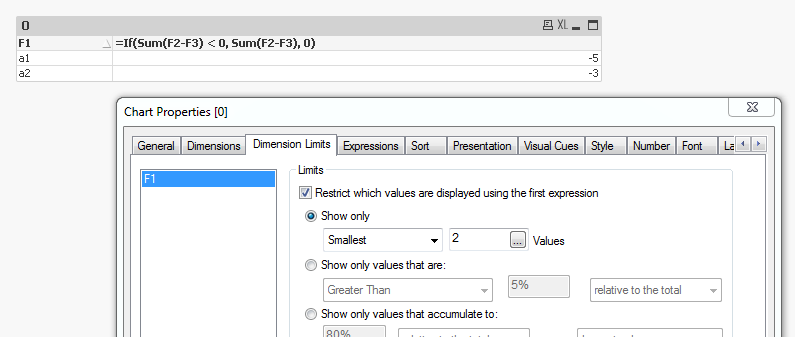
I think the issue was related to the false statement in your if statement. We were leaving it as null, which was causing the issue. Try this expression:
=If(Sum(F2-F3) < 0, Sum(F2-F3), 0)

- Mark as New
- Bookmark
- Subscribe
- Mute
- Subscribe to RSS Feed
- Permalink
- Report Inappropriate Content
which object you choosed for chart
i tried with a straight table and it works

sunny_talwar
- Mark as New
- Bookmark
- Subscribe
- Mute
- Subscribe to RSS Feed
- Permalink
- Report Inappropriate Content
May be try this expression:
=If(Rank(-1*If(Sum(F2-F3) < 0, Sum(F2-F3))) <= 2, If(Sum(F2-F3) < 0, Sum(F2-F3)))

sunny_talwar
- Mark as New
- Bookmark
- Subscribe
- Mute
- Subscribe to RSS Feed
- Permalink
- Report Inappropriate Content
I think he wants to see just lowest 2 values: -5 and -3 
NareshGuntur
- Mark as New
- Bookmark
- Subscribe
- Mute
- Subscribe to RSS Feed
- Permalink
- Report Inappropriate Content
Thanks Sunny.
I want to understand if Dimension Limits is working as expected.
And I am worried to use this big expression as Sum(F2-F3) itself is a complex in my real scenario.
- Mark as New
- Bookmark
- Subscribe
- Mute
- Subscribe to RSS Feed
- Permalink
- Report Inappropriate Content
okay, i need to read until end 
sunny_talwar
- Mark as New
- Bookmark
- Subscribe
- Mute
- Subscribe to RSS Feed
- Permalink
- Report Inappropriate Content
I think the issue was related to the false statement in your if statement. We were leaving it as null, which was causing the issue. Try this expression:
=If(Sum(F2-F3) < 0, Sum(F2-F3), 0)
- Mark as New
- Bookmark
- Subscribe
- Mute
- Subscribe to RSS Feed
- Permalink
- Report Inappropriate Content
follow These instructions and you get what you want:
1) define a new Expression with sum(F2-F3) on first place
2) define Dimension Limits (resticht values... Show only smallest 2 values)
3) tab presentation: hide Expression (first one with sum(F2-F3)
here is what i get:

NareshGuntur
- Mark as New
- Bookmark
- Subscribe
- Mute
- Subscribe to RSS Feed
- Permalink
- Report Inappropriate Content
Thanks much.
I missed a silly thing
Cheers,
Naresh
sunny_talwar
- Mark as New
- Bookmark
- Subscribe
- Mute
- Subscribe to RSS Feed
- Permalink
- Report Inappropriate Content
I am glad we were able to resolve it quickly