Unlock a world of possibilities! Login now and discover the exclusive benefits awaiting you.

- Qlik Community
- :
- All Forums
- :
- QlikView
- :
- Re: Display Large Numbers in Charts
- Subscribe to RSS Feed
- Mark Topic as New
- Mark Topic as Read
- Float this Topic for Current User
- Bookmark
- Subscribe
- Mute
- Printer Friendly Page

 mohan2391
- Mark as New
- Bookmark
- Subscribe
- Mute
- Subscribe to RSS Feed
- Permalink
- Report Inappropriate Content
Display Large Numbers in Charts
Hi,
Please find the attached QVW.
In the chart the expression values are too large (16 digits).
I want to show them in K(divided by 1000) $ M(divided by 1000000) by selecting appropriate button.
It is not showing properly sometimes it is showing only 4 digits and sometimes 10 digits..
How to show full numbers depend on K/M ?
Please look into this..
Thank You
mohan2391
- Mark as New
- Bookmark
- Subscribe
- Mute
- Subscribe to RSS Feed
- Permalink
- Report Inappropriate Content
Please find the new QVW file (LESSER SIZE) not the old one..

 sdmech81
- Mark as New
- Bookmark
- Subscribe
- Mute
- Subscribe to RSS Feed
- Permalink
- Report Inappropriate Content
HI,
I can give you some idea on this, like how to do this:
*) Create variable say vDivider= 1000/1000000
*)Then suppose say there are 2 button/text objects u have to toggle between 1000 and 1000000.
*)Then in each button u set action of setting a variable value(i.e value for vDivider) either 1000/1000000 (fr 1button say it sets 1000 then othr will set 1000000)
*)Then use tht as variable vDivider for dividing.
Hope this helps!
mohan2391
- Mark as New
- Bookmark
- Subscribe
- Mute
- Subscribe to RSS Feed
- Permalink
- Report Inappropriate Content
That is what my text objects on right side do.
$K - 1000
$M - 1000000
Even after dividing it is not showing properly that is the issue.
When I click on $K, it will be having 13 digits so it is not showing full number, only when i keep mouse on bars it is showing full numbers
sdmech81
- Mark as New
- Bookmark
- Subscribe
- Mute
- Subscribe to RSS Feed
- Permalink
- Report Inappropriate Content
HI,
Fr me numbers were visible..
Can u take screen shot and high light the issue if u still feel so?
Sachin

 avinashelite
- Mark as New
- Bookmark
- Subscribe
- Mute
- Subscribe to RSS Feed
- Permalink
- Report Inappropriate Content
Since you have bigger numbers ..the representation is getting over lap , since the numbers are big you need to educate the users to use $M because $K does't make sense here ..if you still need the numbers then increase the distance between the bars in Presentation
Hope this helps you
 MarcoWedel
- Mark as New
- Bookmark
- Subscribe
- Mute
- Subscribe to RSS Feed
- Permalink
- Report Inappropriate Content
sdmech81
- Mark as New
- Bookmark
- Subscribe
- Mute
- Subscribe to RSS Feed
- Permalink
- Report Inappropriate Content
HI,
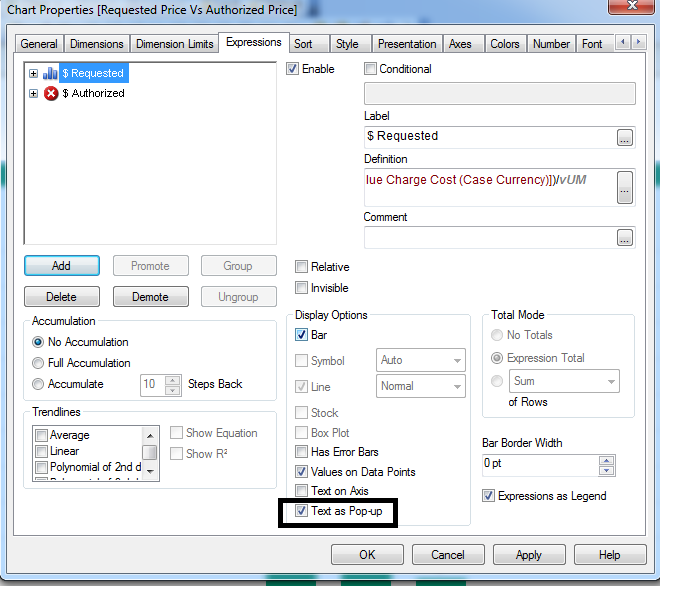
Better show text as pop-up in this case or make ur graph little large so tht values will not over lap:
Tick text as pop up and remove values on data points like in scree below: