Unlock a world of possibilities! Login now and discover the exclusive benefits awaiting you.

- Qlik Community
- :
- All Forums
- :
- QlikView
- :
- Re: Document Reload Failed after AD password Chang...
- Subscribe to RSS Feed
- Mark Topic as New
- Mark Topic as Read
- Float this Topic for Current User
- Bookmark
- Subscribe
- Mute
- Printer Friendly Page

- Mark as New
- Bookmark
- Subscribe
- Mute
- Subscribe to RSS Feed
- Permalink
- Report Inappropriate Content
Document Reload Failed after AD password Changed
Hi @ all,
after administrator server AD password changed the qlik server can't execute the schedulated reload.
The reload works if I lauch it manually.
I try to reload server and all qvs services but the problem remains.
Someone can help me?
- « Previous Replies
-
- 1
- 2
- Next Replies »
- Mark as New
- Bookmark
- Subscribe
- Mute
- Subscribe to RSS Feed
- Permalink
- Report Inappropriate Content
Hi!
It will be much easier to diagnose this issue it you will give us log files from your server in other case this is guess-work and it will take a lot of time to make correct guess.
- Mark as New
- Bookmark
- Subscribe
- Mute
- Subscribe to RSS Feed
- Permalink
- Report Inappropriate Content
QVWS

 ashfaq_haseeb
- Mark as New
- Bookmark
- Subscribe
- Mute
- Subscribe to RSS Feed
- Permalink
- Report Inappropriate Content
Hi,
MyskypeID:
ashfaqhaseeb
Lets see.
Regards
ASHFAQ

 stevedark
- Mark as New
- Bookmark
- Subscribe
- Mute
- Subscribe to RSS Feed
- Permalink
- Report Inappropriate Content
One of my clients landed themselves in this situation, by forgetting the service account password and then resetting it as an Admin.
QlikView Distribution Services was then totally unresponsive from there on in. Tasks would start and then not finish.
Reboots of the server and upgrade of QlikView Server (which was overdue anyway) didn't resolve the problem.
In the end the solution was to create a new Service user, apply this user to all the services and restart those services. Bit of a worry whilst the issue was happening though.
Note this issue has been raised here also: QlikView Server (QEMC) Publisher Reload not working
Hope this helps others facing this issue.
Steve
- Mark as New
- Bookmark
- Subscribe
- Mute
- Subscribe to RSS Feed
- Permalink
- Report Inappropriate Content
Hi,
We had the similar problem in QMC most tasks were failing after QlikView service account's password change.
By looking closely to the problem failure was in distributing the documents to users and groups. So it was in AD lookup.
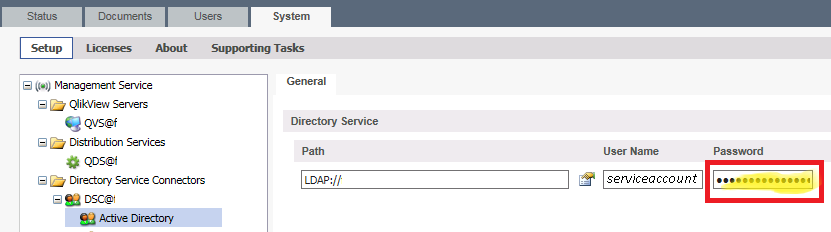
Resetting the Active Directory password in QMC/System/Directory Service Connectors resolved the issue.
- « Previous Replies
-
- 1
- 2
- Next Replies »