Unlock a world of possibilities! Login now and discover the exclusive benefits awaiting you.

- Qlik Community
- :
- All Forums
- :
- QlikView
- :
- Re: Draw a reference line at 90 % in Bar chart
- Subscribe to RSS Feed
- Mark Topic as New
- Mark Topic as Read
- Float this Topic for Current User
- Bookmark
- Subscribe
- Mute
- Printer Friendly Page

 markgraham123
- Mark as New
- Bookmark
- Subscribe
- Mute
- Subscribe to RSS Feed
- Permalink
- Report Inappropriate Content
Draw a reference line at 90 % in Bar chart
Hi Everyone,
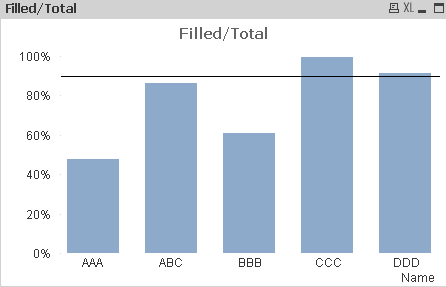
I have a bar chart which shows the percentages of specified names.
I wanna draw a reference line at 90 %.
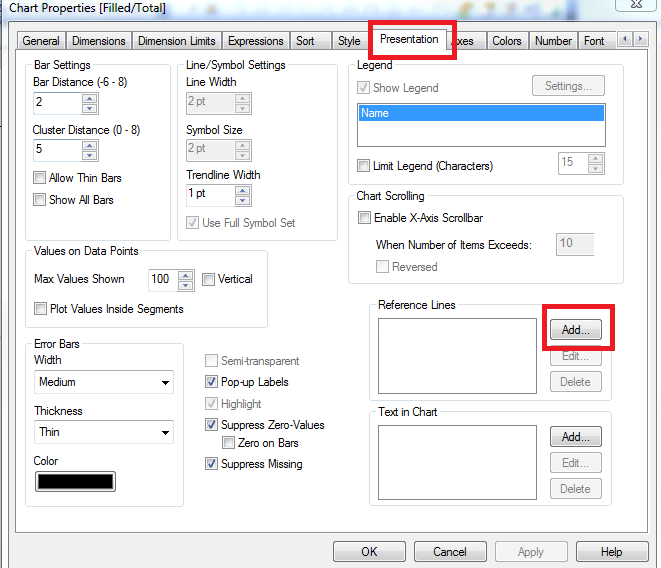
I tried out Presentation> Reference> add> Expression....
but no luck..
Can anyone look into this.
Accepted Solutions

 Nicole-Smith
- Mark as New
- Bookmark
- Subscribe
- Mute
- Subscribe to RSS Feed
- Permalink
- Report Inappropriate Content

 dionverbeke
- Mark as New
- Bookmark
- Subscribe
- Mute
- Subscribe to RSS Feed
- Permalink
- Report Inappropriate Content
Hi,
Select Combo Chart and add a 0.90 line chart expression and label it 90%.
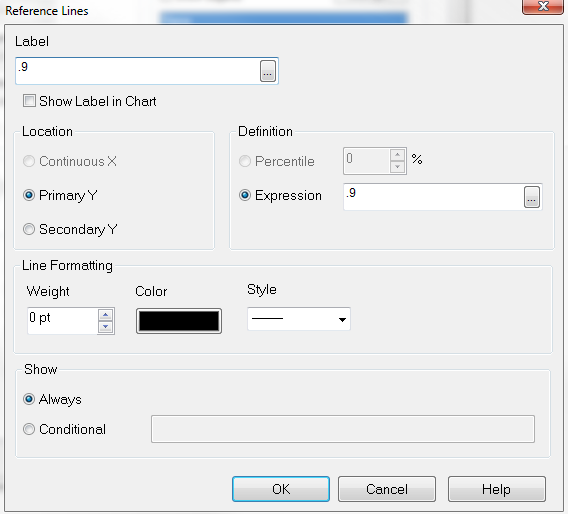
You can do the same with the refence expression: 90% as label and 0.9 as expression.
Usually it goes wrong because you forgot to set it on the secondary axis because it is a percentage xpression.
Dion
Nicole-Smith
- Mark as New
- Bookmark
- Subscribe
- Mute
- Subscribe to RSS Feed
- Permalink
- Report Inappropriate Content
markgraham123
- Mark as New
- Bookmark
- Subscribe
- Mute
- Subscribe to RSS Feed
- Permalink
- Report Inappropriate Content
Hi Dion,
Its working. But as u said, its not working with Secondary axis selcted, its working with primary axis.
markgraham123
- Mark as New
- Bookmark
- Subscribe
- Mute
- Subscribe to RSS Feed
- Permalink
- Report Inappropriate Content
Thanq verymuch Dion,
It sworking. 
markgraham123
- Mark as New
- Bookmark
- Subscribe
- Mute
- Subscribe to RSS Feed
- Permalink
- Report Inappropriate Content
Thanq very much Nicole Smith
 vikasmahajan
- Mark as New
- Bookmark
- Subscribe
- Mute
- Subscribe to RSS Feed
- Permalink
- Report Inappropriate Content
How to apply the same in Qlik Sense ?
Vikas
If the issue is solved please mark the answer with Accept as Solution & like it.
If you want to go quickly, go alone. If you want to go far, go together.
