Unlock a world of possibilities! Login now and discover the exclusive benefits awaiting you.

- Qlik Community
- :
- All Forums
- :
- QlikView
- :
- Re: Dual Replace Class Labels
- Subscribe to RSS Feed
- Mark Topic as New
- Mark Topic as Read
- Float this Topic for Current User
- Bookmark
- Subscribe
- Mute
- Printer Friendly Page

 cbaqir
- Mark as New
- Bookmark
- Subscribe
- Mute
- Subscribe to RSS Feed
- Permalink
- Report Inappropriate Content
Dual Replace Class Labels
My current dimension is:
=Dual(If(Aggr(Sum({<Flag_CurrentStep={1}>}WORKFLOW_DURATION), REQUEST_ID) <= 120, Class(Aggr(Sum({<Flag_CurrentStep={1}>}WORKFLOW_DURATION), REQUEST_ID), 60), '>120'),
If(Aggr(Sum({<Flag_CurrentStep={1}>}WORKFLOW_DURATION), REQUEST_ID) <= 120, Class(Aggr(Sum({<Flag_CurrentStep={1}>}WORKFLOW_DURATION), REQUEST_ID), 60), 120))
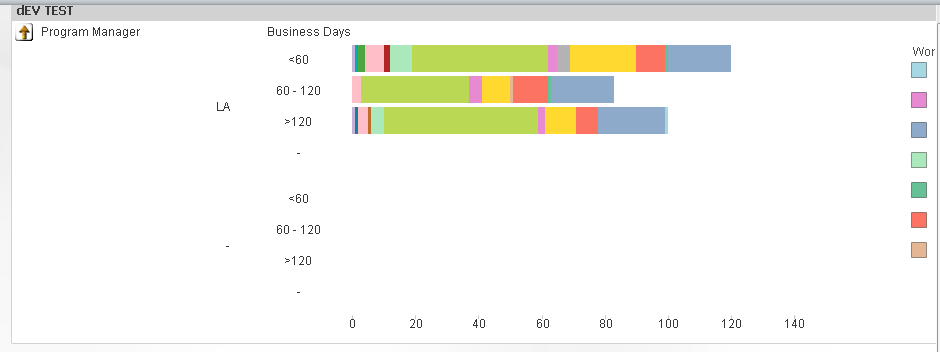
and it gives me these labels:

My customer wants the labels to display (and then sort the same way) more simply:
<60
60-120
>120
I've been playing with the Dual Replace function in the dimension but can't get it to work correctly.
Thanks.
- « Previous Replies
-
- 1
- 2
- Next Replies »
Accepted Solutions

 sunny_talwar
- Mark as New
- Bookmark
- Subscribe
- Mute
- Subscribe to RSS Feed
- Permalink
- Report Inappropriate Content
May be this:
=Dual(
If(Aggr(Sum({<Flag_CurrentStep={1}>}WORKFLOW_DURATION), REQUEST_ID) < 60, '<60',
If(Aggr(Sum({<Flag_CurrentStep={1}>}WORKFLOW_DURATION), REQUEST_ID) > 120, '>120',
Replace(Class(Aggr(Sum({<Flag_CurrentStep={1}>}WORKFLOW_DURATION),REQUEST_ID), 60), '<= x <', '-'))),
If(Aggr(Sum({<Flag_CurrentStep={1}>}WORKFLOW_DURATION), REQUEST_ID) < 60, 0,
If(Aggr(Sum({<Flag_CurrentStep={1}>}WORKFLOW_DURATION), REQUEST_ID) > 120, 120,
Class(Aggr(Sum({<Flag_CurrentStep={1}>}WORKFLOW_DURATION),REQUEST_ID), 60))))

 Gabriel
- Mark as New
- Bookmark
- Subscribe
- Mute
- Subscribe to RSS Feed
- Permalink
- Report Inappropriate Content
Hi,
Can you possibly attached sample file?
This help
cbaqir
- Mark as New
- Bookmark
- Subscribe
- Mute
- Subscribe to RSS Feed
- Permalink
- Report Inappropriate Content
Added to original post.
sunny_talwar
- Mark as New
- Bookmark
- Subscribe
- Mute
- Subscribe to RSS Feed
- Permalink
- Report Inappropriate Content
May be this:
=Dual(
If(Aggr(Sum({<Flag_CurrentStep={1}>}WORKFLOW_DURATION), REQUEST_ID) < 60, '<60',
If(Aggr(Sum({<Flag_CurrentStep={1}>}WORKFLOW_DURATION), REQUEST_ID) > 120, '>120',
Replace(Class(Aggr(Sum({<Flag_CurrentStep={1}>}WORKFLOW_DURATION),REQUEST_ID), 60), '<= x <', '-'))),
If(Aggr(Sum({<Flag_CurrentStep={1}>}WORKFLOW_DURATION), REQUEST_ID) < 60, 0,
If(Aggr(Sum({<Flag_CurrentStep={1}>}WORKFLOW_DURATION), REQUEST_ID) > 120, 120,
Class(Aggr(Sum({<Flag_CurrentStep={1}>}WORKFLOW_DURATION),REQUEST_ID), 60))))
cbaqir
- Mark as New
- Bookmark
- Subscribe
- Mute
- Subscribe to RSS Feed
- Permalink
- Report Inappropriate Content
Perfect! Thanks, Sunny!
 MK_QSL
- Mark as New
- Bookmark
- Subscribe
- Mute
- Subscribe to RSS Feed
- Permalink
- Report Inappropriate Content
You can use below one also
=Aggr(
If(Sum({<Flag_CurrentStep={1}>}WORKFLOW_DURATION)< 60, Dual('<60',1),
If(Sum({<Flag_CurrentStep={1}>}WORKFLOW_DURATION)>= 60 and Sum({<Flag_CurrentStep={1}>}WORKFLOW_DURATION) <= 120, Dual('60-120',2),
If(Sum({<Flag_CurrentStep={1}>}WORKFLOW_DURATION)> 120, Dual('>120',3))))
,REQUEST_ID)
cbaqir
- Mark as New
- Bookmark
- Subscribe
- Mute
- Subscribe to RSS Feed
- Permalink
- Report Inappropriate Content
So to apply the same logic to this version:
=Dual(
If(WORKFLOW_DURATION <= 120,
Class(WORKFLOW_DURATION, 60), '>120'),
If(WORKFLOW_DURATION <= 120,
Class(WORKFLOW_DURATION, 60), 120))
would it be something like this:
=Dual(
If(WORKFLOW_DURATION) < 60, '<60',
If(WORKFLOW_DURATION) > 120, '>120',
Replace(Class(WORKFLOW_DURATION)), 60), '<= x <', '-'),
If(WORKFLOW_DURATION) < 60, 0,
If(WORKFLOW_DURATION) > 120, 120,
Class(WORKFLOW_DURATION), 60)
sunny_talwar
- Mark as New
- Bookmark
- Subscribe
- Mute
- Subscribe to RSS Feed
- Permalink
- Report Inappropriate Content
Some missing parenthesis:
=Dual(
If(WORKFLOW_DURATION) < 60, '<60',
If(WORKFLOW_DURATION) > 120, '>120',
Replace(Class(WORKFLOW_DURATION)), 60), '<= x <', '-'))),
If(WORKFLOW_DURATION) < 60, 0,
If(WORKFLOW_DURATION) > 120, 120,
Class(WORKFLOW_DURATION), 60))))
cbaqir
- Mark as New
- Bookmark
- Subscribe
- Mute
- Subscribe to RSS Feed
- Permalink
- Report Inappropriate Content
That's giving me "Error in calculated dimension"
sunny_talwar
- Mark as New
- Bookmark
- Subscribe
- Mute
- Subscribe to RSS Feed
- Permalink
- Report Inappropriate Content
And you had some extra parenthesis elsewhere:
=Dual(
If(WORKFLOW_DURATION < 60, '<60',
If(WORKFLOW_DURATION > 120, '>120',
Replace(Class(WORKFLOW_DURATION, 60), '<= x <', '-'))),
If(WORKFLOW_DURATION < 60, 0,
If(WORKFLOW_DURATION > 120, 120,
Class(WORKFLOW_DURATION, 60))))

- « Previous Replies
-
- 1
- 2
- Next Replies »