Unlock a world of possibilities! Login now and discover the exclusive benefits awaiting you.

- Qlik Community
- :
- All Forums
- :
- QlikView
- :
- Re: Dynamic Chart Selection , Hide/Unhide based on...
- Subscribe to RSS Feed
- Mark Topic as New
- Mark Topic as Read
- Float this Topic for Current User
- Bookmark
- Subscribe
- Mute
- Printer Friendly Page

- Mark as New
- Bookmark
- Subscribe
- Mute
- Subscribe to RSS Feed
- Permalink
- Report Inappropriate Content
Dynamic Chart Selection , Hide/Unhide based on multiple selection in LIST BOX
Hello All,
I am a new user and I am doing a POC for a client using a personal edition.
I have a list box with a field id and id has 8 values:1,2,3,4,5,6,7,8 respectively and I have 8 charts for each. If I select then Chart1 should be displayed and rest all should be hidden and if I select 2 then Chart 2 should be displayed and rest all be hidden and so forth.
Most Importantly, if a user selects say id=1,2,3,4 then chart1,chart2,chart3 andchart4 should be displayed and rest all should be hidden, could one please help me how to do this. This is really important , Please help ASAP
I have a personal edition and I might not be able to download and use any other Qlikview file other than the ones I create.
- « Previous Replies
-
- 1
- 2
- Next Replies »
- Mark as New
- Bookmark
- Subscribe
- Mute
- Subscribe to RSS Feed
- Permalink
- Report Inappropriate Content
Index(concat(DISTINCT id),1)
Try this please. I forgot that Getfieldselection has a limit of 6. Sorry
- Mark as New
- Bookmark
- Subscribe
- Mute
- Subscribe to RSS Feed
- Permalink
- Report Inappropriate Content
One more change:
GetSelectedCount(id)>0 and Index(concat(DISTINCT id),1)
This will get you what you are looking for.
Thanks
AJ
- Mark as New
- Bookmark
- Subscribe
- Mute
- Subscribe to RSS Feed
- Permalink
- Report Inappropriate Content
Hello Ajay,
Thanks so much. It worked like magic. I have one more question if you do not mind. Is there any way to restrict user selection here, say to a maximum of 4 id's at any given point of time, it can be anything {1,3,5,6} or {1,2,3,4}

 stabben23
- Mark as New
- Bookmark
- Subscribe
- Mute
- Subscribe to RSS Feed
- Permalink
- Report Inappropriate Content
Hi or just use index(concat(id),x) x for the number in your bar 1 to 8 in your example. Works in your attached file.
- Mark as New
- Bookmark
- Subscribe
- Mute
- Subscribe to RSS Feed
- Permalink
- Report Inappropriate Content
Sure. You can tweak it a little like
GetSelectedCount(id)>0 and GetSelectedCount(id)<5 and Index(concat(DISTINCT id),1)
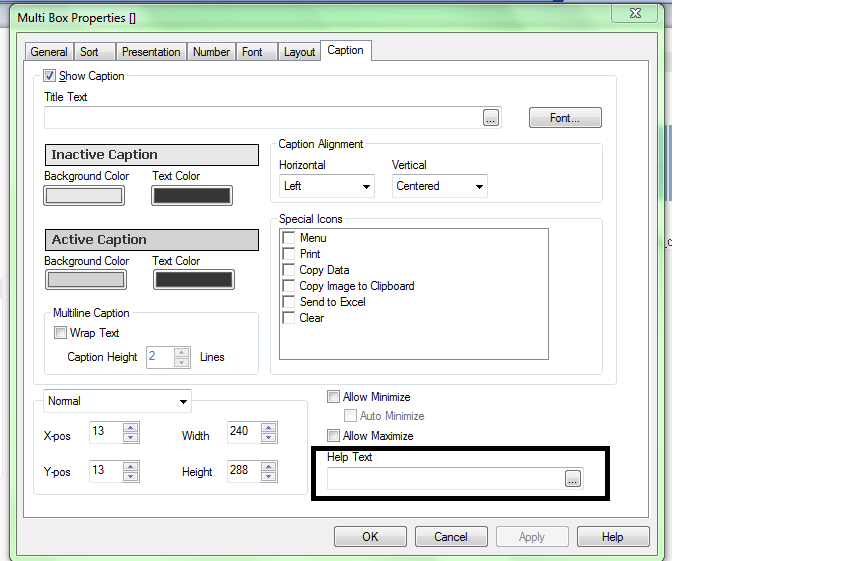
and you can add a help text to display message as 'Select max 4 values'
This can be done in
- Mark as New
- Bookmark
- Subscribe
- Mute
- Subscribe to RSS Feed
- Permalink
- Report Inappropriate Content
Hello Ajay,
Thanks so much , your solution worked like a charm. I actually had posted one more question on the forum, is it possible for you to have a quick look at it ? Here is the link http://community.qlik.com/thread/118761.
I really appreciate your help .
Regards,
ronak Jain
- Mark as New
- Bookmark
- Subscribe
- Mute
- Subscribe to RSS Feed
- Permalink
- Report Inappropriate Content
Thank you Staffan,
I actually had posted one more question on the forum, is it possible for you to have a quick look at it ? Here is the link http://community.qlik.com/thread/118761.
I really appreciate your help .
Regards,
ronak Jain
- « Previous Replies
-
- 1
- 2
- Next Replies »