Unlock a world of possibilities! Login now and discover the exclusive benefits awaiting you.

- Qlik Community
- :
- All Forums
- :
- QlikView
- :
- Re: ERROR MESAGE
- Subscribe to RSS Feed
- Mark Topic as New
- Mark Topic as Read
- Float this Topic for Current User
- Bookmark
- Subscribe
- Mute
- Printer Friendly Page

- Mark as New
- Bookmark
- Subscribe
- Mute
- Subscribe to RSS Feed
- Permalink
- Report Inappropriate Content
ERROR MESAGE
suppose i am getting msg like execution failed what could be the problem.how to solve this issue.
- Tags:
- new_to_qlikview

 its_anandrjs
- Mark as New
- Bookmark
- Subscribe
- Mute
- Subscribe to RSS Feed
- Permalink
- Report Inappropriate Content
You asking about the QVW load fail if so then see the Log files for that.
Regards
Anand

.png "Former Employee") Giuseppe_Novell
Giuseppe_Novell- Mark as New
- Bookmark
- Subscribe
- Mute
- Subscribe to RSS Feed
- Permalink
- Report Inappropriate Content
Venu,
I agree with Anand, the script logs should tell you more about the error.
Principal Technical Support Engineer @ Qlik
- Mark as New
- Bookmark
- Subscribe
- Mute
- Subscribe to RSS Feed
- Permalink
- Report Inappropriate Content
Thank you.where can i check logfiles noramally and if it is is live.
Giuseppe_Novell- Mark as New
- Bookmark
- Subscribe
- Mute
- Subscribe to RSS Feed
- Permalink
- Report Inappropriate Content
- Open QlikView desktop client
- Open the QlikView application that should be logged
- Go to Settings > Document Properties...
- Go to General tab
- Check the "Generate Logfile" checkbox
- Press OK to save the settings and close the dialog
- Each reload will now regenerate a log file named as the QVW file in the same folder as the QVW file
Principal Technical Support Engineer @ Qlik

 maxgro
- Mark as New
- Bookmark
- Subscribe
- Mute
- Subscribe to RSS Feed
- Permalink
- Report Inappropriate Content
- In your Qlik doc menù Settings --> Document properties --> General tab, check generate logfile
- reload
- open the file .log with same name of Qlik doc on same folder or post here the logfile
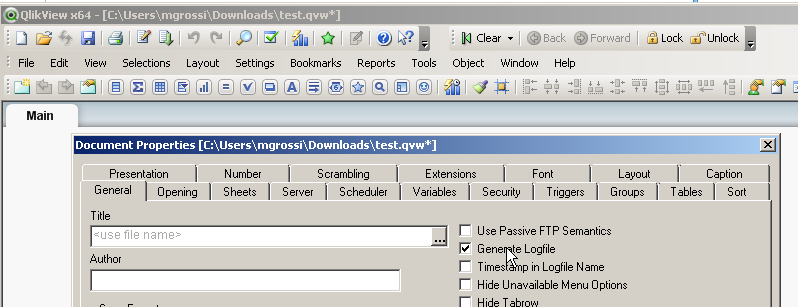
its_anandrjs
- Mark as New
- Bookmark
- Subscribe
- Mute
- Subscribe to RSS Feed
- Permalink
- Report Inappropriate Content
In your server check it is enable or not by checking
Document Setting >> General >> Tick mark Generate Log file if not selected
Snap for this

Regards
Anand