Unlock a world of possibilities! Login now and discover the exclusive benefits awaiting you.

Announcements
Want to see what's currently in public preview? We've pulled it all together in one place. Check it out here
- Qlik Community
- :
- All Forums
- :
- QlikView
- :
- Re: Edit Script Function not appearing in Qlikview
Options
- Subscribe to RSS Feed
- Mark Topic as New
- Mark Topic as Read
- Float this Topic for Current User
- Bookmark
- Subscribe
- Mute
- Printer Friendly Page
Turn on suggestions
Auto-suggest helps you quickly narrow down your search results by suggesting possible matches as you type.
Showing results for

Not applicable
2014-03-03
12:08 PM
- Mark as New
- Bookmark
- Subscribe
- Mute
- Subscribe to RSS Feed
- Permalink
- Report Inappropriate Content
Edit Script Function not appearing in Qlikview
Someone has opened a Qlikview document I created on Qlikview and the Edit Script button has disappeared!
Both my colleague and myself have qlikview developer license.
Much help will be appreciated.
2,937 Views
3 Replies

 Peter_Cammaert
Partner - Champion III
2014-03-03
12:11 PM
- Mark as New
- Bookmark
- Subscribe
- Mute
- Subscribe to RSS Feed
- Permalink
- Report Inappropriate Content
Has it disappeared? Then restore your toolbar or press Ctrl-E to open the script editor.
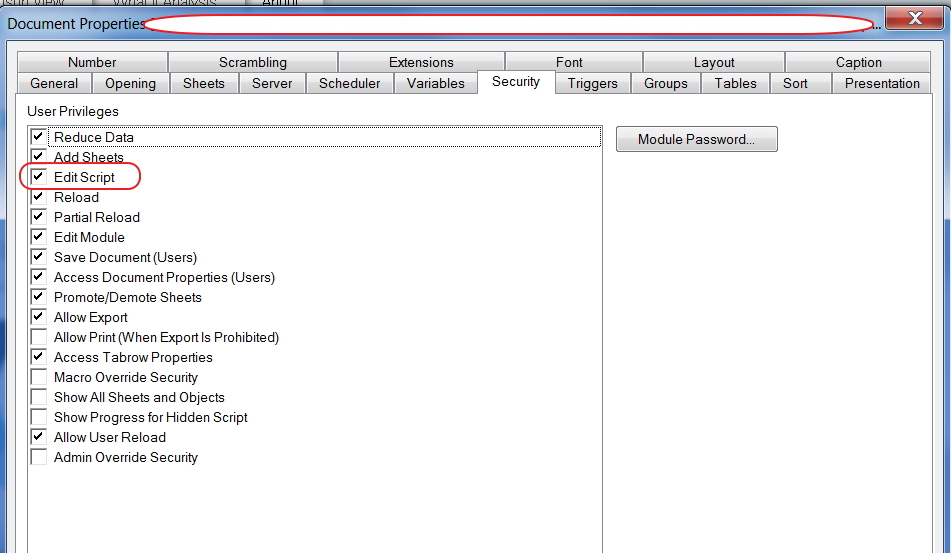
Is it greyed out? Then check Settings->Document Properties->Security and enable the Edit Script checkbox.
Do you have Section Access in this document? Then there may be something wrong with security after a reload...
Peter
1,853 Views

 chiru_thota
Specialist
2014-03-03
12:12 PM
- Mark as New
- Bookmark
- Subscribe
- Mute
- Subscribe to RSS Feed
- Permalink
- Report Inappropriate Content
Enable it
1,853 Views
 alexandros17
Partner - Champion III
2014-03-03
12:13 PM
- Mark as New
- Bookmark
- Subscribe
- Mute
- Subscribe to RSS Feed
- Permalink
- Report Inappropriate Content
Go in view (3° menu item) -> tool bar and select customize ... select the missing icon
In alternative press
ctrl + E
1,853 Views