Unlock a world of possibilities! Login now and discover the exclusive benefits awaiting you.

- Qlik Community
- :
- All Forums
- :
- QlikView
- :
- Error in table sorting
- Subscribe to RSS Feed
- Mark Topic as New
- Mark Topic as Read
- Float this Topic for Current User
- Bookmark
- Subscribe
- Mute
- Printer Friendly Page

- Mark as New
- Bookmark
- Subscribe
- Mute
- Subscribe to RSS Feed
- Permalink
- Report Inappropriate Content
Error in table sorting
Hi guys,
i have a problem in table sorting.
I have a linear table where are listed product codes.
Product codes consist of both numbers and letters.
I've tried to sort by alphabetical or numerical order but i obtain the same result and i think there is a mistake.
For example, i've 3 product codes.
Product 1 -> 65A000000RN;
Product 2 -> 110GLNS00CN;
Product 3 -> 660M0000060.
I expect that correct order would be:
Product 2 -> 110GLNS00CN (first, because it starts with 1!);
Product 1 -> 65A000000RN (65 comes before 66!);
Product 3 -> 660M0000060.
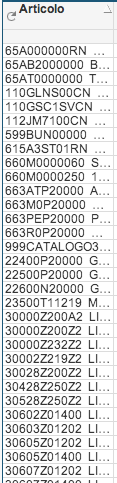
But in Qlikview I have:
Product 1;
Product 2;
Product 3.
(seen the attached image)
I think that Qlikview puts product 1 before product 2/3 because the product 1 code has a letter in third position, while the others has a letter in fourth position (just my idea!).
How can i obtain a "correct" order?
Thanks in advance!
Accepted Solutions

 m_woolf
- Mark as New
- Bookmark
- Subscribe
- Mute
- Subscribe to RSS Feed
- Permalink
- Report Inappropriate Content
Try using text(Product_Code) for the dimension, or using Sort by Expression and putting text(Product_Code) as the expression.
m_woolf
- Mark as New
- Bookmark
- Subscribe
- Mute
- Subscribe to RSS Feed
- Permalink
- Report Inappropriate Content
Try using text(Product_Code) for the dimension, or using Sort by Expression and putting text(Product_Code) as the expression.
- Mark as New
- Bookmark
- Subscribe
- Mute
- Subscribe to RSS Feed
- Permalink
- Report Inappropriate Content
Hi Michael
what you can do is to sort in the script
LOAD text(prodcut_code) as product_code, ..... FROM table
you can then sort either by text or by load order
best regards
Chris

 maxgro
- Mark as New
- Bookmark
- Subscribe
- Mute
- Subscribe to RSS Feed
- Permalink
- Report Inappropriate Content
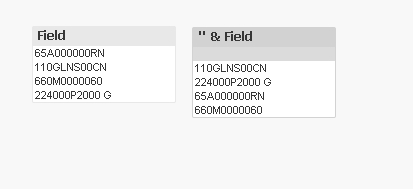
try with '' & Field
- Mark as New
- Bookmark
- Subscribe
- Mute
- Subscribe to RSS Feed
- Permalink
- Report Inappropriate Content
This works (using first five characters here for sorting). I hope there is a better way:
LOAD Product,
mid(Product,1,1) as S1,
mid(Product,2,1) as S2,
mid(Product,3,1) as S3,
mid(Product,4,1) as S4,
mid(Product,5,1) as S5
INLINE [
Product
65A000000RN
110GLNS00CN
660M0000060];
data:
LOAD DISTINCT Product as Prod // it is essential to use different name
RESIDENT source
ORDER BY S1,S2,S3,S4,S5;
DROP Table source;
And, sort by load order.