Unlock a world of possibilities! Login now and discover the exclusive benefits awaiting you.

- Qlik Community
- :
- All Forums
- :
- QlikView
- :
- Re: Exchange rate conversion
- Subscribe to RSS Feed
- Mark Topic as New
- Mark Topic as Read
- Float this Topic for Current User
- Bookmark
- Subscribe
- Mute
- Printer Friendly Page

 settu_periasamy
- Mark as New
- Bookmark
- Subscribe
- Mute
- Subscribe to RSS Feed
- Permalink
- Report Inappropriate Content
Exchange rate conversion
I have the 3 tables
1st table contains : Customer, Product, Loaded_Currency and List Price.
2nd table contains : EFF_Currency, EFF_CUR_TO, Exchange Rate
3rd table contains : EFF_Currency, Product, Effective Price.
1st table sample data:

2nd table data:
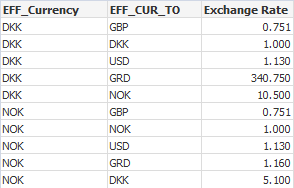
3rd Table:

Now, I need the chart like the Below (Need to shows the two Products and effective price also based on Exchange rate)
i used the expression like the below
=Only([Effective Price])*Only({<EFF_CUR_TO={'$(=Loaded_Currency)'}>}[Exchange Rate]).
But, the result, shows as null... I attached the sample app..
Can you help on this?
Regards,
Settu P
Accepted Solutions

 Gysbert_Wassena
- Mark as New
- Bookmark
- Subscribe
- Mute
- Subscribe to RSS Feed
- Permalink
- Report Inappropriate Content
A set analysis expression calculates a set at the chart level, not at the row level. That's why your expression does not work if you don't make a selection first. You can use an if-statement instead: =only(if(EFF_CUR_TO=Loaded_Currency,[Exchange Rate]))*[Effective Price]
talk is cheap, supply exceeds demand
Gysbert_Wassena- Mark as New
- Bookmark
- Subscribe
- Mute
- Subscribe to RSS Feed
- Permalink
- Report Inappropriate Content
A set analysis expression calculates a set at the chart level, not at the row level. That's why your expression does not work if you don't make a selection first. You can use an if-statement instead: =only(if(EFF_CUR_TO=Loaded_Currency,[Exchange Rate]))*[Effective Price]
talk is cheap, supply exceeds demand
settu_periasamy
- Mark as New
- Bookmark
- Subscribe
- Mute
- Subscribe to RSS Feed
- Permalink
- Report Inappropriate Content
Thank you Gysbert. I will use if statement.
