Unlock a world of possibilities! Login now and discover the exclusive benefits awaiting you.

- Qlik Community
- :
- All Forums
- :
- QlikView
- :
- Exclude selection in Straight table dimension
- Subscribe to RSS Feed
- Mark Topic as New
- Mark Topic as Read
- Float this Topic for Current User
- Bookmark
- Subscribe
- Mute
- Printer Friendly Page

 darkshadow91223
- Mark as New
- Bookmark
- Subscribe
- Mute
- Subscribe to RSS Feed
- Permalink
- Report Inappropriate Content
Exclude selection in Straight table dimension
Hi all!,
I got this straight table and this list box... 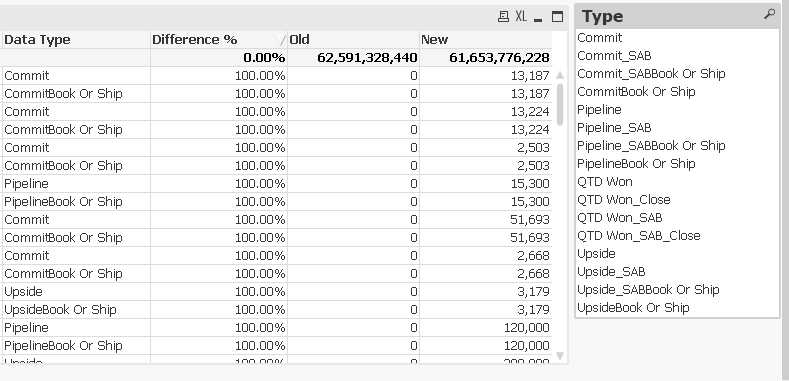
and i want to exclude in the table the values that are selected i.e. if Commit and/or CommitBook or Ship were selected then the table will look like this:
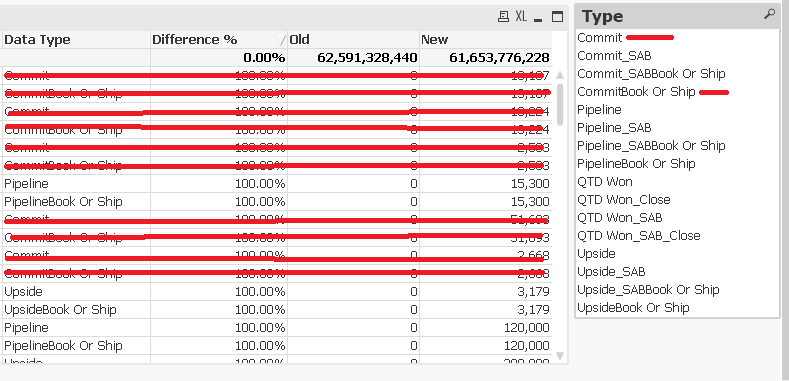
PD: Data type its a dimension.
Any idea?
- « Previous Replies
-
- 1
- 2
- Next Replies »

 sunny_talwar
- Mark as New
- Bookmark
- Subscribe
- Mute
- Subscribe to RSS Feed
- Permalink
- Report Inappropriate Content
Just give this a shot
Difference % - Num(RangeMax(1 - Sum({<TimeStamp={'Old'}, [Data Type] = e([Data Type])>}Amount) / Sum({<TimeStamp={'New'}, [Data Type] = e([Data Type])>}Amount), 0), '#,###.#0%')
OLD - Sum({<TimeStamp={'Old'}, [Data Type] = e([Data Type])>}Amount)
NEW - Sum({<TimeStamp={'New'}, [Data Type] = e([Data Type])>}Amount)
or this
Difference % - If(GetSelectedCount([Data Type]) = 0, Num(RangeMax(1 - Sum({<TimeStamp={'Old'}>}Amount) / Sum({<TimeStamp={'New'}>}Amount), 0), '#,###.#0%'), Num(RangeMax(1 - Sum({<TimeStamp={'Old'}, [Data Type] = e([Data Type])>}Amount) / Sum({<TimeStamp={'New'}, [Data Type] = e([Data Type])>}Amount), 0), '#,###.#0%'))
OLD - If(GetSelectedCount([Data Type]) = 0, Sum({<TimeStamp={'Old'}>}Amount), Sum({<TimeStamp={'Old'}, [Data Type] = e([Data Type])>}Amount))
NEW - If(GetSelectedCount([Data Type]) = 0, Sum({<TimeStamp={'New'}>}Amount), Sum({<TimeStamp={'New'}, [Data Type] = e([Data Type])>}Amount))
darkshadow91223
- Mark as New
- Bookmark
- Subscribe
- Mute
- Subscribe to RSS Feed
- Permalink
- Report Inappropriate Content
Thanks a lot Sunny! it work with the second choice but now i got this other problem i didint mention it but i have 2 list box but one is to filter by and the other is to exclude!, but the solution you gave me affects both. is there a way to choose wich listbox will be affected by the solution ?
the information is this:
Filter by:
Field: Data Type
ID objct: LB14
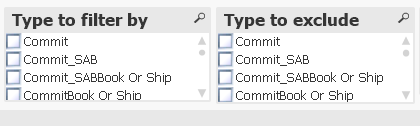
To exclude:
Field: Data Type
ID objct: LB28
sunny_talwar
- Mark as New
- Bookmark
- Subscribe
- Mute
- Subscribe to RSS Feed
- Permalink
- Report Inappropriate Content
Does both the list boxes use the same underlying field? If they do... then this won't work... instead create a new field with the same data in the script
Load [Data Type] as [Data Type],
[Data Type] as DataTypeInclude
FROM ...
now when you select DataTypeInclude... it should work fine for you

- « Previous Replies
-
- 1
- 2
- Next Replies »