Unlock a world of possibilities! Login now and discover the exclusive benefits awaiting you.

- Qlik Community
- :
- All Forums
- :
- QlikView
- :
- Re: Exclusion Calculation Total with Filter
- Subscribe to RSS Feed
- Mark Topic as New
- Mark Topic as Read
- Float this Topic for Current User
- Bookmark
- Subscribe
- Mute
- Printer Friendly Page

 brettaustin
- Mark as New
- Bookmark
- Subscribe
- Mute
- Subscribe to RSS Feed
- Permalink
- Report Inappropriate Content
Exclusion Calculation Total with Filter
Hello community
I have a text box with a calculation with the intention on displaying the 'current' month's total records where there is a date on one field and not in another. See following:
=count(DISTINCT {<
[Report Month] = {"$(=Date(max([Report Month])))"},
ActualApprovalDt = {"*"},
ID = e({<ActualStartDate = {"*"}>}),
[Record Type] = {"Y"},
Name = {"*"}
>}
ID
)
The total.. when no selections are applied is accurate ('18'). HOWEVER, when a user selects multiple filters (Actual Approval Date - 11/2 and 11/9) the total updates to an incorrect number ('34'). The number should be '6'.
Any ideas?
Thank you
Accepted Solutions

 sunny_talwar
- Mark as New
- Bookmark
- Subscribe
- Mute
- Subscribe to RSS Feed
- Permalink
- Report Inappropriate Content
So, when 11/9 and 11/12 is selected, why would you want to see 6 and not 5? ID E151 seems to have an ActualStartDate associated with it, isn't it?
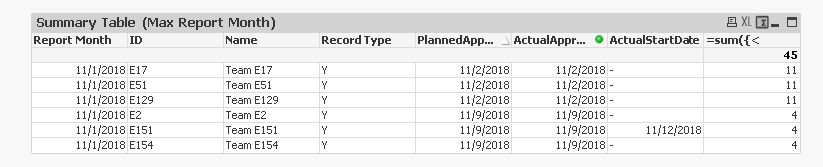
If you agree 5 is the right answer, you can try this
=count(DISTINCT {<
	[Report Month] = {"$(=Date(max([Report Month])))"},
	ActualApprovalDt *= {"*"},
	ID *= e({<ActualStartDate *= {"*"}>}),
	[Record Type] = {"Y"},
	Name = {"*"}
	>}
	ID
	)

 dplr-rn
- Mark as New
- Bookmark
- Subscribe
- Mute
- Subscribe to RSS Feed
- Permalink
- Report Inappropriate Content
That is because you are ignoring
ActualApprovalDt selection in your set analysis.
i changed below to get the value you want
=count(DISTINCT {<
[Report Month] = {"$(=Date(max([Report Month])))"},
//ActualApprovalDt = {"*"},
//ID = e({<ActualStartDate = {"*"}>}),
[Record Type] = {"Y"},
Name = {"*"}
>}
ID
)
sunny_talwar
- Mark as New
- Bookmark
- Subscribe
- Mute
- Subscribe to RSS Feed
- Permalink
- Report Inappropriate Content
So, when 11/9 and 11/12 is selected, why would you want to see 6 and not 5? ID E151 seems to have an ActualStartDate associated with it, isn't it?
If you agree 5 is the right answer, you can try this
=count(DISTINCT {<
	[Report Month] = {"$(=Date(max([Report Month])))"},
	ActualApprovalDt *= {"*"},
	ID *= e({<ActualStartDate *= {"*"}>}),
	[Record Type] = {"Y"},
	Name = {"*"}
	>}
	ID
	)
brettaustin
- Mark as New
- Bookmark
- Subscribe
- Mute
- Subscribe to RSS Feed
- Permalink
- Report Inappropriate Content
1.. Yes 5. I miscounted.
2. Yes.. it works. THANK YOU!
