Unlock a world of possibilities! Login now and discover the exclusive benefits awaiting you.

- Qlik Community
- :
- All Forums
- :
- QlikView
- :
- Execute Statement for Qlikview Scripts without pro...
- Subscribe to RSS Feed
- Mark Topic as New
- Mark Topic as Read
- Float this Topic for Current User
- Bookmark
- Subscribe
- Mute
- Printer Friendly Page

 nedcliqs
- Mark as New
- Bookmark
- Subscribe
- Mute
- Subscribe to RSS Feed
- Permalink
- Report Inappropriate Content
Execute Statement for Qlikview Scripts without prompt
Hi All,
I am executing a command this command in QV12,
EXECUTE C:\WINDOWS\system32\notepad.exe N:\Test\PingResults.txt
It works but a prompt pops up first
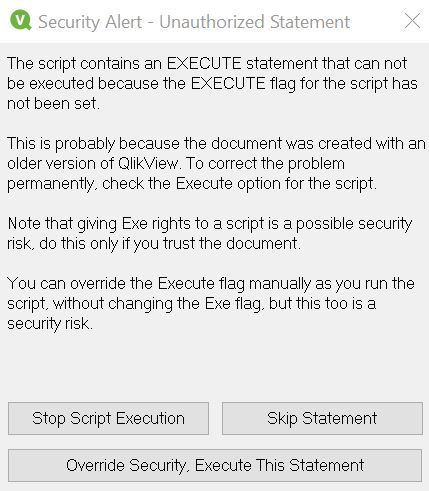
I just want to the script to run without this prompt
I tried the below on Settings - User Preferences ( on QV 12. Desktop). It didnt help
If you may assist please.

Accepted Solutions

 pradosh_thakur
- Mark as New
- Bookmark
- Subscribe
- Mute
- Subscribe to RSS Feed
- Permalink
- Report Inappropriate Content
1: Go to script (ctrl+E)
2: Below in the settings tab make sure "can execute external programs " is checked.
3: make sure allowexecutecommand is set to 1 in setting.ini
pradosh_thakur
- Mark as New
- Bookmark
- Subscribe
- Mute
- Subscribe to RSS Feed
- Permalink
- Report Inappropriate Content
1: Go to script (ctrl+E)
2: Below in the settings tab make sure "can execute external programs " is checked.
3: make sure allowexecutecommand is set to 1 in setting.ini
nedcliqs
- Mark as New
- Bookmark
- Subscribe
- Mute
- Subscribe to RSS Feed
- Permalink
- Report Inappropriate Content
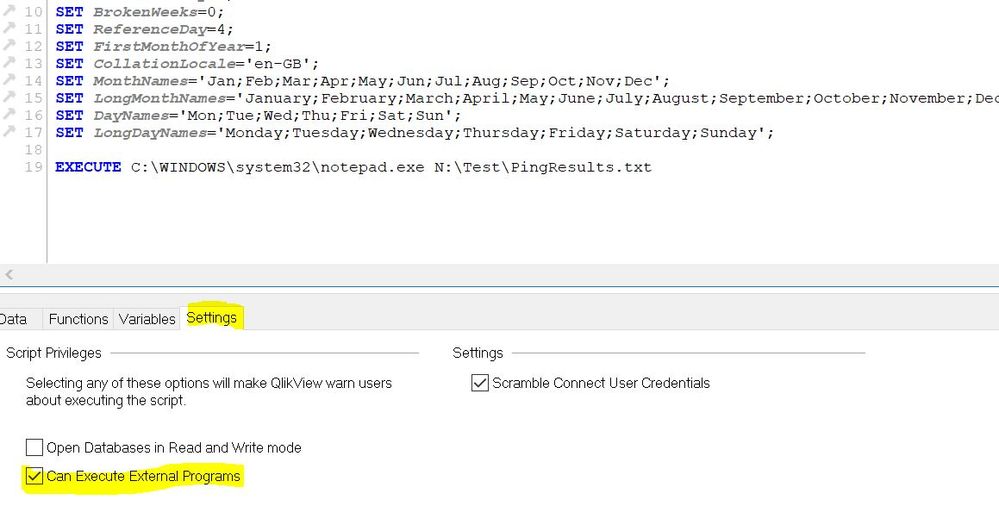
Thank you very much, the highlighted tick worked.
