Unlock a world of possibilities! Login now and discover the exclusive benefits awaiting you.

- Qlik Community
- :
- All Forums
- :
- QlikView
- :
- Export a pdf.
- Subscribe to RSS Feed
- Mark Topic as New
- Mark Topic as Read
- Float this Topic for Current User
- Bookmark
- Subscribe
- Mute
- Printer Friendly Page

- Mark as New
- Bookmark
- Subscribe
- Mute
- Subscribe to RSS Feed
- Permalink
- Report Inappropriate Content
Export a pdf.
Hi all, I want to export pdf but i'm having a problem because the code i'm using print the pdf and export it. I only want to export....
Here is the code:
set WSHShell = CreateObject("WScript.Shell")
WSHShell.RegWrite "HKCU\Software\QlikViewPDF\OutputFile", "E:\util\MailQV\Cohortes.PDF", "REG_SZ"
WSHShell.RegWrite "HKCU\Software\QlikViewPDF\BypassSaveAs", "1", "REG_SZ"
ActiveDocument.PrintReport "RP01", "QlikviewPDF", false
set WSHShell = nothing
Thanks!!

 suniljain
- Mark as New
- Bookmark
- Subscribe
- Mute
- Subscribe to RSS Feed
- Permalink
- Report Inappropriate Content
Dear Kumar,
I alredy use the same that you suggest although execution stop there.
- Mark as New
- Bookmark
- Subscribe
- Mute
- Subscribe to RSS Feed
- Permalink
- Report Inappropriate Content
I tried the same and found no issues.
Try this:
Sub Createpdf
Set PDFCreator = CreateObject("PDFCreator.clsPDFCreator")
PDFCreator.cOption("UseAutosave") = 1 ' Enable autosave
PDFCreator.cOption("UseAutosaveDirectory") = 1 ' Use a specific save directory
PDFCreator.cOption("AutosaveDirectory") = "C:\Test\"' ActiveDocument.getVariable("TempPath").GetContent.String ' Set autosave directory
PDFCreator.cOption("AutosaveFormat") = 0 ' Use PDF file type (.PDF extension)
PDFCreator.cOption("AutosaveFilename") = "My PDF" ' set the filename, optionally you can get the Caption of the object and use it as Filename
PDFCreator.cPrinterStop = FALSE
' Export to PDF File
ActiveDocument.PrintDocReport "RP01", "PDFCreator"
End Sub
- Mark as New
- Bookmark
- Subscribe
- Mute
- Subscribe to RSS Feed
- Permalink
- Report Inappropriate Content
Dear Matytr21,
Take this Macro and Paste in Your VBScript and Try, and You have to use QVPDF Install it ,you can Download it from QlikView Website, It will Work Fine, Just Select Your Default Printer as CudePDF it will Export PDF File Will Noy Print it.
sub printReport_MktEval
set oReportsId = ActiveDocument.Fields("ReportID").GetPossibleValues
set RepName=ActiveDocument.Fields("ReportValue").GetSelectedValues
if(RepName.count=1) then
dim id
id=oReportsId.Item(0).Text
ActiveDocument.PrintReport id
else
msgbox ("Please select a Report")
end if
end sub
Regards,
Pranav
suniljain
- Mark as New
- Bookmark
- Subscribe
- Mute
- Subscribe to RSS Feed
- Permalink
- Report Inappropriate Content
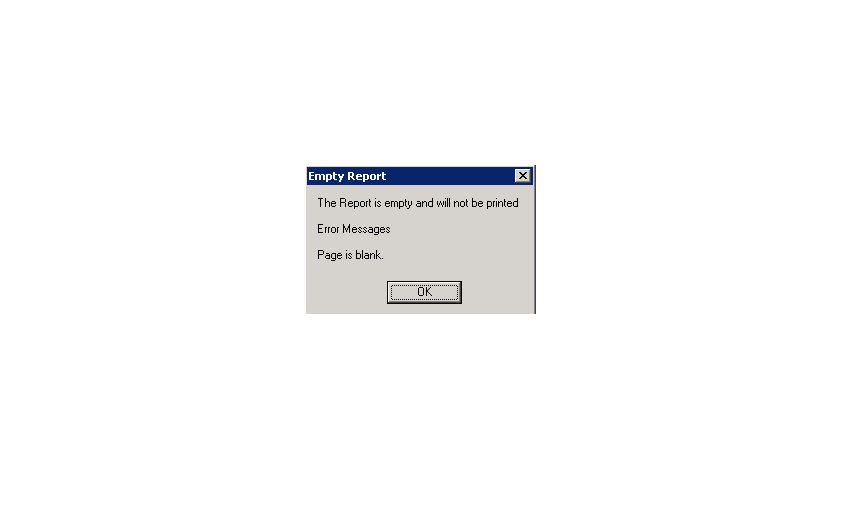
Dear Kumar,
Thanks lot for quick response
but I get error which showns in screenshot.
- Mark as New
- Bookmark
- Subscribe
- Mute
- Subscribe to RSS Feed
- Permalink
- Report Inappropriate Content
Dear Sunil,
Can you Explain y? u are getting Error means what you have written in Macro.
Regards,
Pranav
suniljain
- Mark as New
- Bookmark
- Subscribe
- Mute
- Subscribe to RSS Feed
- Permalink
- Report Inappropriate Content
Thanks Pranav,Kumar
Resolved the issue.
- Mark as New
- Bookmark
- Subscribe
- Mute
- Subscribe to RSS Feed
- Permalink
- Report Inappropriate Content
Sunil Jain ha scritto:
Dear Glenn,
I get following error whem using your code.
ActiveX component can't create object: 'PDFCreator.clsPDFCreator'
Regards
Sunil;
Hi, i have your same problem, how do you resolve it?
thanx
suniljain
- Mark as New
- Bookmark
- Subscribe
- Mute
- Subscribe to RSS Feed
- Permalink
- Report Inappropriate Content
Dear Pranav,
if you donot create report and directly try to create PDF in that case you will get that types of Error.
- Mark as New
- Bookmark
- Subscribe
- Mute
- Subscribe to RSS Feed
- Permalink
- Report Inappropriate Content
Sunil Jain ha scritto:
Dear Pranav,
if you donot create report and directly try to create PDF in that case you will get that types of Error.
Hi Sunil,
i've already create report RP01 when i call this macro, but it doesn't works. It stop at line 2: Set PDFCreator = CreateObject("PDFCreator.clsPDFCreator")
this is my script:
sub createPDF
Set PDFCreator = CreateObject("PDFCreator.clsPDFCreator")
PDFCreator.cOption("UseAutosave") = 1
PDFCreator.cOption("UseAutosaveDirectory") = 1
PDFCreator.cOption("AutosaveDirectory") = "C:\Users\Public\Documents\TestQlik\PreviousPeek\Test"
ActiveDocument.getVariable("TempPath").GetContent.String
PDFCreator.cOption("AutosaveFormat") = 0
PDFCreator.cOption("AutosaveFilename") = "My PDF"
PDFCreator.cPrinterStop = FALSE
ActiveDocument.PrintDocReport "RP01", "PDFCreator"
end sub
Can you look at my qvw? It is very simple. I use QlikView 10 SR2 64bit and i've installed PDFCreator 1.2.1
Thanks
- Mark as New
- Bookmark
- Subscribe
- Mute
- Subscribe to RSS Feed
- Permalink
- Report Inappropriate Content
Did you ever resolve this issue?
Alex