Unlock a world of possibilities! Login now and discover the exclusive benefits awaiting you.

- Qlik Community
- :
- All Forums
- :
- QlikView
- :
- Re: Export report
- Subscribe to RSS Feed
- Mark Topic as New
- Mark Topic as Read
- Float this Topic for Current User
- Bookmark
- Subscribe
- Mute
- Printer Friendly Page

 arethaking
- Mark as New
- Bookmark
- Subscribe
- Mute
- Subscribe to RSS Feed
- Permalink
- Report Inappropriate Content
Export report
Hi All,
I want to export this report to C:\Users\arethaking\Qlikview folder.
How to write the macro for this?
Thanks in advance.
Accepted Solutions


- Mark as New
- Bookmark
- Subscribe
- Mute
- Subscribe to RSS Feed
- Permalink
- Report Inappropriate Content
Try this code to send the reports to excel using Macro
sub test
filePath = "C:\Users\arethaking\Qlikview\Test.xls"
'Create the Excel spreadsheet
Set excelFile = CreateObject("Excel.Application")
excelFile.Visible = true
'Create the WorkBook
Set curWorkBook = excelFile.WorkBooks.Add
'Create the Sheet
'first chart object
Set curSheet = curWorkBook.WorkSheets(1)
'loop
chartArray = Array("CH06") ' give the name of your object instead of CH06
usedRows=0
For Each chart In chartArray
Set i = ActiveDocument.GetSheetObject(chart)
chartCaption = i.GetCaption.Name.v
curSheet.Cells(usedRows+1, 1)=chartCaption
i.CopyTableToClipboard true
curSheet.Cells(usedRows+3, 1).Select
curSheet.Paste
usedRows=curSheet.UsedRange.Rows.Count+3
Next
'loop end
excelFile.Visible = true
'Save the file and quit excel
curWorkBook.SaveAs filePath
curWorkBook.Close
excelFile.Quit
'Cleanup
Set curWorkBook = nothing
Set excelFile = nothing
end sub
- Mark as New
- Bookmark
- Subscribe
- Mute
- Subscribe to RSS Feed
- Permalink
- Report Inappropriate Content
I didn't open your file, As i assume you might require this, Here i added one and more Sheet objects. If you want one then you can take one. Hope this helps
Ctrl + M and then copy paste this on your VBA and then create Button - Action is Macro From External tab - Give Name ppt then run
Sub ppt
'An array with the objects you want to export to powerpoint
Dim myArray(4)
myArray(0) = "YourObjectId"
myArray(1) = "YourObjectId"
myArray(2) = "YourObjectId"
myArray(3) = "YourObjectId"
myArray(4) = "YourObjectId"
'Create ppt object
Set objPPT = CreateObject("PowerPoint.Application")
objPPT.Visible = True
Set objPresentation = objPPT.Presentations.Add
'Apply a template if you want one
objPresentation.ApplyTemplate _
("C:\Users\arethaking\Qlikview\mytemplate.potx")
'For each object in the array create a new slide and paste it.
For each item in myArray
Set PPSlide = objPresentation.Slides.Add(1,11)
ActiveDocument.GetSheetObject(item).CopyBitmapToClipboard
PPSlide.Shapes.Paste
Next
'Clean up
Set PPSlide = Nothing
Set PPPres = Nothing
Set PPApp = Nothing
End Sub
arethaking
- Mark as New
- Bookmark
- Subscribe
- Mute
- Subscribe to RSS Feed
- Permalink
- Report Inappropriate Content
Sorry. I missed something, want to export to xlsx.
- Mark as New
- Bookmark
- Subscribe
- Mute
- Subscribe to RSS Feed
- Permalink
- Report Inappropriate Content
Try this code to send the reports to excel using Macro
sub test
filePath = "C:\Users\arethaking\Qlikview\Test.xls"
'Create the Excel spreadsheet
Set excelFile = CreateObject("Excel.Application")
excelFile.Visible = true
'Create the WorkBook
Set curWorkBook = excelFile.WorkBooks.Add
'Create the Sheet
'first chart object
Set curSheet = curWorkBook.WorkSheets(1)
'loop
chartArray = Array("CH06") ' give the name of your object instead of CH06
usedRows=0
For Each chart In chartArray
Set i = ActiveDocument.GetSheetObject(chart)
chartCaption = i.GetCaption.Name.v
curSheet.Cells(usedRows+1, 1)=chartCaption
i.CopyTableToClipboard true
curSheet.Cells(usedRows+3, 1).Select
curSheet.Paste
usedRows=curSheet.UsedRange.Rows.Count+3
Next
'loop end
excelFile.Visible = true
'Save the file and quit excel
curWorkBook.SaveAs filePath
curWorkBook.Close
excelFile.Quit
'Cleanup
Set curWorkBook = nothing
Set excelFile = nothing
end sub
arethaking
- Mark as New
- Bookmark
- Subscribe
- Mute
- Subscribe to RSS Feed
- Permalink
- Report Inappropriate Content
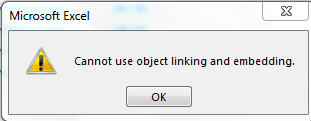
I am getting the below error message.
- Mark as New
- Bookmark
- Subscribe
- Mute
- Subscribe to RSS Feed
- Permalink
- Report Inappropriate Content
Aretha, Why not simple this. Try and let me know
SUB EXPORT
set sObject1 = ActiveDocument.GetSheetProperties("CH_EXPORT")
sObject1.Export "C:\Users\arethaking\Qlikview\MyDoc.csv", ", "
end sub
- Mark as New
- Bookmark
- Subscribe
- Mute
- Subscribe to RSS Feed
- Permalink
- Report Inappropriate Content
Sorry, My Miss understnd
SUB EXPORT
set sObject1 = ActiveDocument.GetSheetObject("CH01")
sObject1.Export "C:\Users\arethaking\Qlikview\MyDoc.csv", ", "
end sub

 tamilarasu
- Mark as New
- Bookmark
- Subscribe
- Mute
- Subscribe to RSS Feed
- Permalink
- Report Inappropriate Content
Hi Aretha,
Have a look at the attachment and let me know.
Sub Test()

 Dim XLApp, XLDoc

 FileName = "Test.xlsx"
 FilePath = ActiveDocument.GetVariable("vPath").GetContent.String

 'FilePath = C:\Users\arethaking\Qlikview\

 '***************************************
 If Right(FilePath,1)<> "\" then
 FilePath = FilePath & "\"
 End If

 File = FilePath & FileName
 '***************************************

 Set XLApp = CreateObject("Excel.Application")
 XLApp.Visible = False 'True to display the excel
 Set XLDoc = XLApp.Workbooks.Add

 ActiveDocument.GetSheetObject("CH01").CopyTableToClipboard True
 XLDoc.Worksheets("Sheet1").Paste
 XLDoc.Worksheets("Sheet1").Range("A1:F60000").ColumnWidth = 13.5

 XLDoc.SaveAs File
 XLApp.Application.quit

 Set XLApp = Nothing
 Set XLDoc = Nothing

 Msgbox "Chart Exported" & VbNewline & vbNewline & "File path: " & File, vbInformation , "Export"

 End Sub

 beck_bakytbek
- Mark as New
- Bookmark
- Subscribe
- Mute
- Subscribe to RSS Feed
- Permalink
- Report Inappropriate Content
Hi Aretha,
check this : QlikTip #32: Exporting multiple QV objects to a single Excel document
i find a necessary Information with whose assistance you resolve your issue
beck
