Unlock a world of possibilities! Login now and discover the exclusive benefits awaiting you.

- Qlik Community
- :
- All Forums
- :
- QlikView
- :
- Export to PPT issue
- Subscribe to RSS Feed
- Mark Topic as New
- Mark Topic as Read
- Float this Topic for Current User
- Bookmark
- Subscribe
- Mute
- Printer Friendly Page

- Mark as New
- Bookmark
- Subscribe
- Mute
- Subscribe to RSS Feed
- Permalink
- Report Inappropriate Content
Export to PPT issue
Can anyone tell me how to export to PPT?
I have tried writing a macro but it requires system access everytime qlikview is restarted. I have to provide system access my pressing Ctrl+Shift+M.
Is there any other turn around to export to PPT so that everytime system access need not be provided manually?
Thanks in advance!
- « Previous Replies
-
- 1
- 2
- Next Replies »
Accepted Solutions

 er_mohit
- Mark as New
- Bookmark
- Subscribe
- Mute
- Subscribe to RSS Feed
- Permalink
- Report Inappropriate Content
press ctrl +m
in requested module security --> System access
and in current local security also --> Allow system Access
then ok
hope it helps you
 sushil353
- Mark as New
- Bookmark
- Subscribe
- Mute
- Subscribe to RSS Feed
- Permalink
- Report Inappropriate Content
Try the option:
Current local Security> Allow System Access.
HTH
Sushil
- Mark as New
- Bookmark
- Subscribe
- Mute
- Subscribe to RSS Feed
- Permalink
- Report Inappropriate Content
But we need to set the system access everytime qlikview is restarted.
Is there any solution to the problem that we need not give the access everytime but once?
sushil353
- Mark as New
- Bookmark
- Subscribe
- Mute
- Subscribe to RSS Feed
- Permalink
- Report Inappropriate Content
Ok,
Try this:
Settings>User Prefereces>Security> uncheck Confirm Launch from Macro
- Mark as New
- Bookmark
- Subscribe
- Mute
- Subscribe to RSS Feed
- Permalink
- Report Inappropriate Content
Thanks Sushil but i am not able to proceed yet.
This is my code:
sub exportToPPT
Set objPPT = CreateObject("PowerPoint.Application")
objPPT.Visible = True
Set objPresentation = objPPT.Presentations.Add
Set PPSlide = objPresentation.Slides.Add(1,11)
ActiveDocument.ActiveSheet.CopyBitmapToClipboard
PPSlide.Shapes.Paste
Set PPSlide = Nothing
Set PPPres = Nothing
Set PPApp = Nothing
end Sub
I have to select option 1 in the dialog box in the attached image again.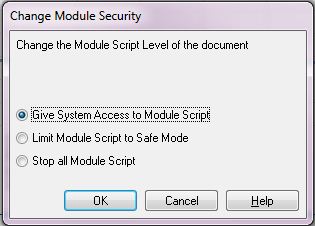
sushil353
- Mark as New
- Bookmark
- Subscribe
- Mute
- Subscribe to RSS Feed
- Permalink
- Report Inappropriate Content
Please post the sample app.
er_mohit
- Mark as New
- Bookmark
- Subscribe
- Mute
- Subscribe to RSS Feed
- Permalink
- Report Inappropriate Content
press ctrl +m
in requested module security --> System access
and in current local security also --> Allow system Access
then ok
hope it helps you
sushil353
- Mark as New
- Bookmark
- Subscribe
- Mute
- Subscribe to RSS Feed
- Permalink
- Report Inappropriate Content
Hi,
I just checked your macro to my local machine.. i have given the system access and it is working perfect..
I am using qlikview 11.0 SR1. Which version you are using.?
sushil353
- Mark as New
- Bookmark
- Subscribe
- Mute
- Subscribe to RSS Feed
- Permalink
- Report Inappropriate Content
Check out the attached application.
- Mark as New
- Bookmark
- Subscribe
- Mute
- Subscribe to RSS Feed
- Permalink
- Report Inappropriate Content
Thanks a lot er.mohit. It is working.
But still i am having a trouble in this. Once clicking on the button for "Export to PPT", qlikview takes me to the Macro editor (same as we have on pressing Ctrl+M). When i click again on the button after it, then only the PPT is generated. Any solution to it?
- « Previous Replies
-
- 1
- 2
- Next Replies »