Unlock a world of possibilities! Login now and discover the exclusive benefits awaiting you.

- Qlik Community
- :
- All Forums
- :
- QlikView
- :
- Re: Expression Not working
- Subscribe to RSS Feed
- Mark Topic as New
- Mark Topic as Read
- Float this Topic for Current User
- Bookmark
- Subscribe
- Mute
- Printer Friendly Page

 NavinReddy
- Mark as New
- Bookmark
- Subscribe
- Mute
- Subscribe to RSS Feed
- Permalink
- Report Inappropriate Content
Expression Not working
Dear Experts,
Not working below expression.
When ELE_VALUE_TYPE_CD = 'PCT' i have to evaluate the value with 100 and i want to include %
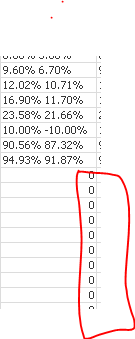
its not working for '0' values its displaying '0', its should display "0%"
i have tried with below two expression its not working
please any suggessions
=if(ELE_VALUE_TYPE_CD = '-',
if(ELE_VALUE_TYPE_CD = 'PCT',Num((GREEN_RAG)*100,'###.00000'&'%'),
if(ELE_VALUE_TYPE_CD = 'QTY',Num(GREEN_RAG))),
if(ELE_VALUE_TYPE_CD = 'PCT', Num((HIGH_GREEN_RAG),'##.00'&'%')&' '&' '&Num((GREEN_RAG),'##.00'&'%'),
if(ELE_VALUE_TYPE_CD = 'QTY',Num(HIGH_GREEN_RAG)&' '&Num(GREEN_RAG))))
=if(ELE_VALUE_TYPE_CD = '-',
if(ELE_VALUE_TYPE_CD = 'PCT',Num((GREEN_RAG),'##.00%'),
if(ELE_VALUE_TYPE_CD = 'QTY',Num(GREEN_RAG))),
if(ELE_VALUE_TYPE_CD = 'PCT',Num((HIGH_GREEN_RAG),'##.00%')& '' & Num((GREEN_RAG),'##.00%'),
if(ELE_VALUE_TYPE_CD = 'QTY',Num(HIGH_GREEN_RAG)& ' ' & Num(GREEN_RAG))))
Best Regards,
Niranjan
- « Previous Replies
-
- 1
- 2
- Next Replies »

 jonathandienst
- Mark as New
- Bookmark
- Subscribe
- Mute
- Subscribe to RSS Feed
- Permalink
- Report Inappropriate Content
I am not sure exactly what you are trying to do, because your expression is logically inconsistent. You provide for 3 possible values (is the - supposed to be checking for null?), but the true condition for the '-' will always return null, and only the second part can ever produce a value.
I assume that you want to check if HIGH_GREEN_RAG is empty/null, then your expression would look like:
=If(Len(HIGH_GREEN_RAG) = 0,
  If(ELE_VALUE_TYPE_CD = 'PCT',
    Num((GREEN_RAG),'##.00%'),
    If(ELE_VALUE_TYPE_CD = 'QTY', Num(GREEN_RAG))
  ),

  If(ELE_VALUE_TYPE_CD = 'PCT',
    Num(HIGH_GREEN_RAG, '##.00%') & ' ' & Num(GREEN_RAG, '##.00%'),
    If(ELE_VALUE_TYPE_CD = 'QTY',
      Num(HIGH_GREEN_RAG) & ' ' & Num(GREEN_RAG)
    )
  )
)
Make sure that you leave the format in the Number tab as 'expression default'.
jonathandienst
- Mark as New
- Bookmark
- Subscribe
- Mute
- Subscribe to RSS Feed
- Permalink
- Report Inappropriate Content
If ELE_VALUE_TYPE_CD can only have two possible values (PCT or QTY), then you can simplify further:
=If(Len(HIGH_GREEN_RAG) = 0,
  If(ELE_VALUE_TYPE_CD = 'PCT',
    Num((GREEN_RAG),'##.00%'),
    Num(GREEN_RAG)),

  If(ELE_VALUE_TYPE_CD = 'PCT',
    Num(HIGH_GREEN_RAG, '##.00%') & ' ' & Num(GREEN_RAG, '##.00%'),
    Num(HIGH_GREEN_RAG) & ' ' & Num(GREEN_RAG)
  )
)
NavinReddy
- Mark as New
- Bookmark
- Subscribe
- Mute
- Subscribe to RSS Feed
- Permalink
- Report Inappropriate Content
HI Jonathan,
Thanks for your reply, Yes your correct if HIGH_GREEN_RAG is empty/null,one expression or else including HIGH_GREEN_RAG one expression
i think your both expression right but here is the problem
when GREEN_RAG =0 its displaying "0" but i have to display "0%"
on 0 location i have to display 0%, i have tried but im not able to archive
any suggestions
Regards,
Niranjan
NavinReddy
- Mark as New
- Bookmark
- Subscribe
- Mute
- Subscribe to RSS Feed
- Permalink
- Report Inappropriate Content
Hi Digvijay,
Thanks for your reply
if ELE_VALUE_TYPE_CD = emply/null one expression else part including HIGH_RED_RAG
Thanks,
Niranjan

- Mark as New
- Bookmark
- Subscribe
- Mute
- Subscribe to RSS Feed
- Permalink
- Report Inappropriate Content
Why don't you try with the expression Jonathan gave you as a chart expression instead of a calculated dimension?
It should work.
Best regards,
Alex
NavinReddy
- Mark as New
- Bookmark
- Subscribe
- Mute
- Subscribe to RSS Feed
- Permalink
- Report Inappropriate Content
Thanks Every one
jonathandienst
- Mark as New
- Bookmark
- Subscribe
- Mute
- Subscribe to RSS Feed
- Permalink
- Report Inappropriate Content
>>when GREEN_RAG =0 its displaying "0" but i have to display "0%"
Are you sure that ELE_VALUE_TYPE_CD = PCT for these values?
- « Previous Replies
-
- 1
- 2
- Next Replies »