Unlock a world of possibilities! Login now and discover the exclusive benefits awaiting you.

Announcements
Share your agentic AI experience, learn from others, and earn a new badge: Put Agentic AI to Work
- Qlik Community
- :
- All Forums
- :
- QlikView
- :
- Re: Expression label fonts
Options
- Subscribe to RSS Feed
- Mark Topic as New
- Mark Topic as Read
- Float this Topic for Current User
- Bookmark
- Subscribe
- Mute
- Printer Friendly Page
Turn on suggestions
Auto-suggest helps you quickly narrow down your search results by suggesting possible matches as you type.
Showing results for

Not applicable
2014-06-24
11:31 PM
- Mark as New
- Bookmark
- Subscribe
- Mute
- Subscribe to RSS Feed
- Permalink
- Report Inappropriate Content
Expression label fonts
hi
dose any one know how to change font size and colors in expression labels??
would appreciate help in this... thank you in advance 
5,623 Views
- « Previous Replies
-
- 1
- 2
- Next Replies »
10 Replies
Anonymous
Not applicable
2014-06-26
05:33 AM
Author
- Mark as New
- Bookmark
- Subscribe
- Mute
- Subscribe to RSS Feed
- Permalink
- Report Inappropriate Content
Hi,
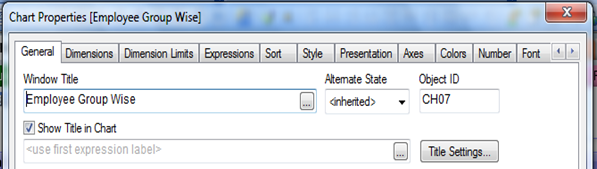
If you want to show the first expression label as title in your chart. Try like this.
and if you want to change font color in that, try like as.
In the Chart: Properties -> General -> Show Title in Chart and in Title Setting you can change the font color.
Thanks
Nisha loganathan.
4,846 Views
- « Previous Replies
-
- 1
- 2
- Next Replies »