Unlock a world of possibilities! Login now and discover the exclusive benefits awaiting you.

- Qlik Community
- :
- All Forums
- :
- QlikView
- :
- Re: Expressions as Dimensions?
- Subscribe to RSS Feed
- Mark Topic as New
- Mark Topic as Read
- Float this Topic for Current User
- Bookmark
- Subscribe
- Mute
- Printer Friendly Page

 semgem12
- Mark as New
- Bookmark
- Subscribe
- Mute
- Subscribe to RSS Feed
- Permalink
- Report Inappropriate Content
Expressions as Dimensions?
Hello
I hope someone can help, I have searched the community but not really sure what to search on.
I have data in this format
Brand | Actual Qty | Actual Weight | Budget Qty | Budget Weight |
A | 100 | 3000 | 110 | 3200 |
B | 200 | 6100 | 190 | 6150 |
C | 300 | 4000 | 315 | 4200 |
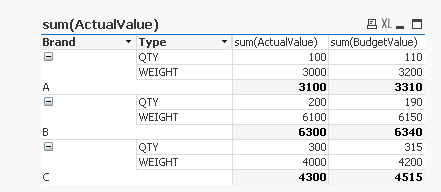
and I would like to produce a Qlikview (v12.02) table that looks like this
Brand | Actual | Budget |
A | ||
Qty | 100 | 110 |
Weight | 3000 | 3200 |
B | ||
Qty | 200 | 190 |
Weight | 6100 | 6150 |
C | ||
Qty | 300 | 315 |
Weight | 4000 | 4200 |
It seems like I need a pivot table where the initial dimension is Brand but then Qty and Weight need to be dimensions too.
Is this possible? Thanks for any help.
Accepted Solutions

 vinieme12
- Mark as New
- Bookmark
- Subscribe
- Mute
- Subscribe to RSS Feed
- Permalink
- Report Inappropriate Content
As below
temp1:
CrossTable(Type,ActualValue,1)
LOAD Brand,
[Actual Qty] as QTY,
[Actual Weight] as WEIGHT
// [Budget Qty],
// [Budget Weight]
FROM
[https://community.qlik.com/thread/254503]
(html, codepage is 1252, embedded labels, table is @1);
FACT:
CrossTable(Type,BudgetValue,1)
LOAD Brand,
// [Actual Qty],
// [Actual Weight],
[Budget Qty]as QTY,
[Budget Weight] as WEIGHT
FROM
[https://community.qlik.com/thread/254503]
(html, codepage is 1252, embedded labels, table is @1);
Concatenate
Load * Resident temp1;
drop table temp1;
If a post helps to resolve your issue, please accept it as a Solution.
vinieme12
- Mark as New
- Bookmark
- Subscribe
- Mute
- Subscribe to RSS Feed
- Permalink
- Report Inappropriate Content
As below
temp1:
CrossTable(Type,ActualValue,1)
LOAD Brand,
[Actual Qty] as QTY,
[Actual Weight] as WEIGHT
// [Budget Qty],
// [Budget Weight]
FROM
[https://community.qlik.com/thread/254503]
(html, codepage is 1252, embedded labels, table is @1);
FACT:
CrossTable(Type,BudgetValue,1)
LOAD Brand,
// [Actual Qty],
// [Actual Weight],
[Budget Qty]as QTY,
[Budget Weight] as WEIGHT
FROM
[https://community.qlik.com/thread/254503]
(html, codepage is 1252, embedded labels, table is @1);
Concatenate
Load * Resident temp1;
drop table temp1;
If a post helps to resolve your issue, please accept it as a Solution.
semgem12
- Mark as New
- Bookmark
- Subscribe
- Mute
- Subscribe to RSS Feed
- Permalink
- Report Inappropriate Content
Thank you for replying so quickly. This is just what I wanted.
