Unlock a world of possibilities! Login now and discover the exclusive benefits awaiting you.

- Qlik Community
- :
- All Forums
- :
- QlikView
- :
- Re: Extract data from data by conditionally
- Subscribe to RSS Feed
- Mark Topic as New
- Mark Topic as Read
- Float this Topic for Current User
- Bookmark
- Subscribe
- Mute
- Printer Friendly Page

 nihhalmca
- Mark as New
- Bookmark
- Subscribe
- Mute
- Subscribe to RSS Feed
- Permalink
- Report Inappropriate Content
Extract data from data by conditionally
Hi All,
Please have a look at attachment for details.
Thanks,
Nihhal.
Accepted Solutions

 maxgro
- Mark as New
- Bookmark
- Subscribe
- Mute
- Subscribe to RSS Feed
- Permalink
- Report Inappropriate Content
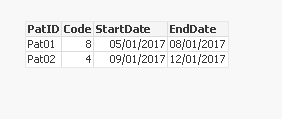
S:
LOAD PatID, Code, Date
FROM [Source.xlsx] (ooxml, embedded labels, table is DB);
S1:
NoConcatenate
load PatID, Code, Date as EndDate
Resident S
Where PatID <> Peek('PatID')
order by PatID, Code desc;
left join (S1)
load PatID, Code +3 as Code, Date as StartDate
Resident S;
DROP Table S;

 ahaahaaha
- Mark as New
- Bookmark
- Subscribe
- Mute
- Subscribe to RSS Feed
- Permalink
- Report Inappropriate Content
Hi Nihhal,
May be as at attached file.
Regards,
Andrey

 vinieme12
- Mark as New
- Bookmark
- Subscribe
- Mute
- Subscribe to RSS Feed
- Permalink
- Report Inappropriate Content
do you already have a flag that specifies start and end date?then just use
Max({<Dateflag={'StartDate'}) Date) for StartDate
and Max({<Dateflag={'EndDate'}) Date) for EndDate
If a post helps to resolve your issue, please accept it as a Solution.
nihhalmca
- Mark as New
- Bookmark
- Subscribe
- Mute
- Subscribe to RSS Feed
- Permalink
- Report Inappropriate Content
Hi Andrey,
Thanks for your attachment.
Actually i have to give logic while extracting data from table (edit script) instead of UI.
I need to extract only required records from data source (latest startdate and enddate per each patid) instead of all records.
maxgro
- Mark as New
- Bookmark
- Subscribe
- Mute
- Subscribe to RSS Feed
- Permalink
- Report Inappropriate Content
S:
LOAD PatID, Code, Date
FROM [Source.xlsx] (ooxml, embedded labels, table is DB);
S1:
NoConcatenate
load PatID, Code, Date as EndDate
Resident S
Where PatID <> Peek('PatID')
order by PatID, Code desc;
left join (S1)
load PatID, Code +3 as Code, Date as StartDate
Resident S;
DROP Table S;
