Unlock a world of possibilities! Login now and discover the exclusive benefits awaiting you.

- Qlik Community
- :
- All Forums
- :
- QlikView
- :
- Re: First Non-zero value in a chart
- Subscribe to RSS Feed
- Mark Topic as New
- Mark Topic as Read
- Float this Topic for Current User
- Bookmark
- Subscribe
- Mute
- Printer Friendly Page

- Mark as New
- Bookmark
- Subscribe
- Mute
- Subscribe to RSS Feed
- Permalink
- Report Inappropriate Content
First Non-zero value in a chart
Sample file attached. Expectation is to have in FinalResult column, first non-zero value from the grouping if Sum is zero:
| Cat2 | =Cat1&'-'&Cat3 | Sum(Value) | Final Result |
| 1 | A-X | 28.2 | 28.2 |
| 2 | A-X | 29.3 | 29.3 |
| 3 | A-X | 0 | 29.3 |
| 4 | A-X | 0 | 29.3 |
| 5 | A-X | 0 | 29.3 |
| 1 | A-Y | 22.6 | 22.6 |
| 2 | A-Y | 21.9 | 21.9 |
| 3 | A-Y | 0 | 21.9 |
| 4 | A-Y | 0 | 21.9 |
| 5 | A-Y | 27.6 | 27.6 |
| 1 | B-X | 23.4 | 23.4 |
| 2 | B-X | 29.2 | 29.2 |
| 3 | B-X | 0 | 29.2 |
| 4 | B-X | 23.8 | 23.8 |
| 5 | B-X | 25.7 | 25.7 |
Above() only works for one-level above. Trying to see if FristSortedtValue() would work.
Thank you.
- « Previous Replies
-
- 1
- 2
- Next Replies »

 sunny_talwar
- Mark as New
- Bookmark
- Subscribe
- Mute
- Subscribe to RSS Feed
- Permalink
- Report Inappropriate Content
Again this is just a sample and the actual expression might be more complex (instead of Sum(Value) if it was Sum(Aggr(FirstSortedValue(Aggr(Sum(Value), Date), -Date), Date, OtherDimensions)) or something)... would you still want to do this in the backend? 
- Mark as New
- Bookmark
- Subscribe
- Mute
- Subscribe to RSS Feed
- Permalink
- Report Inappropriate Content
Thank you both. Client's requirement was to do it on chart level. But thank you for your input.
sunny_talwar
- Mark as New
- Bookmark
- Subscribe
- Mute
- Subscribe to RSS Feed
- Permalink
- Report Inappropriate Content
This?
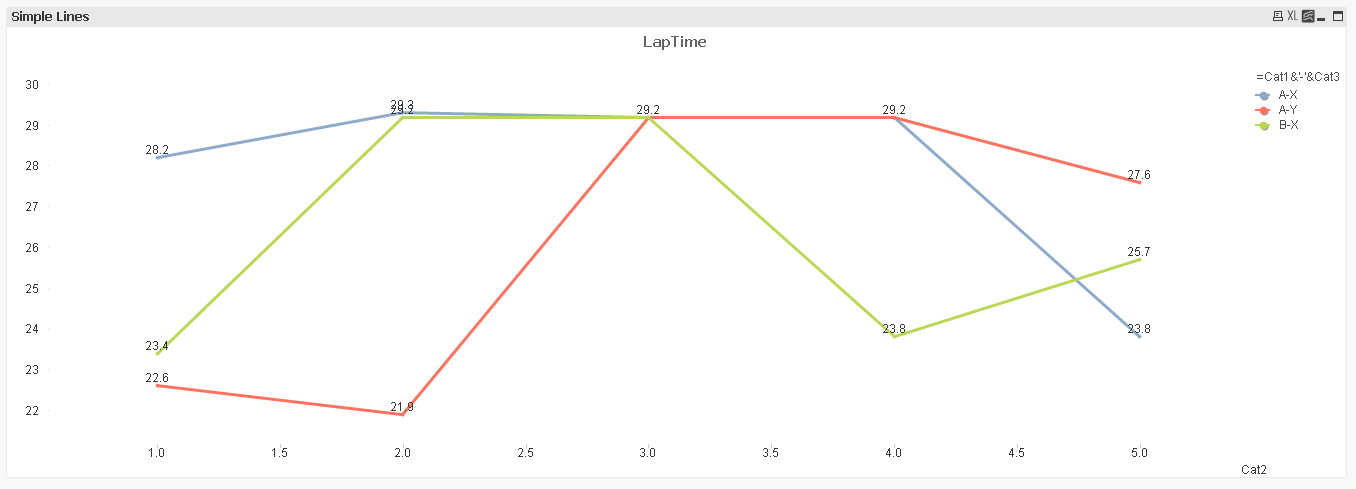
Expression:
If(Sum(Value) <> 0, Sum(Value), Above(TOTAL Column(1)))

 jayanttibhe
- Mark as New
- Bookmark
- Subscribe
- Mute
- Subscribe to RSS Feed
- Permalink
- Report Inappropriate Content
Depends on the requirement; If target expression where he needed non zero values of row above look like the one you have shown, I would first get additional field with that complex expression and then would apply the same logic on that field
sunny_talwar
- Mark as New
- Bookmark
- Subscribe
- Mute
- Subscribe to RSS Feed
- Permalink
- Report Inappropriate Content
Again, I don't think this is always a good idea... but if you think that's the best way... then ya that is always an option
- Mark as New
- Bookmark
- Subscribe
- Mute
- Subscribe to RSS Feed
- Permalink
- Report Inappropriate Content
Thank you Sunny, looks like Jayant's solution is close to what client is looking for.
sunny_talwar
- Mark as New
- Bookmark
- Subscribe
- Mute
- Subscribe to RSS Feed
- Permalink
- Report Inappropriate Content
Sounds good... I thought your expression was complicated and that is why you wanted to do this on the front end. If that's what you need. I suggest marking his response as correct and close this thread
Best,
Sunny
- Mark as New
- Bookmark
- Subscribe
- Mute
- Subscribe to RSS Feed
- Permalink
- Report Inappropriate Content
Ideally, was looking for only front-end option but seems like there's a compromise on it now.
sunny_talwar
- Mark as New
- Bookmark
- Subscribe
- Mute
- Subscribe to RSS Feed
- Permalink
- Report Inappropriate Content
That's great.... Backend should always be preferred over front end. Wise decision
- « Previous Replies
-
- 1
- 2
- Next Replies »