Unlock a world of possibilities! Login now and discover the exclusive benefits awaiting you.

- Qlik Community
- :
- All Forums
- :
- QlikView
- :
- Re: Fiscal Year Week Day
- Subscribe to RSS Feed
- Mark Topic as New
- Mark Topic as Read
- Float this Topic for Current User
- Bookmark
- Subscribe
- Mute
- Printer Friendly Page

- Mark as New
- Bookmark
- Subscribe
- Mute
- Subscribe to RSS Feed
- Permalink
- Report Inappropriate Content
Fiscal Year Week Day
Hi Everyone,
I have managed to start my Financial Year on the Right Month (June) , And have copied the syntax below from somewhere to map out the financial weeks. However this makes the start day for June 2012 which is week1 as the 1st June which is a friday.
How would i start the financial weeks from the Monday, in this case i beleiev week one should be Monday 28th - Sunday 3rd June
This is what i have so far
Date(yearstart(TempDate,0,6),'YYYY') as FY,
Div(TempDate-YearStart(TempDate,0,6) + WeekDay(YearStart(TempDate,0,6)) +7,7) as FiscalWeek
Thank you
Michael
- Tags:
- fiscal_week_day
Accepted Solutions

 swuehl
- Mark as New
- Bookmark
- Subscribe
- Mute
- Subscribe to RSS Feed
- Permalink
- Report Inappropriate Content
Maybe like this.
swuehl
- Mark as New
- Bookmark
- Subscribe
- Mute
- Subscribe to RSS Feed
- Permalink
- Report Inappropriate Content
Michael,
try like this
If(
Weekstart(TempDate)=weekstart(yearstart(TempDate,1,6)),
1,
Div(TempDate-YearStart(TempDate,0,6) + WeekDay(YearStart(TempDate,0,6)) +7,7)
) as FiscalWeek
- Mark as New
- Bookmark
- Subscribe
- Mute
- Subscribe to RSS Feed
- Permalink
- Report Inappropriate Content
Thanks for the Reply Swuehl,
However the formula didn't work for me
Michael
---
MasterCalendar:
Load
TempDate AS CalendarDate,
week(TempDate) As Week,
YEAR(TempDate) As Year,
Month(TempDate) As Month,
Day(TempDate) As Day,
YeartoDate(TempDate)*-1 as CurYTDFlag,
YeartoDate(TempDate,-1)*-1 as LastYTDFlag,
inyear(TempDate, Monthstart($(varMaxDate)),-1) as RC12,
date(monthstart(TempDate), 'MMM-YYYY') as MonthYear,
ApplyMap('QuartersMap', month(TempDate), Null()) as Quarter,
Week(weekstart(TempDate)) & '-' & WeekYear(TempDate) as WeekYear,
WeekDay(TempDate) as WeekDay,
Date(yearend(TempDate,0,6),'YYYY') as FY,
//Div(TempDate-YearStart(TempDate,0,6) + WeekDay(YearStart(TempDate,0,6)) +7,7) as FiscalWeek
If(
Weekstart(TempDate)=weekstart(yearstart(TempDate,1,6)),
1,
Div(TempDate-YearStart(TempDate,0,6) + WeekDay(YearStart(TempDate,0,6)) +7,7)
) as FiscalWeek
Resident TempCalendar
Order By TempDate ASC;
Drop Table TempCalendar;
swuehl
- Mark as New
- Bookmark
- Subscribe
- Mute
- Subscribe to RSS Feed
- Permalink
- Report Inappropriate Content
Could you elaborate a bit more what your isse with the result is?
I do see something like this with the posted code:
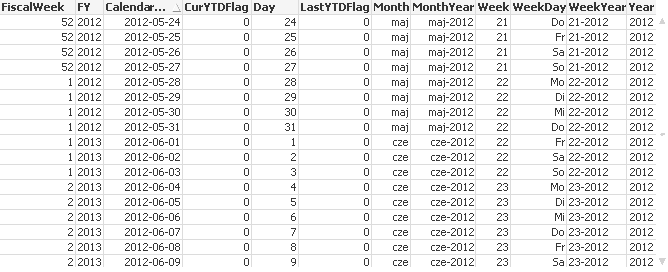
This seems to match your original requirement regarding the first fiscal week in 2012.
- Mark as New
- Bookmark
- Subscribe
- Mute
- Subscribe to RSS Feed
- Permalink
- Report Inappropriate Content
Hi Swuehl,
Thank you for bearing with me. I had a look at your qvw and it occured to me that the way you were generating the years was a lot simplier than the thing i had cobbled together, i changed that which did effect the Calendar weeks!
It now works with Calendar Year Perfectly, i cant follow the logic in the syntax yet but im sure i will get there.
However when i try to use my FY (financial year) instead the dates do no't quite make sense
For Week 1 im getting confusing dates. Im assuiming i will need to do something else with FY syntax?
Thank you so much
swuehl
- Mark as New
- Bookmark
- Subscribe
- Mute
- Subscribe to RSS Feed
- Permalink
- Report Inappropriate Content
Thank you for bearing with me. I had a look at your qvw and it occured to me that the way you were generating the years was a lot simplier than the thing i had cobbled together, i changed that which did effect the Calendar weeks!
That sounds a bit strange to me, I believe I've just copied your script code (commenting out some lines where I missed your variable definitions). What was the difference to your original code concerning the year calculation?
However when i try to use my FY (financial year) instead the dates do no't quite make sense
For Week 1 im getting confusing dates. Im assuiming i will need to do something else with FY syntax?
Your current FY calculation assigns e.g. the period from 2012-06-01 to 2013-05-31 to FY value 2013. Seems ok to me. If you want a match with your FiscalWeek numbering instead (FY to start always on Mondays, too), you can use something like
Date(yearend(weekend(TempDate),0,6),'YYYY') as FY
but this will create FY with different length (364 or 371 days, instead of 365 / 366 days of a calendar year).
I also noticed that you use a Date/Timestamp for your FY (yearend(...) ), formatted as four digit year, but still keeping the timestamp's numeric value.
That's ok in principle, but you can't do standard year arithmetic then (like finding the next or previous year by simply adding +1 / -1 to your FY value).
But it's up to you and your requirements to define your calendar.
- Mark as New
- Bookmark
- Subscribe
- Mute
- Subscribe to RSS Feed
- Permalink
- Report Inappropriate Content
Hi Swuehl,
I really appreciate your time and effort with this.
I sat down with the finance guys yesterday to help identify my issues
They want week 1 for the 2013 Financial year to start 4/6/12 -10/6/12 as its the first complete week of the year.
This makes Week 44 1st April 2013 -7th April 2013
As for the formatting of the year , i had copied that from a Qlikview training document and wasnt sure how else to do it. I will need to calculate figures from that at some point
Michael
swuehl
- Mark as New
- Bookmark
- Subscribe
- Mute
- Subscribe to RSS Feed
- Permalink
- Report Inappropriate Content
Maybe like this.
- Mark as New
- Bookmark
- Subscribe
- Mute
- Subscribe to RSS Feed
- Permalink
- Report Inappropriate Content
Thank you so Much Swuehl.
I have a new issue now which i think you touched upon
In my Chart i have a clolumn showing last year sales.
I was using this syntax:
sum( {$<Year = {$(#=Only(Year-1))},Week =,FiscalWeek =, Day=>} CURSALES)
However when using FY using this formula im getting Zero.
sum( {$<Year = {$(#=Only(FY-1)})>} CURSALES)
Is this related to the field formatting?