Unlock a world of possibilities! Login now and discover the exclusive benefits awaiting you.

- Qlik Community
- :
- All Forums
- :
- QlikView
- :
- Re: Flag for null values
- Subscribe to RSS Feed
- Mark Topic as New
- Mark Topic as Read
- Float this Topic for Current User
- Bookmark
- Subscribe
- Mute
- Printer Friendly Page

- Mark as New
- Bookmark
- Subscribe
- Mute
- Subscribe to RSS Feed
- Permalink
- Report Inappropriate Content
Flag for null values
Good Day guys,
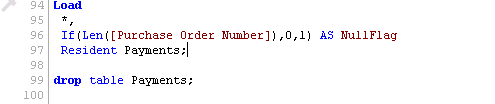
Please assist, im trying to create a flag for null values on the Purchase Order Number field.
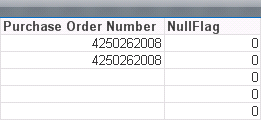
I created the flag but its bringing all values as 0 (Null and not null values). Now i cant filter on the null ones. Attached below is the Script and the results that i get after loading. Null and not null flag is the same. Thank you
- Tags:
- new_to_qlikview
- « Previous Replies
-
- 1
- 2
- Next Replies »
Accepted Solutions

 sunny_talwar
- Mark as New
- Bookmark
- Subscribe
- Mute
- Subscribe to RSS Feed
- Permalink
- Report Inappropriate Content
Try adding Trim to your Len() function. There might be white space in those rows:
If(Len(Trim([Purchase Order Number)) = 0, 1, 0) as NullFlag
Nulls are flagged 1 and non-nulls will be 0
sunny_talwar
- Mark as New
- Bookmark
- Subscribe
- Mute
- Subscribe to RSS Feed
- Permalink
- Report Inappropriate Content
Try adding Trim to your Len() function. There might be white space in those rows:
If(Len(Trim([Purchase Order Number)) = 0, 1, 0) as NullFlag
Nulls are flagged 1 and non-nulls will be 0

 tamilarasu
- Mark as New
- Bookmark
- Subscribe
- Mute
- Subscribe to RSS Feed
- Permalink
- Report Inappropriate Content
Hi Gaonyadiwe,
Try,
If(Len(Trim(Purchase Order Number))=0, 0,1) as NullFlage
tamilarasu
- Mark as New
- Bookmark
- Subscribe
- Mute
- Subscribe to RSS Feed
- Permalink
- Report Inappropriate Content
You are fast Sunny. 
sunny_talwar
- Mark as New
- Bookmark
- Subscribe
- Mute
- Subscribe to RSS Feed
- Permalink
- Report Inappropriate Content
Hahahaha

 PradeepReddy
- Mark as New
- Bookmark
- Subscribe
- Mute
- Subscribe to RSS Feed
- Permalink
- Report Inappropriate Content
try like this also..
if(isnull(Purchase Order Number),1,0) as Flag
sunny_talwar
- Mark as New
- Bookmark
- Subscribe
- Mute
- Subscribe to RSS Feed
- Permalink
- Report Inappropriate Content
As long as I know, this won't work pradeep because Len() function did find some white space, so its not null.
- Mark as New
- Bookmark
- Subscribe
- Mute
- Subscribe to RSS Feed
- Permalink
- Report Inappropriate Content
may be like this as well?
If([Purchase Order Number]=' ', 1,0) as NullFlage
sunny_talwar
- Mark as New
- Bookmark
- Subscribe
- Mute
- Subscribe to RSS Feed
- Permalink
- Report Inappropriate Content
But how will this capture true nulls?
May be this:
If([Purchase Order Number]=' ' or IsNull([Purchase Order Number]), 1,0) as NullFlage
But why make this so complicated, why not just Len(Trim()) test?
PradeepReddy
- Mark as New
- Bookmark
- Subscribe
- Mute
- Subscribe to RSS Feed
- Permalink
- Report Inappropriate Content
yes sunny...
- « Previous Replies
-
- 1
- 2
- Next Replies »