Unlock a world of possibilities! Login now and discover the exclusive benefits awaiting you.

- Qlik Community
- :
- All Forums
- :
- QlikView
- :
- Forecasting with zero-values
- Subscribe to RSS Feed
- Mark Topic as New
- Mark Topic as Read
- Float this Topic for Current User
- Bookmark
- Subscribe
- Mute
- Printer Friendly Page

- Mark as New
- Bookmark
- Subscribe
- Mute
- Subscribe to RSS Feed
- Permalink
- Report Inappropriate Content
Forecasting with zero-values
Hi,
I have a question regarding a forecast I want to make in Qlikview:
I want to forecast the price of the upcoming months based on the costs of the previous months and based on some forecast weight parameters:
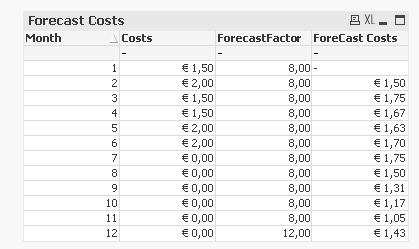
The expression I used:
(Sum( aggr( rangesum( above(Costs,0,12) ),Month)) - Costs) / (Sum( aggr( rangesum( above(ForecastFactor,0,12) ),Month)) - ForecastFactor) * ForecastFactor
The problem starts in month 8. If the value is € 0,00, the costs for that month are still not known. So, for month 8 I do not want to take the costs of month 7 into account, as the costs are still €0,00. However, with my expression it goes wrong: the forecast of month 8 is based on the costs of month 1 to 7 divided by the forecastfactor s of those months, instead of being based on the costs and forecastfactors of month 1 to 6. In fact I expect for the months 8, 9, 10 and 11 a forecast of € 1,75 as the forecastfactor is 8 and the forecast is based on the real costs of month 1 to 6.
Moreover, I prefer to solve this problem using the expressions and/or other chart properties. Anyone knows how I can base the forecast costs of month 8 on the output of month 1 to 6 instead of 1 to 7?
Thank you in advance!

 swuehl
- Mark as New
- Bookmark
- Subscribe
- Mute
- Subscribe to RSS Feed
- Permalink
- Report Inappropriate Content
Maybe something like
(Sum( aggr( rangesum( above(Costs,0,12) ),Month)) - Costs) / (Sum( aggr( rangesum( above(Only({<Costs = {">0"}>}ForecastFactor),0,12) ),Month)) - ForecastFactor) * ForecastFactor
Maybe add the Only() with set expression also to your other ForecastFactor references.