Unlock a world of possibilities! Login now and discover the exclusive benefits awaiting you.

Announcements
Want to see what's currently in public preview? We've pulled it all together in one place. Check it out here
- Qlik Community
- :
- All Forums
- :
- QlikView
- :
- Re: Format Colouring for one cell - Pivot Table
Options
- Subscribe to RSS Feed
- Mark Topic as New
- Mark Topic as Read
- Float this Topic for Current User
- Bookmark
- Subscribe
- Mute
- Printer Friendly Page
Turn on suggestions
Auto-suggest helps you quickly narrow down your search results by suggesting possible matches as you type.
Showing results for

 kfahri342
Contributor III
2017-06-21
11:59 AM
- Mark as New
- Bookmark
- Subscribe
- Mute
- Subscribe to RSS Feed
- Permalink
- Report Inappropriate Content
Format Colouring for one cell - Pivot Table
Hi All,
I have a pivot table, and I need to colour in only specific cells. The only way I have figured out colouring cells is by right-clicking and going on Custom Format Cell. But this method colours the entire dimension, rather than a specific value within that dimension.
Eg. I have a months column [dimension] and only want to colour in Jan & Feb
Month |
|---|
Jan |
| Feb |
| Mar |
| Apr |
Is there a way to do this?
Many Thanks
Kozan
2,023 Views
1 Solution
Accepted Solutions

 vishsaggi
Champion III
2017-06-21
12:01 PM
- Mark as New
- Bookmark
- Subscribe
- Mute
- Subscribe to RSS Feed
- Permalink
- Report Inappropriate Content
Write a background expression for Month like
= IF(Match(Month, 'Jan', 'Feb'), Green(), White())
1,860 Views
2 Replies
vishsaggi
Champion III
2017-06-21
12:01 PM
- Mark as New
- Bookmark
- Subscribe
- Mute
- Subscribe to RSS Feed
- Permalink
- Report Inappropriate Content
Write a background expression for Month like
= IF(Match(Month, 'Jan', 'Feb'), Green(), White())
1,861 Views

 Sergey_Shuklin
Specialist
2017-06-21
12:24 PM
- Mark as New
- Bookmark
- Subscribe
- Mute
- Subscribe to RSS Feed
- Permalink
- Report Inappropriate Content
Hello, Kozan!
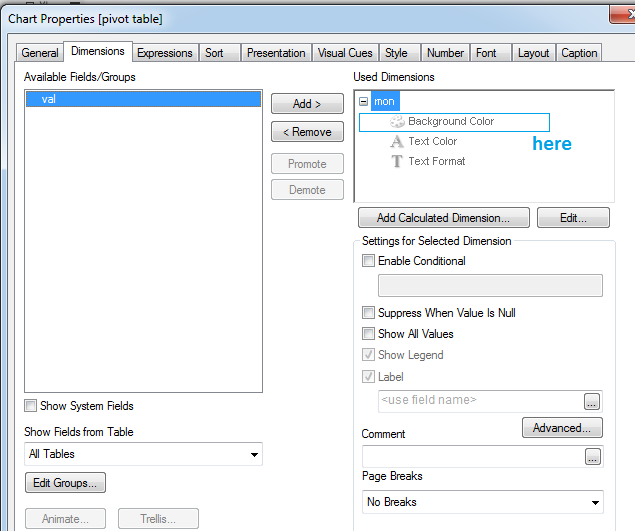
Background expression is here:
1,860 Views
