Unlock a world of possibilities! Login now and discover the exclusive benefits awaiting you.

- Qlik Community
- :
- All Forums
- :
- QlikView
- :
- Formato de Texto?
- Subscribe to RSS Feed
- Mark Topic as New
- Mark Topic as Read
- Float this Topic for Current User
- Bookmark
- Subscribe
- Mute
- Printer Friendly Page

- Mark as New
- Bookmark
- Subscribe
- Mute
- Subscribe to RSS Feed
- Permalink
- Report Inappropriate Content
Formato de Texto?
Como hacer que mi texto solo de una dimension de mi tabla pivot tenga un tamaño de 22 y este en negrita:
Texto = Texto
Accepted Solutions
- Mark as New
- Bookmark
- Subscribe
- Mute
- Subscribe to RSS Feed
- Permalink
- Report Inappropriate Content
Settings > User Preferences > Select 'Always Show Design Menu Items'
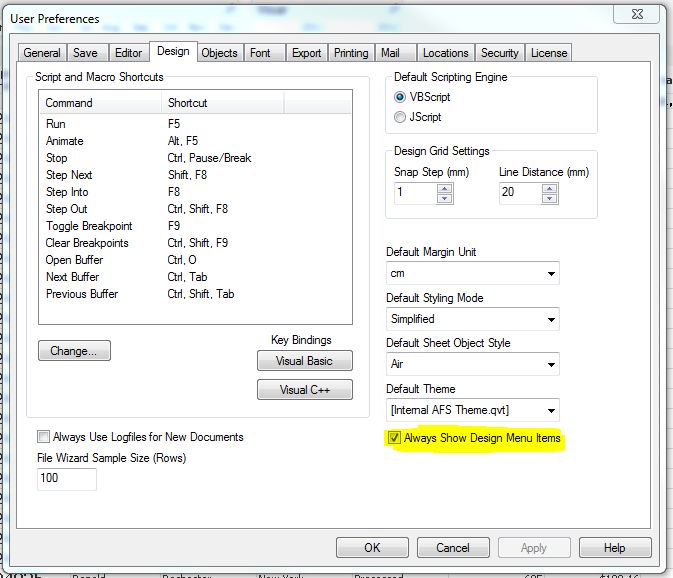
Right click column > Click 'Format Cells' > Increase font size:


 MayilVahanan
- Mark as New
- Bookmark
- Subscribe
- Mute
- Subscribe to RSS Feed
- Permalink
- Report Inappropriate Content
Hi
For Bold, Use Like this,
Dimension tab -> select the dimension and click '+' sign in Text Format gives ='<B>'
Hope it helps
Please close the thread by marking correct answer & give likes if you like the post.
- Mark as New
- Bookmark
- Subscribe
- Mute
- Subscribe to RSS Feed
- Permalink
- Report Inappropriate Content
Muchas gracias,
pero no te entindo muy bien como agrandar el texto me puedes explciar de nuevo, adicional a eso no sabes como Virar el texto? por los mismo codigo tipo html ?
- Mark as New
- Bookmark
- Subscribe
- Mute
- Subscribe to RSS Feed
- Permalink
- Report Inappropriate Content
Settings > User Preferences > Select 'Always Show Design Menu Items'
Right click column > Click 'Format Cells' > Increase font size:
MayilVahanan
- Mark as New
- Bookmark
- Subscribe
- Mute
- Subscribe to RSS Feed
- Permalink
- Report Inappropriate Content
hi
For single dimension,is not possible to increase the font size in pivot table, i think..
Please close the thread by marking correct answer & give likes if you like the post.
- Mark as New
- Bookmark
- Subscribe
- Mute
- Subscribe to RSS Feed
- Permalink
- Report Inappropriate Content
Mayil - it still works with a pivot. See attached.
MayilVahanan
- Mark as New
- Bookmark
- Subscribe
- Mute
- Subscribe to RSS Feed
- Permalink
- Report Inappropriate Content
Hi
ya. Its nice.. Custom Format cell is good option to achieve this. Thanx rebeccad
Please close the thread by marking correct answer & give likes if you like the post.