Unlock a world of possibilities! Login now and discover the exclusive benefits awaiting you.

Announcements
ALERT: QlikView server communication interruptions following Microsoft Windows Domain Controller security updates
- Qlik Community
- :
- All Forums
- :
- QlikView
- :
- Formatting a particular Row in Straight table
Options
- Subscribe to RSS Feed
- Mark Topic as New
- Mark Topic as Read
- Float this Topic for Current User
- Bookmark
- Subscribe
- Mute
- Printer Friendly Page
Turn on suggestions
Auto-suggest helps you quickly narrow down your search results by suggesting possible matches as you type.
Showing results for

Anonymous
Not applicable
2016-09-21
08:14 AM
- Mark as New
- Bookmark
- Subscribe
- Mute
- Subscribe to RSS Feed
- Permalink
- Report Inappropriate Content
Formatting a particular Row in Straight table
Hi There,
I want to format (Font= Grey, back ground= Dark) a particular row of a straight table. Lets say "USA" row which is the last row of the table
UK 10
India 13
USA 18
Please help
Br,
Deepak
1,208 Views
3 Replies

 adamdavi3s
Master
2016-09-22
04:11 AM
- Mark as New
- Bookmark
- Subscribe
- Mute
- Subscribe to RSS Feed
- Permalink
- Report Inappropriate Content
Do you want to format the last row (based on? max value?) or the one which says USA?
978 Views

 tresB
tresB
Champion III
2016-09-22
04:24 AM
- Mark as New
- Bookmark
- Subscribe
- Mute
- Subscribe to RSS Feed
- Permalink
- Report Inappropriate Content
Try writing expression for background/text color accordingly for both dimension and expression. 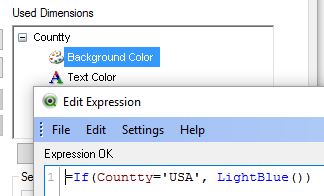
978 Views
Anonymous
Not applicable
2016-09-22
04:33 AM
Author
- Mark as New
- Bookmark
- Subscribe
- Mute
- Subscribe to RSS Feed
- Permalink
- Report Inappropriate Content
Hi,
Go to Chart properties>Expressions>Expand '+' symbol you can format background color, font text color using " If " condition.
If not explain little bit more about your requirement.
Hope it helps!!
978 Views