Unlock a world of possibilities! Login now and discover the exclusive benefits awaiting you.

- Qlik Community
- :
- All Forums
- :
- QlikView
- :
- Re: Formatting pivot table dissapears when collaps...
- Subscribe to RSS Feed
- Mark Topic as New
- Mark Topic as Read
- Float this Topic for Current User
- Bookmark
- Subscribe
- Mute
- Printer Friendly Page

- Mark as New
- Bookmark
- Subscribe
- Mute
- Subscribe to RSS Feed
- Permalink
- Report Inappropriate Content
Formatting pivot table dissapears when collapsed
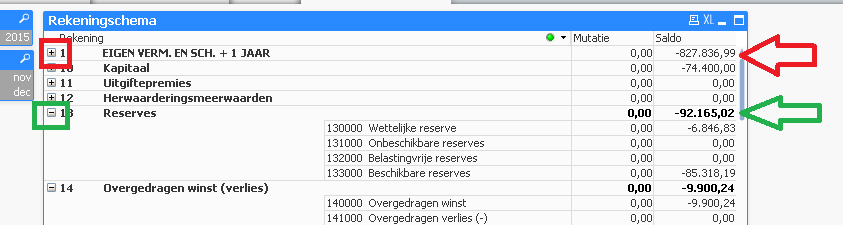
I have this problem with formatting a pivot table, when I collapse a part of the pivot table, the format of the expression values dissapears.
I used the text format property on the dimension ( '<B>')
Accepted Solutions

 rwunderlich
- Mark as New
- Bookmark
- Subscribe
- Mute
- Subscribe to RSS Feed
- Permalink
- Report Inappropriate Content
Interesting. I never noticed that before. When a group is collapsed, the expression total loses it's bolding. You can work around it by using a conditional Text Format in your expression.
=if(Dimensionality()=1, '<B>')
-Rob
rwunderlich
- Mark as New
- Bookmark
- Subscribe
- Mute
- Subscribe to RSS Feed
- Permalink
- Report Inappropriate Content
Interesting. I never noticed that before. When a group is collapsed, the expression total loses it's bolding. You can work around it by using a conditional Text Format in your expression.
=if(Dimensionality()=1, '<B>')
-Rob
- Mark as New
- Bookmark
- Subscribe
- Mute
- Subscribe to RSS Feed
- Permalink
- Report Inappropriate Content
It works! Amazing. Thank you very much.