Unlock a world of possibilities! Login now and discover the exclusive benefits awaiting you.

- Qlik Community
- :
- All Forums
- :
- QlikView
- :
- Full accumulation after filter
- Subscribe to RSS Feed
- Mark Topic as New
- Mark Topic as Read
- Float this Topic for Current User
- Bookmark
- Subscribe
- Mute
- Printer Friendly Page

- Mark as New
- Bookmark
- Subscribe
- Mute
- Subscribe to RSS Feed
- Permalink
- Report Inappropriate Content
Full accumulation after filter
How can I still have the full accumulation in a chart, after select a filter?
When I filter, I want the first value to be accumulated with the all the previous values ones. (althoguh they are not selected).
For example:
I have this chart:
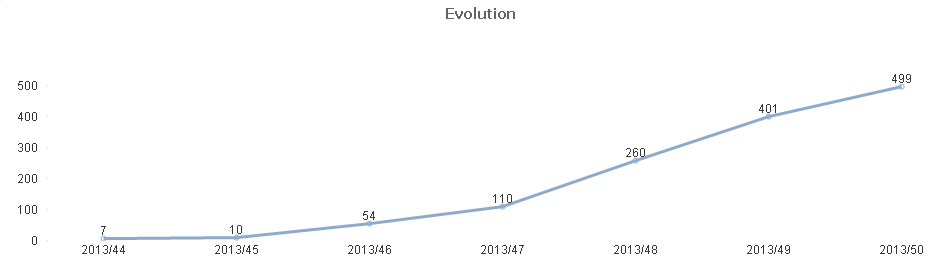
When I select November, the chart is:
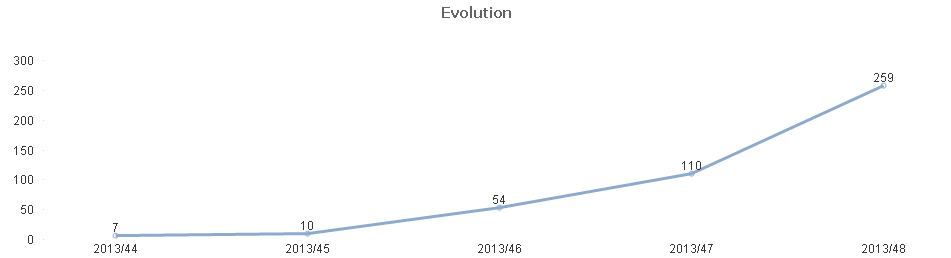
And if I select December I have this one:
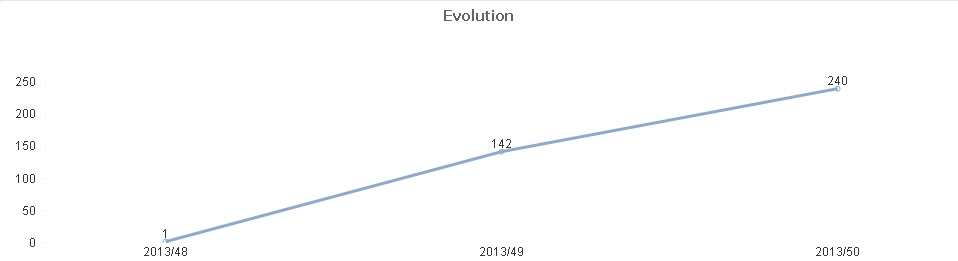
In december I want the full accumulation, not just the data from december. So, instead of 1, 143, 240, I want the 260, 401, 499.
I've tried with total, all...
Thanks in advance.
Accepted Solutions

 annafuksa1
- Mark as New
- Bookmark
- Subscribe
- Mute
- Subscribe to RSS Feed
- Permalink
- Report Inappropriate Content
Sorry,
in my graph I used expression
rangesum(above(total sum({$<Date= >}Sales), 0, rowno(Total))) + Sum(TOTAL {<Month={"$(=min(Month)-1)"}>} Sales)
rangesum(above(total sum({$<Date= >}Sales), 0, rowno(Total))) this is regular sum above for a chosen month month
+ Sum(TOTAL {<Month={"$(=min(Month)-1)"}>} Sales) this add value from previous month - you need to have month in calendar.
Best Regards,
Anna
- Mark as New
- Bookmark
- Subscribe
- Mute
- Subscribe to RSS Feed
- Permalink
- Report Inappropriate Content
I've also tried:
sum( {<Date>} , Id, 0))
I have the correct values, but the chart show all the weeks and not only December.
annafuksa1
- Mark as New
- Bookmark
- Subscribe
- Mute
- Subscribe to RSS Feed
- Permalink
- Report Inappropriate Content
Please see attachment
 javier_florian
- Mark as New
- Bookmark
- Subscribe
- Mute
- Subscribe to RSS Feed
- Permalink
- Report Inappropriate Content
Hi Jose,
How do you set week/year? You need set expression to get values from the first day of the week no matter if month is A or B.
-JFlorian
annafuksa1
- Mark as New
- Bookmark
- Subscribe
- Mute
- Subscribe to RSS Feed
- Permalink
- Report Inappropriate Content
I just find out that my previous answer it is not what you are looking for 
See new file
- Mark as New
- Bookmark
- Subscribe
- Mute
- Subscribe to RSS Feed
- Permalink
- Report Inappropriate Content
I cant open your document, because I can't access with License Qlikview, and I am using a Personal Edition.
- Mark as New
- Bookmark
- Subscribe
- Mute
- Subscribe to RSS Feed
- Permalink
- Report Inappropriate Content
What do you mean by setting the expression?
I have a table with a date. That day, is link to another table (calendar table), from where I choose the field to select WeekName (Date), in this case. So Week 48, is in November and December.
I am basically using this expression: sum (idOrder), (idOrder is always 1, so i'm counting rows) with Full Accumulation.
javier_florian
- Mark as New
- Bookmark
- Subscribe
- Mute
- Subscribe to RSS Feed
- Permalink
- Report Inappropriate Content
I think is not the best way but...
I work with expression, where we call min date in the month selected "Min(Fecha)"... so, we calculated the weekstart and then week to the year...
=Sum(
{<Semana_Año={">=$(=Week(WeekStart(Min(Fecha))))<=$(=Week(WeekStart(Min(Fecha)))+4)"}>}
idOrder)
I hope you can understand me...
-JFlorian
annafuksa1
- Mark as New
- Bookmark
- Subscribe
- Mute
- Subscribe to RSS Feed
- Permalink
- Report Inappropriate Content
Sorry,
in my graph I used expression
rangesum(above(total sum({$<Date= >}Sales), 0, rowno(Total))) + Sum(TOTAL {<Month={"$(=min(Month)-1)"}>} Sales)
rangesum(above(total sum({$<Date= >}Sales), 0, rowno(Total))) this is regular sum above for a chosen month month
+ Sum(TOTAL {<Month={"$(=min(Month)-1)"}>} Sales) this add value from previous month - you need to have month in calendar.
Best Regards,
Anna
- Mark as New
- Bookmark
- Subscribe
- Mute
- Subscribe to RSS Feed
- Permalink
- Report Inappropriate Content
Wow!!
Thank you so much! That worked perfectly.
Kind regards.