Unlock a world of possibilities! Login now and discover the exclusive benefits awaiting you.

- Qlik Community
- :
- All Forums
- :
- QlikView
- :
- Re: Generate Ranks Per Month
- Subscribe to RSS Feed
- Mark Topic as New
- Mark Topic as Read
- Float this Topic for Current User
- Bookmark
- Subscribe
- Mute
- Printer Friendly Page

 psk180590
- Mark as New
- Bookmark
- Subscribe
- Mute
- Subscribe to RSS Feed
- Permalink
- Report Inappropriate Content
Generate Ranks Per Month
Hello All,
I have my data as in the attached Excel.
Basically 4 Columns (An overview of how my data is structured):
| Area Code | Month | Market | Value |
|---|---|---|---|
| XX | 1 | AA | 20 |
Please, check the Excel Table for more details.
From, this data i'm looking to generate Rank for Area based on the Value.
Ex:
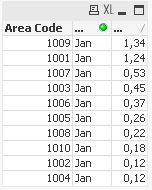
In Jan Area 1009 is Rank1, 1001 is 2 ......1004 is 10
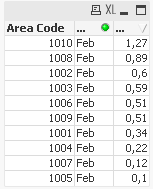
In Feb Area 1010 is Rank1.....1005 is Rank10
I have used the RecNo() function to generate the Ranks in Script, but i'm not able to generate Ranks per Month.
Ex: For the month of Feb with RecNo() i was able to generate the following ranks:
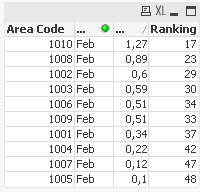
But, what i'm looking for is Rank 1-10 per month.
TIA!!
Accepted Solutions

 sunny_talwar
- Mark as New
- Bookmark
- Subscribe
- Mute
- Subscribe to RSS Feed
- Permalink
- Report Inappropriate Content
Try this
Raw_Data:
LOAD Distinct *
FROM
[Rank_Test.xlsx]
(ooxml, embedded labels, table is Tabelle1);
Ranking:
LOAD *,
If(Month = Previous(Month), RangeSum(Peek('Ranking'), 1), 1) as Ranking,
AutoNumber(RecNo(), Month) as Ranking2
Resident Raw_Data
Order by Month, Value desc;
DROP Table Raw_Data;
I will go with the green option... but I have added the blue one too...
sunny_talwar
- Mark as New
- Bookmark
- Subscribe
- Mute
- Subscribe to RSS Feed
- Permalink
- Report Inappropriate Content
Try this
Raw_Data:
LOAD Distinct *
FROM
[Rank_Test.xlsx]
(ooxml, embedded labels, table is Tabelle1);
Ranking:
LOAD *,
If(Month = Previous(Month), RangeSum(Peek('Ranking'), 1), 1) as Ranking,
AutoNumber(RecNo(), Month) as Ranking2
Resident Raw_Data
Order by Month, Value desc;
DROP Table Raw_Data;
I will go with the green option... but I have added the blue one too...
psk180590
- Mark as New
- Bookmark
- Subscribe
- Mute
- Subscribe to RSS Feed
- Permalink
- Report Inappropriate Content
Hello Sunny,
Your solution has perfectly worked for me thanks for this.
But, now i need to create Regiob from Area Code and also generate Ranks for the Regions. I'm somehow not able to acheive it through both the logics you defined.
Please, have a look at the updated qvd and Excel Table.
Thanks Again and Best Regards
Sai.
sunny_talwar
- Mark as New
- Bookmark
- Subscribe
- Mute
- Subscribe to RSS Feed
- Permalink
- Report Inappropriate Content
What is the expected output?
psk180590
- Mark as New
- Bookmark
- Subscribe
- Mute
- Subscribe to RSS Feed
- Permalink
- Report Inappropriate Content
The 'RankingReg' should always have 8(1-8 Ranks).
Same logic as Area Code(Which has 1-91 Ranks always)
sunny_talwar
- Mark as New
- Bookmark
- Subscribe
- Mute
- Subscribe to RSS Feed
- Permalink
- Report Inappropriate Content
Can you check if attached is what you want
psk180590
- Mark as New
- Bookmark
- Subscribe
- Mute
- Subscribe to RSS Feed
- Permalink
- Report Inappropriate Content
Many Thanks looks good. I will give it a try right away!! 
sunny_talwar
- Mark as New
- Bookmark
- Subscribe
- Mute
- Subscribe to RSS Feed
- Permalink
- Report Inappropriate Content
Sounds good
