Unlock a world of possibilities! Login now and discover the exclusive benefits awaiting you.

- Qlik Community
- :
- All Forums
- :
- QlikView
- :
- Re: Group By Not Working
- Subscribe to RSS Feed
- Mark Topic as New
- Mark Topic as Read
- Float this Topic for Current User
- Bookmark
- Subscribe
- Mute
- Printer Friendly Page

- Mark as New
- Bookmark
- Subscribe
- Mute
- Subscribe to RSS Feed
- Permalink
- Report Inappropriate Content
Group By Not Working
Hello: I have a data set that shows up like this:
| teamNAME | gameDATE | timeOUT | tixSOLDPERDAYX |
| vs. Team L | 8/15/2014 0:00 | 66% | 4 |
| vs. Team L | 8/15/2014 0:00 | 67% | 12 |
| vs. Team L | 8/15/2014 0:00 | 68% | 2 |
| vs. Team L | 8/15/2014 0:00 | 69% | 0 |
| vs. Team L | 8/15/2014 0:00 | 69% | 2 |
| vs. Team L | 8/15/2014 0:00 | 70% | 0 |
| vs. Team L | 8/15/2014 0:00 | 71% | 2 |
| vs. Team L | 8/15/2014 0:00 | 72% | 15 |
| vs. Team L | 8/15/2014 0:00 | 73% | 0 |
i think use this transformation:
HISTORICALTICKETING:
LOAD
timeOUT,
teamNAME,
gameDATE,
sum(tixSOLDPERDAYX) as perDayCOUNT,
IF(timeOUT=0, SUM(tixSOLDPERDAYX), RangeSum(SUM(tixSOLDPERDAYX), Peek('RunningTotal'))) as RunningTotal
RESIDENT RECONFIGURED_TICKETING4
Group by timeOUT, teamNAME, gameDATE;
DROP TABLE RECONFIGURED_TICKETING4;
I was trying to utilize the group by function to eliminate the duplicate values (like 69% above). however the output still shows two 69% values. This is problematic because i am showing an average of Team L RunningTotal, which is double counting these values.
Is there something wrong with my group By? Or is there a way to write something to eliminate the duplicate values?
- « Previous Replies
-
- 1
- 2
- Next Replies »
- Mark as New
- Bookmark
- Subscribe
- Mute
- Subscribe to RSS Feed
- Permalink
- Report Inappropriate Content
Hi,
Try this:
RECONFIGURED_TICKETING4:
LOAD * INLINE [
teamNAME, gameDATE, timeOUT, tixSOLDPERDAYX
vs. Team L, 8/15/2014 0:00, 66%, 4
vs. Team L, 8/15/2014 0:00, 67%, 12
vs. Team L, 8/15/2014 0:00, 68%, 2
vs. Team L, 8/15/2014 0:00, 69%, 0
vs. Team L, 8/15/2014 0:00, 69%, 2
vs. Team L, 8/15/2014 0:00, 70%, 0
vs. Team L, 8/15/2014 0:00, 71%, 2
vs. Team L, 8/15/2014 0:00, 72%, 15
vs. Team L, 8/15/2014 0:00, 73%, 0
];
HISTORICALTICKETING:
LOAD
text(timeOUT) as timeOUT,
teamNAME,
gameDATE,
sum(tixSOLDPERDAYX) as perDayCOUNT
//IF(timeOUT=0, SUM(tixSOLDPERDAYX), RangeSum(SUM(tixSOLDPERDAYX), Peek('RunningTotal'))) as RunningTotal
RESIDENT RECONFIGURED_TICKETING4
Group by text(timeOUT), teamNAME, gameDATE;
DROP TABLE RECONFIGURED_TICKETING4;
// The above will remove duplicate percentages
then reload the resident table above and convert back to a numeric value:
num#(timeOUT,'#,##0%') as timeOUT
- Mark as New
- Bookmark
- Subscribe
- Mute
- Subscribe to RSS Feed
- Permalink
- Report Inappropriate Content
Edited to conver text format back to %
RECONFIGURED_TICKETING4:
LOAD * INLINE [
teamNAME, gameDATE, timeOUT, tixSOLDPERDAYX
vs. Team L, 8/15/2014 0:00, 66%, 4
vs. Team L, 8/15/2014 0:00, 67%, 12
vs. Team L, 8/15/2014 0:00, 68%, 2
vs. Team L, 8/15/2014 0:00, 69%, 0
vs. Team L, 8/15/2014 0:00, 69%, 2
vs. Team L, 8/15/2014 0:00, 70%, 0
vs. Team L, 8/15/2014 0:00, 71%, 2
vs. Team L, 8/15/2014 0:00, 72%, 15
vs. Team L, 8/15/2014 0:00, 73%, 0
];
HISTORICALTICKETING_TEMP:
LOAD
text(timeOUT) as timeOUT,
teamNAME,
gameDATE,
sum(tixSOLDPERDAYX) as perDayCOUNT
//IF(timeOUT=0, SUM(tixSOLDPERDAYX), RangeSum(SUM(tixSOLDPERDAYX), Peek('RunningTotal'))) as RunningTotal
RESIDENT RECONFIGURED_TICKETING4
Group by text(timeOUT), teamNAME, gameDATE;
DROP TABLE RECONFIGURED_TICKETING4;
HISTORICALTICKETING:
NoConcatenate
LOAD
num#(timeOUT,'#,##0%') as timeOUT,
teamNAME,
gameDATE,
perDayCOUNT
//IF(timeOUT=0, SUM(tixSOLDPERDAYX), RangeSum(SUM(tixSOLDPERDAYX), Peek('RunningTotal'))) as RunningTotal
RESIDENT HISTORICALTICKETING_TEMP;
drop Table HISTORICALTICKETING_TEMP;

 Kushal_Chawda
- Mark as New
- Bookmark
- Subscribe
- Mute
- Subscribe to RSS Feed
- Permalink
- Report Inappropriate Content
try this
HISTORICALTICKETING:
LOAD
teamNAME,
gameDATE,
Sum( distinct timeOUT) as timeOUT,
sum(tixSOLDPERDAYX) as perDayCOUNT
RESIDENT RECONFIGURED_TICKETING4
Group by teamNAME, gameDATE;

 jonathandienst
- Mark as New
- Bookmark
- Subscribe
- Mute
- Subscribe to RSS Feed
- Permalink
- Report Inappropriate Content
I think your script is OK, and the results are correct, but you have added tixSOLDPERDAYX as a dimension to the chart. That is causing the expression for 8/15/2014 to be shown twice.
- Mark as New
- Bookmark
- Subscribe
- Mute
- Subscribe to RSS Feed
- Permalink
- Report Inappropriate Content
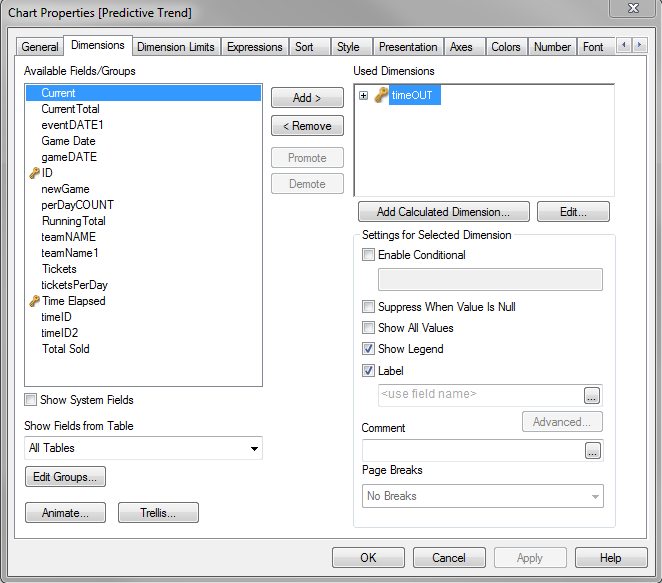
the dimension I am using is only timeOUT
- Mark as New
- Bookmark
- Subscribe
- Mute
- Subscribe to RSS Feed
- Permalink
- Report Inappropriate Content
this worked great. thank you!!!
- « Previous Replies
-
- 1
- 2
- Next Replies »