Unlock a world of possibilities! Login now and discover the exclusive benefits awaiting you.

- Qlik Community
- :
- All Forums
- :
- QlikView
- :
- Re: Growth Calculation
- Subscribe to RSS Feed
- Mark Topic as New
- Mark Topic as Read
- Float this Topic for Current User
- Bookmark
- Subscribe
- Mute
- Printer Friendly Page

 upaliwije
- Mark as New
- Bookmark
- Subscribe
- Mute
- Subscribe to RSS Feed
- Permalink
- Report Inappropriate Content
Growth Calculation
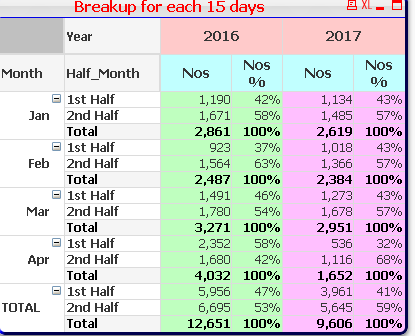
In the Pivot table shown below I want to calculate the growth of nos over the year 2016
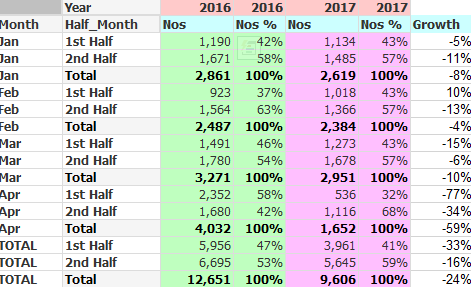
After the calculation of growth out put report should look like below
My expression for Nos is as follows
sum(Nos)
Year is a dimension
I tried following expression to calculate growth but it does not work. Pls help
if(RISK_YEAR=2017,(sum({<RISK_YEAR={'2017'}>} Nos)-sum({<RISK_YEAR={'2016'}>} Nos)),sum({<RISK_YEAR={'2016'}>} Nos))
upaliwije
- Mark as New
- Bookmark
- Subscribe
- Mute
- Subscribe to RSS Feed
- Permalink
- Report Inappropriate Content
Hi Friends
I manage to calculate growth my pivot table now looks as shown below
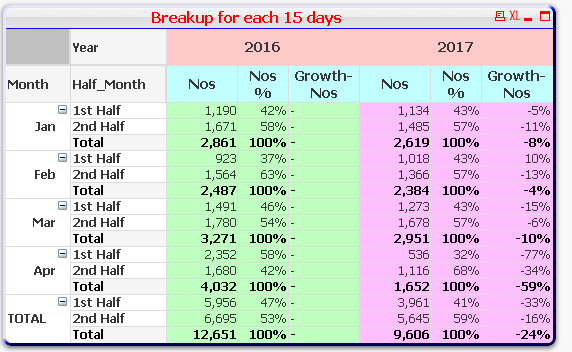
My expression for growth is (Sum(Nos)/Before(Sum({<RISK_YEAR>}Nos)) - 1) * Avg(1)
However There is blank Column (3 rd Column ) which I want to hide. Can you suggest a solution please

 sunny_talwar
- Mark as New
- Bookmark
- Subscribe
- Mute
- Subscribe to RSS Feed
- Permalink
- Report Inappropriate Content
We have done the Pick(Dim(....)) approach so many times before... are you still not able to implement it?
upaliwije
- Mark as New
- Bookmark
- Subscribe
- Mute
- Subscribe to RSS Feed
- Permalink
- Report Inappropriate Content
Hi Sunny,
I tried with this Expression
IF(match(YEAR,'2017'),(Sum(Nos)/Before(Sum({<RISK_YEAR>}Nos)) - 1) * Avg(1))
still the blank row appears
