Unlock a world of possibilities! Login now and discover the exclusive benefits awaiting you.

- Qlik Community
- :
- All Forums
- :
- QlikView
- :
- Help Hiding a row
- Subscribe to RSS Feed
- Mark Topic as New
- Mark Topic as Read
- Float this Topic for Current User
- Bookmark
- Subscribe
- Mute
- Printer Friendly Page

- Mark as New
- Bookmark
- Subscribe
- Mute
- Subscribe to RSS Feed
- Permalink
- Report Inappropriate Content
Help Hiding a row
Hi Guy's
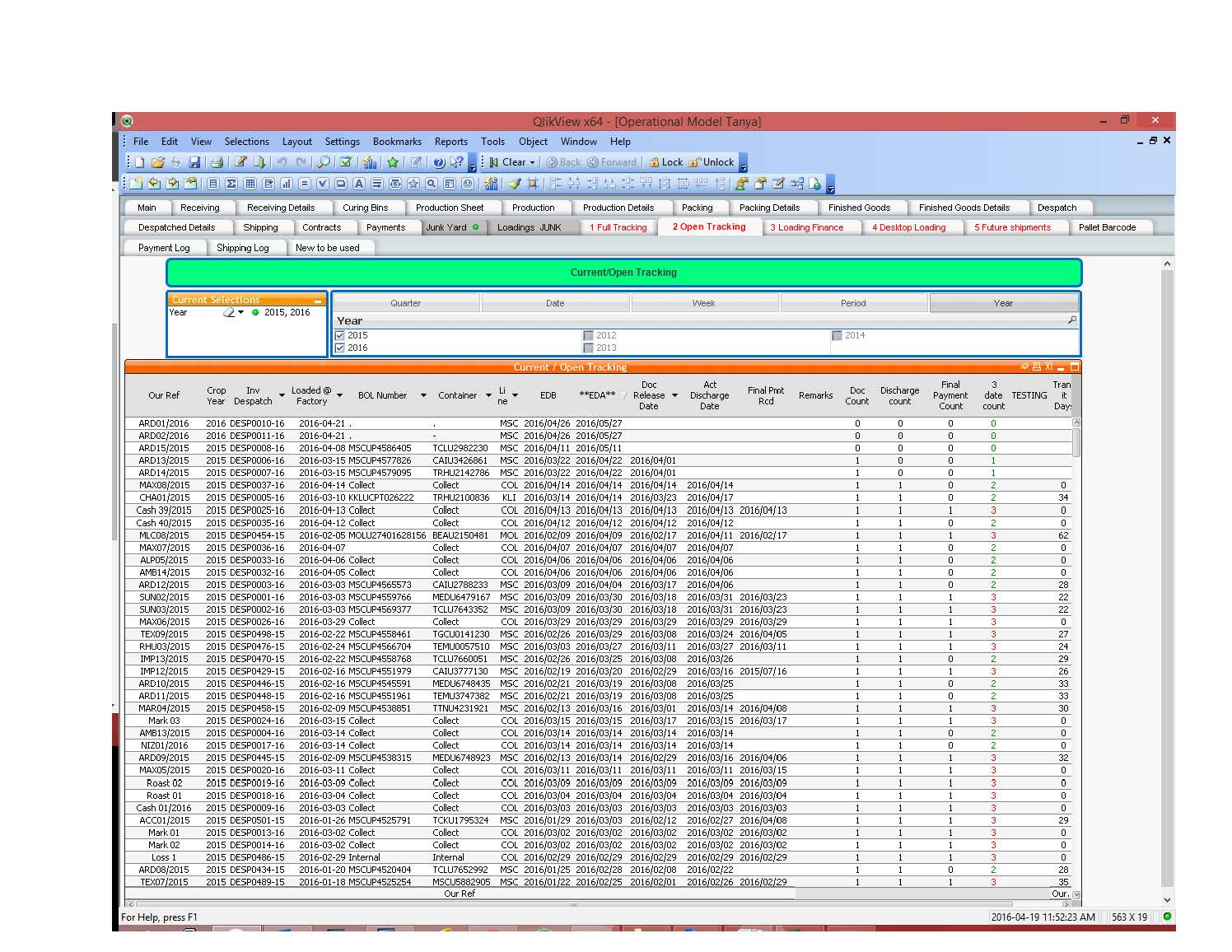
I have the following sheet as shown below. I would like to hide all rows where the expression "date count" fields is 3. Is this possible ?
Kind regards
Accepted Solutions
- Mark as New
- Bookmark
- Subscribe
- Mute
- Subscribe to RSS Feed
- Permalink
- Report Inappropriate Content
Thanks so Much Sunny
I tried the following in a calculated dimension and it worked.
=Aggr(if(isNull(MaxString([Shipment Document Release Date])) or IsNull(MaxString([Actual Discharge Date])) or IsNull(MaxString([Final Payment Recieved])), [Our Shipment Reference]), [Our Shipment Reference])
Regards

 sunny_talwar
- Mark as New
- Bookmark
- Subscribe
- Mute
- Subscribe to RSS Feed
- Permalink
- Report Inappropriate Content
May be use this kind of logic for all your expressions, except date count expression
If([date count] <> 3, yourexpreission)
and for date count expression
If(expression <> 3, expression)
- Mark as New
- Bookmark
- Subscribe
- Mute
- Subscribe to RSS Feed
- Permalink
- Report Inappropriate Content
Thanks so Much Sunny
I tried the following in a calculated dimension and it worked.
=Aggr(if(isNull(MaxString([Shipment Document Release Date])) or IsNull(MaxString([Actual Discharge Date])) or IsNull(MaxString([Final Payment Recieved])), [Our Shipment Reference]), [Our Shipment Reference])
Regards
sunny_talwar
- Mark as New
- Bookmark
- Subscribe
- Mute
- Subscribe to RSS Feed
- Permalink
- Report Inappropriate Content
Great, I am glad you were able to figure it out. Please close the thread now 