Unlock a world of possibilities! Login now and discover the exclusive benefits awaiting you.

- Qlik Community
- :
- All Forums
- :
- QlikView
- :
- Re: Hide Excluded in Staright Table
- Subscribe to RSS Feed
- Mark Topic as New
- Mark Topic as Read
- Float this Topic for Current User
- Bookmark
- Subscribe
- Mute
- Printer Friendly Page

 varunreddy
- Mark as New
- Bookmark
- Subscribe
- Mute
- Subscribe to RSS Feed
- Permalink
- Report Inappropriate Content
Hide Excluded in Staright Table
Hi All,
I have created the straight table to show the dimension values using the drop down select. Now I am trying to "Hide Excluded" values. Is there a way we can do that in the straight table.
I am trying replicate the functionality of "Hide Excluded" in list box into straight table.
Can anyone please help me with this?
Thanks,
Varun
- Tags:
- sunny t
- sunny talwar
- « Previous Replies
-
- 1
- 2
- Next Replies »
Accepted Solutions

 Sergey_Shuklin
- Mark as New
- Bookmark
- Subscribe
- Mute
- Subscribe to RSS Feed
- Permalink
- Report Inappropriate Content

 sunny_talwar
- Mark as New
- Bookmark
- Subscribe
- Mute
- Subscribe to RSS Feed
- Permalink
- Report Inappropriate Content
I thought Straight table did that by default
varunreddy
- Mark as New
- Bookmark
- Subscribe
- Mute
- Subscribe to RSS Feed
- Permalink
- Report Inappropriate Content
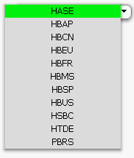
I don't want the greyed out values.
I am trying to achieve something like this:

sunny_talwar
- Mark as New
- Bookmark
- Subscribe
- Mute
- Subscribe to RSS Feed
- Permalink
- Report Inappropriate Content
Both your screenshots are not a straight table  ... you are asking to hide excluded in straight table, aren't you?
varunreddy
- Mark as New
- Bookmark
- Subscribe
- Mute
- Subscribe to RSS Feed
- Permalink
- Report Inappropriate Content
Yes
Wondering, if this is possible?
sunny_talwar
- Mark as New
- Bookmark
- Subscribe
- Mute
- Subscribe to RSS Feed
- Permalink
- Report Inappropriate Content
So, once again I think, by default... straight table doesn't show excluded values
varunreddy
- Mark as New
- Bookmark
- Subscribe
- Mute
- Subscribe to RSS Feed
- Permalink
- Report Inappropriate Content
Are there any alternatives?
sunny_talwar
- Mark as New
- Bookmark
- Subscribe
- Mute
- Subscribe to RSS Feed
- Permalink
- Report Inappropriate Content
Yes there is... close down your computer and go back home and take rest....
Just kidding... Alternative for what? Something which is QlikView is doing by default.... you want to do it using alternative? Who will be brave enough to do this ... I guess I am not
Sergey_Shuklin
- Mark as New
- Bookmark
- Subscribe
- Mute
- Subscribe to RSS Feed
- Permalink
- Report Inappropriate Content
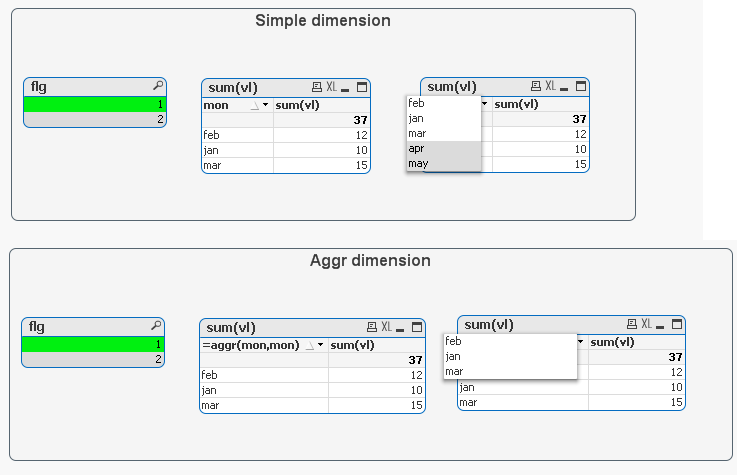
Hello, Varun!
The Aggr() function may be useful here:
varunreddy
- Mark as New
- Bookmark
- Subscribe
- Mute
- Subscribe to RSS Feed
- Permalink
- Report Inappropriate Content

Maybe I will try with button and list box.

- « Previous Replies
-
- 1
- 2
- Next Replies »