Unlock a world of possibilities! Login now and discover the exclusive benefits awaiting you.

- Qlik Community
- :
- All Forums
- :
- QlikView
- :
- Hide lines - line chart
- Subscribe to RSS Feed
- Mark Topic as New
- Mark Topic as Read
- Float this Topic for Current User
- Bookmark
- Subscribe
- Mute
- Printer Friendly Page

- Mark as New
- Bookmark
- Subscribe
- Mute
- Subscribe to RSS Feed
- Permalink
- Report Inappropriate Content
Hide lines - line chart
Can I hide lines (using the Conditional option) within a line chart based on the selections a user chooses? For example, re the below pic... if the user selects 'Access and Inclusion' and 'Sensory' for example, I'd like these two only to appear. If it is possible, can someone advise as to the conditional expression? Many thanks.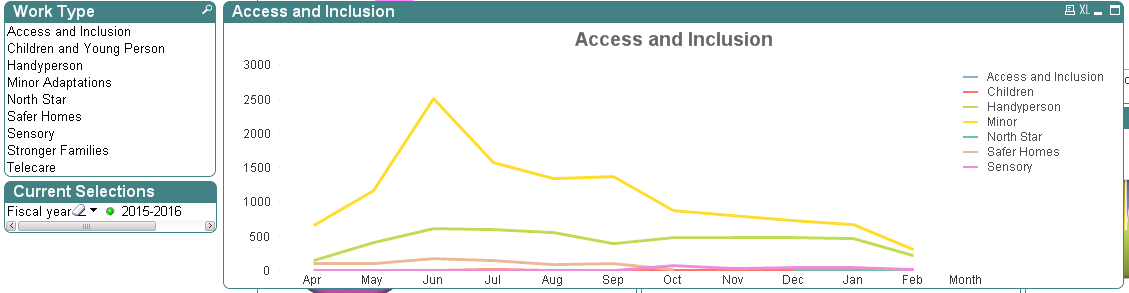
- Tags:
- new_to_qlikview
Accepted Solutions

 Clever_Anjos
- Mark as New
- Bookmark
- Subscribe
- Mute
- Subscribe to RSS Feed
- Permalink
- Report Inappropriate Content
Maybe
=index(concat([WorkType]),'Access and Inclusion') > 0 or index(concat([WorkType]),'Sensory') > 0
Clever_Anjos
- Mark as New
- Bookmark
- Subscribe
- Mute
- Subscribe to RSS Feed
- Permalink
- Report Inappropriate Content
Maybe:
=index([WorkType],'Access and Inclusion') > 0 or index([WorkType],'Sensory') > 0
- Mark as New
- Bookmark
- Subscribe
- Mute
- Subscribe to RSS Feed
- Permalink
- Report Inappropriate Content
That works but appears to be only partly what I'm after, but thanks so much for that 
I'd like the line chart to initially show all of the Work Types until the user decides they want to see specific ones alongside each other. Using the expression you've given me will display the work types where only one is selected but doesn't work if more than one is selected, which is ideally what I'd like it to do.
Thanks.
Clever_Anjos
- Mark as New
- Bookmark
- Subscribe
- Mute
- Subscribe to RSS Feed
- Permalink
- Report Inappropriate Content
Would you mind sharing a sample of your app?
Preparing examples for Upload - Reduction and Data Scrambling
Clever_Anjos
- Mark as New
- Bookmark
- Subscribe
- Mute
- Subscribe to RSS Feed
- Permalink
- Report Inappropriate Content
Maybe
=index(concat([WorkType]),'Access and Inclusion') > 0 or index(concat([WorkType]),'Sensory') > 0
- Mark as New
- Bookmark
- Subscribe
- Mute
- Subscribe to RSS Feed
- Permalink
- Report Inappropriate Content
Exactly what I'm after... thanks so much