Unlock a world of possibilities! Login now and discover the exclusive benefits awaiting you.

- Qlik Community
- :
- All Forums
- :
- QlikView
- :
- Re: Hiding zero figures in expression
- Subscribe to RSS Feed
- Mark Topic as New
- Mark Topic as Read
- Float this Topic for Current User
- Bookmark
- Subscribe
- Mute
- Printer Friendly Page

- Mark as New
- Bookmark
- Subscribe
- Mute
- Subscribe to RSS Feed
- Permalink
- Report Inappropriate Content
Hiding zero figures in expression
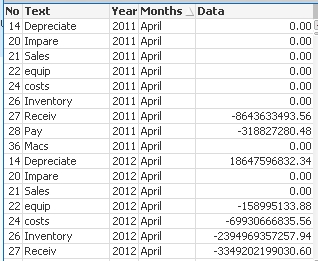
I want to hide all 0.00 in my table . Not suppress, I need the dimension to stay as its but hide the 0.00 in the expression @ Data
Accepted Solutions

 swuehl
- Mark as New
- Bookmark
- Subscribe
- Mute
- Subscribe to RSS Feed
- Permalink
- Report Inappropriate Content
You can also use a condition in your expression, like
=If( fabs( Sum(Value) )> 1E-10, Sum(Value), '')
Again, replace Sum(Value) with your expression.
This should return an empty string instead of zero.
If this is not solving your problem, please describe in more detail what your problem is.
swuehl
- Mark as New
- Bookmark
- Subscribe
- Mute
- Subscribe to RSS Feed
- Permalink
- Report Inappropriate Content
Try a text color attribute expression (open the attributes by clicking on the small plus next to the expressions on expression tab):
=If( fabs( Sum(Value) )<=1E-12,White() )
replace sum(Value) with your expression
- Mark as New
- Bookmark
- Subscribe
- Mute
- Subscribe to RSS Feed
- Permalink
- Report Inappropriate Content
is there another way? the white isn't really solving the problem
swuehl
- Mark as New
- Bookmark
- Subscribe
- Mute
- Subscribe to RSS Feed
- Permalink
- Report Inappropriate Content
You can also use a condition in your expression, like
=If( fabs( Sum(Value) )> 1E-10, Sum(Value), '')
Again, replace Sum(Value) with your expression.
This should return an empty string instead of zero.
If this is not solving your problem, please describe in more detail what your problem is.