Unlock a world of possibilities! Login now and discover the exclusive benefits awaiting you.

- Qlik Community
- :
- All Forums
- :
- QlikView
- :
- Re: How obtain a value
- Subscribe to RSS Feed
- Mark Topic as New
- Mark Topic as Read
- Float this Topic for Current User
- Bookmark
- Subscribe
- Mute
- Printer Friendly Page

- Mark as New
- Bookmark
- Subscribe
- Mute
- Subscribe to RSS Feed
- Permalink
- Report Inappropriate Content
How obtain a value
Hi, i have problem for obtain a value.
I obtain the value Real AC. I do this with max(Real AC) = 99.37% and it works well but i need obtain the value Ppto AC = 99.98% and i don't know do this.
I am work into simple table..
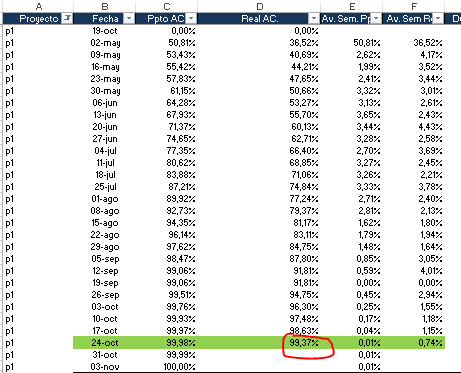
Helps me please.
Accepted Solutions

 sunny_talwar
- Mark as New
- Bookmark
- Subscribe
- Mute
- Subscribe to RSS Feed
- Permalink
- Report Inappropriate Content
May be this:
FirstSortedValue([Ppto AC], -[Real AC])
Update: Removed the - sign next to Ppto AC based on Alejandro's response 

 alexdataiq
- Mark as New
- Bookmark
- Subscribe
- Mute
- Subscribe to RSS Feed
- Permalink
- Report Inappropriate Content
It's not very clear to me what you want to achieve. Wouldn't a simple Max(Ppto AC) do the trick? Are you doing filter/selections based on Fecha?
If you could provide more details or maybe a sample application with your data it would be easier to assist you.
Regards
sunny_talwar
- Mark as New
- Bookmark
- Subscribe
- Mute
- Subscribe to RSS Feed
- Permalink
- Report Inappropriate Content
May be this:
FirstSortedValue([Ppto AC], -[Real AC])
Update: Removed the - sign next to Ppto AC based on Alejandro's response
alexdataiq
- Mark as New
- Bookmark
- Subscribe
- Mute
- Subscribe to RSS Feed
- Permalink
- Report Inappropriate Content
That is neat! Why is the minus sign needed in the first parameter? Wouldn't that return a negative value?
Regards
sunny_talwar
- Mark as New
- Bookmark
- Subscribe
- Mute
- Subscribe to RSS Feed
- Permalink
- Report Inappropriate Content
My bad, that is a typo
- Mark as New
- Bookmark
- Subscribe
- Mute
- Subscribe to RSS Feed
- Permalink
- Report Inappropriate Content
Thanks for you answer.
But if i write max(Ppto AC), I view 100% always and this is wrong.
The dimension of the table is the proyect, i need know the advance of proyect. This is la view i need:
real advance vs advance budget

p1 Advance constProy(P) = 99.98% (the budget must be equivalent to real progress)
Thanks!
- Mark as New
- Bookmark
- Subscribe
- Mute
- Subscribe to RSS Feed
- Permalink
- Report Inappropriate Content
Perfect. Thank you very much!!