Unlock a world of possibilities! Login now and discover the exclusive benefits awaiting you.

- Qlik Community
- :
- All Forums
- :
- QlikView
- :
- How to auto Load Date.
- Subscribe to RSS Feed
- Mark Topic as New
- Mark Topic as Read
- Float this Topic for Current User
- Bookmark
- Subscribe
- Mute
- Printer Friendly Page

- Mark as New
- Bookmark
- Subscribe
- Mute
- Subscribe to RSS Feed
- Permalink
- Report Inappropriate Content
How to auto Load Date.
Hello Everyone,
I am new to Qlik view please help me load the date in to my table while loading itself.
Here is my situation.
I have two tables. Table A which is 2015 has the date field included while Table B which is 2016 does not have date field included. So I am trying to include the date field while loading itself.
I have tried the below statements and its giving me the string

The above statement is giving me the date. but in a string format. The result is like this:
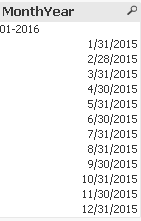
I have also tried using

and its giving me the below result
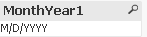
Can anyone Please help me get the date auto loaded and in the actual date format rather than a string. Also I want it in the ascending order i.e first 2015 and then 2016 order.
Thanks So much.
Accepted Solutions

 sunny_talwar
- Mark as New
- Bookmark
- Subscribe
- Mute
- Subscribe to RSS Feed
- Permalink
- Report Inappropriate Content
Awesome 
Please close the thread down by marking correct answer (Qlik Community Tip: Marking Replies as Correct or Helpful)
Best,
Sunny
sunny_talwar
- Mark as New
- Bookmark
- Subscribe
- Mute
- Subscribe to RSS Feed
- Permalink
- Report Inappropriate Content
May be this:
Date(Floor(MonthEnd(Date#(Mid(FileName(), 16, 2) & '-' & Mid(FileName(), 11, 4), 'MM-YYYY')))) as MonthYear
- Mark as New
- Bookmark
- Subscribe
- Mute
- Subscribe to RSS Feed
- Permalink
- Report Inappropriate Content
It Worked. Thanks So much Sunny.
sunny_talwar
- Mark as New
- Bookmark
- Subscribe
- Mute
- Subscribe to RSS Feed
- Permalink
- Report Inappropriate Content
Awesome
Please close the thread down by marking correct answer (Qlik Community Tip: Marking Replies as Correct or Helpful)
Best,
Sunny