Unlock a world of possibilities! Login now and discover the exclusive benefits awaiting you.

- Qlik Community
- :
- All Forums
- :
- QlikView
- :
- Re: How to change date format?
- Subscribe to RSS Feed
- Mark Topic as New
- Mark Topic as Read
- Float this Topic for Current User
- Bookmark
- Subscribe
- Mute
- Printer Friendly Page

- Mark as New
- Bookmark
- Subscribe
- Mute
- Subscribe to RSS Feed
- Permalink
- Report Inappropriate Content
How to change date format?
Hi all ,
I am having two date formats in single column:
Invoicedate
01-Apr-2014
01-May-2014
01-Jun-2014
42006
42007
42008
42010
How to change change this format to single format i.e, MMM-YYYY(ex: Apr-2015)
thank you
- Tags:
- qlikview_scripting

 settu_periasamy
- Mark as New
- Bookmark
- Subscribe
- Mute
- Subscribe to RSS Feed
- Permalink
- Report Inappropriate Content
May be like this..
Load Date(Alt( date#( Invoicedate , 'DD-MMM-YYYY' ),
Date(Invoicedate),
'No valid date' ),'MMM-YYYY') as Date;
LOAD * Inline [
Invoicedate
01-Apr-2014
01-May-2014
01-Jun-2014
42006
42007
42008
42010
];

 sunny_talwar
- Mark as New
- Bookmark
- Subscribe
- Mute
- Subscribe to RSS Feed
- Permalink
- Report Inappropriate Content
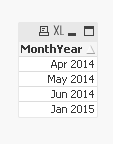
Or this should also work
SET DateFormat='DD-MMM-YYYY';
Load DateMonthName(Invoicedate, 'MMM-YYYY') as MonthYear;
LOAD * Inline [
Invoicedate
01-Apr-2014
01-May-2014
01-Jun-2014
42006
42007
42008
42010
];
 maxgro
- Mark as New
- Bookmark
- Subscribe
- Mute
- Subscribe to RSS Feed
- Permalink
- Report Inappropriate Content
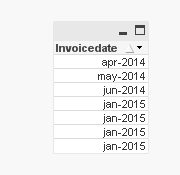
with the alt function
load
Date(alt(Date#(Invoicedate, 'DD-MMM-YYYY'), Invoicedate), 'MMM-YYYY') as Invoicedate
inline [
Invoicedate
01-Apr-2014
01-May-2014
01-Jun-2014
42006
42007
42008
42010
];
or, if you want the same result as Sunny
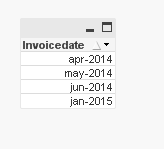
load Date(MonthStart(alt(Date#(Invoicedate, 'DD-MMM-YYYY'), Invoicedate)), 'MMM-YYYY') as Invoicedate
......