Unlock a world of possibilities! Login now and discover the exclusive benefits awaiting you.

- Qlik Community
- :
- All Forums
- :
- QlikView
- :
- Re: How to check data model table size?
- Subscribe to RSS Feed
- Mark Topic as New
- Mark Topic as Read
- Float this Topic for Current User
- Bookmark
- Subscribe
- Mute
- Printer Friendly Page

- Mark as New
- Bookmark
- Subscribe
- Mute
- Subscribe to RSS Feed
- Permalink
- Report Inappropriate Content
How to check data model table size?
Hello.
I have multiple tables in my data model. How could I quickly list the size (volume of data) contained by each table?
Thank you
- Tags:
- qlikview_deployment
Accepted Solutions
- Mark as New
- Bookmark
- Subscribe
- Mute
- Subscribe to RSS Feed
- Permalink
- Report Inappropriate Content
I found something also useful: Document settings -> General -> press Memory Statics button -> save a file
Open the file with Excel and you can see various statistics on object memory consumption.

 Clever_Anjos
- Mark as New
- Bookmark
- Subscribe
- Mute
- Subscribe to RSS Feed
- Permalink
- Report Inappropriate Content
Check your Document Settings / Tables Sheet

 manideep78
- Mark as New
- Bookmark
- Subscribe
- Mute
- Subscribe to RSS Feed
- Permalink
- Report Inappropriate Content
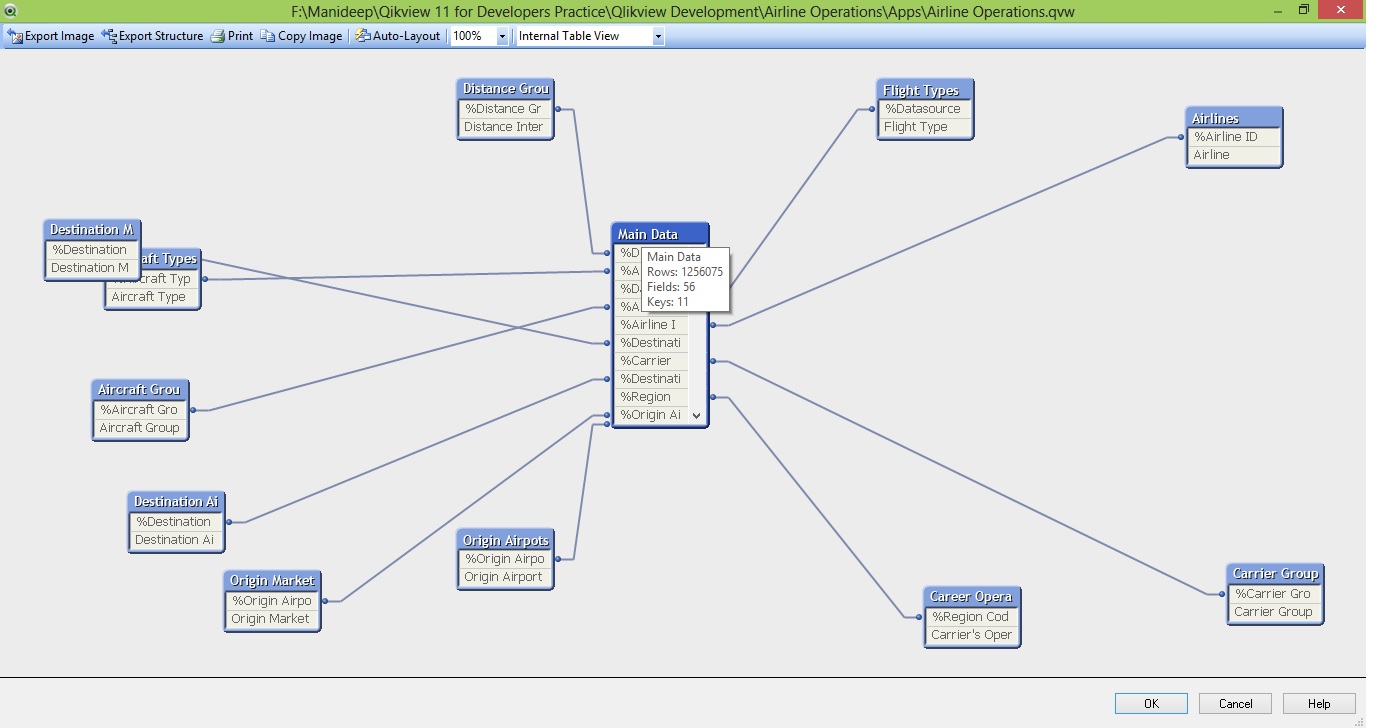
Open Table Viewer in you qvw document and hover the cursor on Table header.
You can see some thing like this:
 NareshGuntur
- Mark as New
- Bookmark
- Subscribe
- Mute
- Subscribe to RSS Feed
- Permalink
- Report Inappropriate Content
You can use the System fields $Table and $Rows.
Take a table box and add $Table and $Rows where $Table gives you the list of tables and $Rows will give you the corresponding rows of that table.
Best Regards,
Naresh
- Mark as New
- Bookmark
- Subscribe
- Mute
- Subscribe to RSS Feed
- Permalink
- Report Inappropriate Content
I found something also useful: Document settings -> General -> press Memory Statics button -> save a file
Open the file with Excel and you can see various statistics on object memory consumption.