Unlock a world of possibilities! Login now and discover the exclusive benefits awaiting you.

- Qlik Community
- :
- All Forums
- :
- QlikView
- :
- How to convert sec to interval?
- Subscribe to RSS Feed
- Mark Topic as New
- Mark Topic as Read
- Float this Topic for Current User
- Bookmark
- Subscribe
- Mute
- Printer Friendly Page

 raju_salmon
- Mark as New
- Bookmark
- Subscribe
- Mute
- Subscribe to RSS Feed
- Permalink
- Report Inappropriate Content
How to convert sec to interval?
Hi Expert,
In my data, time is available in seconds which should be shown in hh:mm:ss format.
I have tried using interval function but it is showing wrong result, can anyone help me on this?
Attached qvw file for reference.
Thanks,
Raju
Accepted Solutions

 tresB
tresB
- Mark as New
- Bookmark
- Subscribe
- Mute
- Subscribe to RSS Feed
- Permalink
- Report Inappropriate Content
Interval(SUM([Available Time in Sec]/24/60/60),'hh:mm:ss')
tresB
- Mark as New
- Bookmark
- Subscribe
- Mute
- Subscribe to RSS Feed
- Permalink
- Report Inappropriate Content
Interval(SUM([Available Time in Sec]/24/60/60),'hh:mm:ss')
raju_salmon
- Mark as New
- Bookmark
- Subscribe
- Mute
- Subscribe to RSS Feed
- Permalink
- Report Inappropriate Content
Perfect...Thanks a lot Tresesco.
raju_salmon
- Mark as New
- Bookmark
- Subscribe
- Mute
- Subscribe to RSS Feed
- Permalink
- Report Inappropriate Content
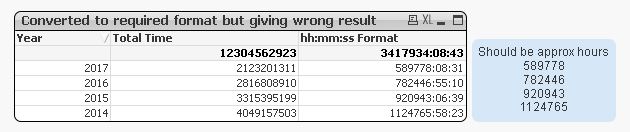
Is there any specific reason why my expression showing wrong result for 2014,2015 and 2016... but not for 2017?
tresB
- Mark as New
- Bookmark
- Subscribe
- Mute
- Subscribe to RSS Feed
- Permalink
- Report Inappropriate Content
Is not this what you see?
raju_salmon
- Mark as New
- Bookmark
- Subscribe
- Mute
- Subscribe to RSS Feed
- Permalink
- Report Inappropriate Content
If i use the expression which you suggested is working very fine and giving accurate result.
Earlier i tried with below expression, but not sure why it is not working.
Interval((Interval#((Num(SUM([Available Time in Sec]))),'SS')),'hh:mm:ss')
tresB
- Mark as New
- Bookmark
- Subscribe
- Mute
- Subscribe to RSS Feed
- Permalink
- Report Inappropriate Content
I guess it's because how qlik is handling the long numbers. It seems that number bigger than 2147483648 (which is 2^31) are being interpreted differently (may be signed bit interpretation). So the discrepancy.
