Unlock a world of possibilities! Login now and discover the exclusive benefits awaiting you.

- Qlik Community
- :
- All Forums
- :
- QlikView
- :
- Re: How to create a second column from a dimension...
- Subscribe to RSS Feed
- Mark Topic as New
- Mark Topic as Read
- Float this Topic for Current User
- Bookmark
- Subscribe
- Mute
- Printer Friendly Page

- Mark as New
- Bookmark
- Subscribe
- Mute
- Subscribe to RSS Feed
- Permalink
- Report Inappropriate Content
How to create a second column from a dimension value.
Hi, I was hoping someone here would be able to help me.
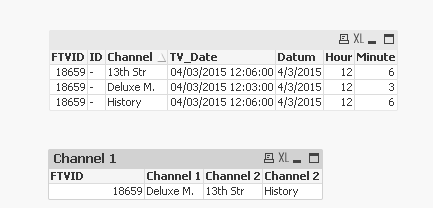
I have the below data and would like the dimension data as value in one column (as the results pic), instead of 3 records.
So the first Channel in 'Channel 1', the second Channel in 'Channel 2' - this is in order by 'TV_Date'
I managed to display the first value by the below code, but need help on the following columns...
=FirstSortedValue({<TV_Date={'=aggr(min(TV_Date), FTVID)'}>}Sender, TV_Date)
Any help appreciated!
Best,
Betul
Data

Results
Accepted Solutions

 sunny_talwar
- Mark as New
- Bookmark
- Subscribe
- Mute
- Subscribe to RSS Feed
- Permalink
- Report Inappropriate Content
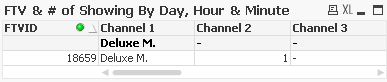
May be this in straight table
Dimension: FTVID
Expressions
Channel 1
=FirstSortedValue(Channel, TV_Date)
Channel 2
=FirstSortedValue(Channel, ((TV_Date)* 100000 + Ord(Left(Channel, 1))), 2)
Channel 3
=FirstSortedValue(Channel, ((TV_Date)* 100000 + Ord(Left(Channel, 1))), 3)
sunny_talwar
- Mark as New
- Bookmark
- Subscribe
- Mute
- Subscribe to RSS Feed
- Permalink
- Report Inappropriate Content
May be try this:
What would Channel 2 = ? since both 13th Str and History have exactly the same TV_Date?
- Mark as New
- Bookmark
- Subscribe
- Mute
- Subscribe to RSS Feed
- Permalink
- Report Inappropriate Content
Hi Sunny, Can go by alphabetical order if the TV_Date is exactly the same.
sunny_talwar
- Mark as New
- Bookmark
- Subscribe
- Mute
- Subscribe to RSS Feed
- Permalink
- Report Inappropriate Content
May be this in straight table
Dimension: FTVID
Expressions
Channel 1
=FirstSortedValue(Channel, TV_Date)
Channel 2
=FirstSortedValue(Channel, ((TV_Date)* 100000 + Ord(Left(Channel, 1))), 2)
Channel 3
=FirstSortedValue(Channel, ((TV_Date)* 100000 + Ord(Left(Channel, 1))), 3)
- Mark as New
- Bookmark
- Subscribe
- Mute
- Subscribe to RSS Feed
- Permalink
- Report Inappropriate Content
Hi Sunny,
That works great! Thank you so much for your help.
Betul
sunny_talwar
- Mark as New
- Bookmark
- Subscribe
- Mute
- Subscribe to RSS Feed
- Permalink
- Report Inappropriate Content
Not a problem 