Unlock a world of possibilities! Login now and discover the exclusive benefits awaiting you.

- Qlik Community
- :
- All Forums
- :
- QlikView
- :
- Re: How to find Avg and Total.
- Subscribe to RSS Feed
- Mark Topic as New
- Mark Topic as Read
- Float this Topic for Current User
- Bookmark
- Subscribe
- Mute
- Printer Friendly Page

- Mark as New
- Bookmark
- Subscribe
- Mute
- Subscribe to RSS Feed
- Permalink
- Report Inappropriate Content
How to find Avg and Total.
Hi Folks,
I have student table, in this table have
hltno,sno, m1, m2, m3 fields
I need to find out avg and also total
Form back-end and front end of each student wise.
Accepted Solutions

 avinashelite
- Mark as New
- Bookmark
- Subscribe
- Mute
- Subscribe to RSS Feed
- Permalink
- Report Inappropriate Content
In frontend ..
Add hltno,sno, m1, m2, m3 as dimension and in the expression
Total: sum(m1)+sum(m2)+sum(m3) --- this will give the total
Avg: AVG(m1+m2+m3) or (sum(m1)+sum(m2)+sum(m3))/3 ------ as you have 3 subjects
avinashelite
- Mark as New
- Bookmark
- Subscribe
- Mute
- Subscribe to RSS Feed
- Permalink
- Report Inappropriate Content
In frontend ..
Add hltno,sno, m1, m2, m3 as dimension and in the expression
Total: sum(m1)+sum(m2)+sum(m3) --- this will give the total
Avg: AVG(m1+m2+m3) or (sum(m1)+sum(m2)+sum(m3))/3 ------ as you have 3 subjects

 amit_saini
- Mark as New
- Bookmark
- Subscribe
- Mute
- Subscribe to RSS Feed
- Permalink
- Report Inappropriate Content
Hi,
u can use these settings while you have data in charts.
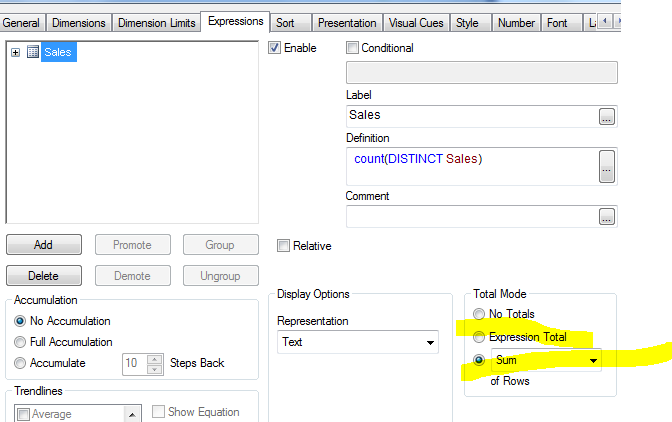
Thanks,
AS
- Mark as New
- Bookmark
- Subscribe
- Mute
- Subscribe to RSS Feed
- Permalink
- Report Inappropriate Content
Total: sum(m1)+sum(m2)+sum(m3) --total
Avg: AVG(m1+m2+m3);