Unlock a world of possibilities! Login now and discover the exclusive benefits awaiting you.

Announcements
Share your agentic AI experience, learn from others, and earn a new badge: Put Agentic AI to Work
- Qlik Community
- :
- All Forums
- :
- QlikView
- :
- Re: How to hide allocations
Options
- Subscribe to RSS Feed
- Mark Topic as New
- Mark Topic as Read
- Float this Topic for Current User
- Bookmark
- Subscribe
- Mute
- Printer Friendly Page
Turn on suggestions
Auto-suggest helps you quickly narrow down your search results by suggesting possible matches as you type.
Showing results for

 posywang
Creator II
2017-06-07
01:57 PM
- Mark as New
- Bookmark
- Subscribe
- Mute
- Subscribe to RSS Feed
- Permalink
- Report Inappropriate Content
How to hide allocations
Hi,
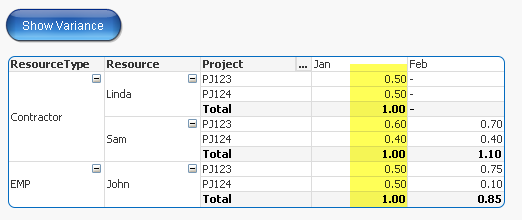
I am trying to hide project allocations if resource is fully allocated to projects as 1 FTE. However, I am not able to hide allocations at a lower level, project level in this case. Is there a way to hide highlighted numbers when Show Variance button is clicked? Thanks!
1,156 Views
1 Solution
Accepted Solutions

 sunny_talwar
MVP
2017-06-07
02:13 PM
- Mark as New
- Bookmark
- Subscribe
- Mute
- Subscribe to RSS Feed
- Permalink
- Report Inappropriate Content
1,123 Views
4 Replies
sunny_talwar
MVP
2017-06-07
02:03 PM
- Mark as New
- Bookmark
- Subscribe
- Mute
- Subscribe to RSS Feed
- Permalink
- Report Inappropriate Content
The complete column should go away?
1,123 Views
posywang
Creator II
2017-06-07
02:11 PM
Author
- Mark as New
- Bookmark
- Subscribe
- Mute
- Subscribe to RSS Feed
- Permalink
- Report Inappropriate Content
Yes in this case since everyone is fully allocated in January. Of course, if someone is allocated say 0.8 in total in January, that allocation should be kept.
1,123 Views
sunny_talwar
MVP
2017-06-07
02:13 PM
- Mark as New
- Bookmark
- Subscribe
- Mute
- Subscribe to RSS Feed
- Permalink
- Report Inappropriate Content
Try this expression
=If(Sum(TOTAL <Resource, Mth> FTE)=1,0,Sum(FTE))
1,124 Views
posywang
Creator II
2017-06-07
02:15 PM
Author
- Mark as New
- Bookmark
- Subscribe
- Mute
- Subscribe to RSS Feed
- Permalink
- Report Inappropriate Content
Thanks! Works like a charm!
1,123 Views
