Unlock a world of possibilities! Login now and discover the exclusive benefits awaiting you.

- Qlik Community
- :
- All Forums
- :
- QlikView
- :
- Re: How to make a dimension avoiding some columns?
- Subscribe to RSS Feed
- Mark Topic as New
- Mark Topic as Read
- Float this Topic for Current User
- Bookmark
- Subscribe
- Mute
- Printer Friendly Page

- Mark as New
- Bookmark
- Subscribe
- Mute
- Subscribe to RSS Feed
- Permalink
- Report Inappropriate Content
How to make a dimension avoiding some columns?
Hello everybody, i am new here in the community but i am not new in QV, but I have found an issue I dont know how to solve it.
I have something like that:
| CustomerID | Subscription |
| 1 | A |
| 1 | B |
| 1 | C |
| 1 | D |
| 2 | B |
| 3 | B |
| 3 | C |
| 4 | A |
| 5 | D |
And what I want to do is to count the customers by their subscription. There are 4 types of subscription (A, B, C and D) but I really want to separate them by: PremiumSubscription and FreeSubscription.
FreeSubscription is B. And that means that if a customer has 4 subscriptions and within them is the subscription B, the customer has a FreeSubscription. And of course, if he only has B subscription, it has FreeSubscription.
On the other hand, if a customer doesnt have B subscription, he will have a PremiumSubscription.
So, the result I would like to have is the shown below:
| nº | |
| Premium | 2 |
| Free | 3 |
| TOTAL | 5 |
But what I am obtainig in QV is the following:
| QV | |
| Premium | 3 |
| Free | 3 |
| TOTAL | 5 |
I am doing this:
1) Calculated dimension: =If(subscription='B', 'Free', 'Premium') <-- THE PROBLEM IS CLEARLY HERE
2) Expression: =count(DISTINCT CustomerID)
The problem is the dimension, cause I am counting a customer as Premium even if he has B subscription, and customer with more than one subscription containig B should be only in FreeSubscription.
I hope I have explained my problem well, and you can help me!
Thanks a lot!
- « Previous Replies
-
- 1
- 2
- Next Replies »
Accepted Solutions

 swuehl
- Mark as New
- Bookmark
- Subscribe
- Mute
- Subscribe to RSS Feed
- Permalink
- Report Inappropriate Content
Alternatively, just create a chart with no dimension and three expressions:
Total:
=Count(DISTINCT CustomerID)
Free:
=Count({<Subscription = {'B'}>}DISTINCT CustomerID)
Premium:
Count({<CustomerID = e({<Subscription = {B}>})>} DISTINCT CustomerID)
[or for premium: =Column(1) - Column(2) ]
edit:
Or similar to Sunny's solution a calculated dimension
=Aggr( If(Count(if(Subscription = 'B', Subscription ))>0, 'Free','Premium'), CustomerID)
with an expression
=Count(DISTINCT CustomerID)
you can use this calculated dimension also in a list box as field <expression>, so you can filter the customers by selecting Free or Premium value in the list box.

 m_woolf
- Mark as New
- Bookmark
- Subscribe
- Mute
- Subscribe to RSS Feed
- Permalink
- Report Inappropriate Content
See the attached qvw:
- Mark as New
- Bookmark
- Subscribe
- Mute
- Subscribe to RSS Feed
- Permalink
- Report Inappropriate Content
Sorry man, I have QV personal edition and cannot open it...
Can you tell me what is it doing?
Thanks!

 PradeepReddy
- Mark as New
- Bookmark
- Subscribe
- Mute
- Subscribe to RSS Feed
- Permalink
- Report Inappropriate Content
try the bellow script...
Temp:
load * inline [
CustomerID,Subscription
1,A
1,B
1,C
1,D
2,B
3,B
3,C
4,A
5,D
];


Left Join
Temp1:
Load
CustomerID,
'Free' as Subscription_Type
resident Temp
where Subscription='B';


NoConcatenate
Final:
Load
CustomerID,
Subscription,
if(isnull(Subscription_Type),'Premium',Subscription_Type) as Subscription_Type
resident Temp;


drop table Temp;

 sunny_talwar
- Mark as New
- Bookmark
- Subscribe
- Mute
- Subscribe to RSS Feed
- Permalink
- Report Inappropriate Content
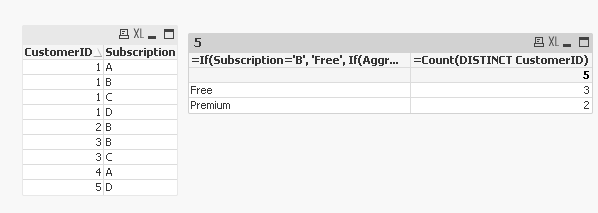
For a front end solution, you can try this as your calculated dimension:
=If(Subscription='B', 'Free', If(Aggr(NODISTINCT Count({<Subscription = {'B'}>}Subscription), CustomerID) > 0, Null(), 'Premium'))
sunny_talwar
- Mark as New
- Bookmark
- Subscribe
- Mute
- Subscribe to RSS Feed
- Permalink
- Report Inappropriate Content
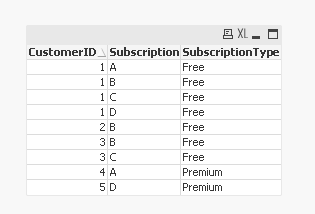
m w suggested to do this why script:
DataTemp:
load * inline [
CustomerID,Subscription
1,A
1,B
1,C
1,D
2,B
3,B
3,C
4,A
5,D
];

DataTemp1:
load
  *,
  if(Subscription='B',1,0) as Free
Resident DataTemp;
drop table DataTemp;
join load
    CustomerID,
    sum(Free) as FreeSum
Resident DataTemp1
Group by CustomerID;

drop field Free;

Data:
load
  *,
  if(FreeSum = 0,'Premium','Free') as SubscriptionType
resident DataTemp1;

drop table DataTemp1;
Drop field FreeSum;
His output looks like this:
 maxgro
- Mark as New
- Bookmark
- Subscribe
- Mute
- Subscribe to RSS Feed
- Permalink
- Report Inappropriate Content
chart with
dimension
=ValueList('Free', 'Premium')
expression
pick(match(ValueList('Free', 'Premium'),
'Free',
'Premium'),
Count({<Subscription={B}>} DISTINCT CustomerID),
Count(TOTAL DISTINCT CustomerID) - Count({<Subscription={B}>} DISTINCT CustomerID))
swuehl
- Mark as New
- Bookmark
- Subscribe
- Mute
- Subscribe to RSS Feed
- Permalink
- Report Inappropriate Content
Alternatively, just create a chart with no dimension and three expressions:
Total:
=Count(DISTINCT CustomerID)
Free:
=Count({<Subscription = {'B'}>}DISTINCT CustomerID)
Premium:
Count({<CustomerID = e({<Subscription = {B}>})>} DISTINCT CustomerID)
[or for premium: =Column(1) - Column(2) ]
edit:
Or similar to Sunny's solution a calculated dimension
=Aggr( If(Count(if(Subscription = 'B', Subscription ))>0, 'Free','Premium'), CustomerID)
with an expression
=Count(DISTINCT CustomerID)
you can use this calculated dimension also in a list box as field <expression>, so you can filter the customers by selecting Free or Premium value in the list box.
- Mark as New
- Bookmark
- Subscribe
- Mute
- Subscribe to RSS Feed
- Permalink
- Report Inappropriate Content
Hi swuehl!
The first solution you gave me was exactly what I was doing, but I wanted to do it softlier...
But, the second solution was exactly what I was looking for!
Thank you very much!
- Mark as New
- Bookmark
- Subscribe
- Mute
- Subscribe to RSS Feed
- Permalink
- Report Inappropriate Content
It works!
Can you tell me what ValueList does?
Thank you M G!!
- « Previous Replies
-
- 1
- 2
- Next Replies »