Unlock a world of possibilities! Login now and discover the exclusive benefits awaiting you.

Announcements
ALERT: QlikView server communication interruptions following Microsoft Windows Domain Controller security updates
- Qlik Community
- :
- All Forums
- :
- QlikView
- :
- How to make the value headers in a pivot table Bol...
Options
- Subscribe to RSS Feed
- Mark Topic as New
- Mark Topic as Read
- Float this Topic for Current User
- Bookmark
- Subscribe
- Mute
- Printer Friendly Page
Turn on suggestions
Auto-suggest helps you quickly narrow down your search results by suggesting possible matches as you type.
Showing results for

 rudywelvaert
Creator
2019-01-30
09:41 AM
- Mark as New
- Bookmark
- Subscribe
- Mute
- Subscribe to RSS Feed
- Permalink
- Report Inappropriate Content
How to make the value headers in a pivot table Bold
Hi,
In the attached qvw file I want to make the value headers in a pivot table Bold

In the Design toolbar

I select Design Grid
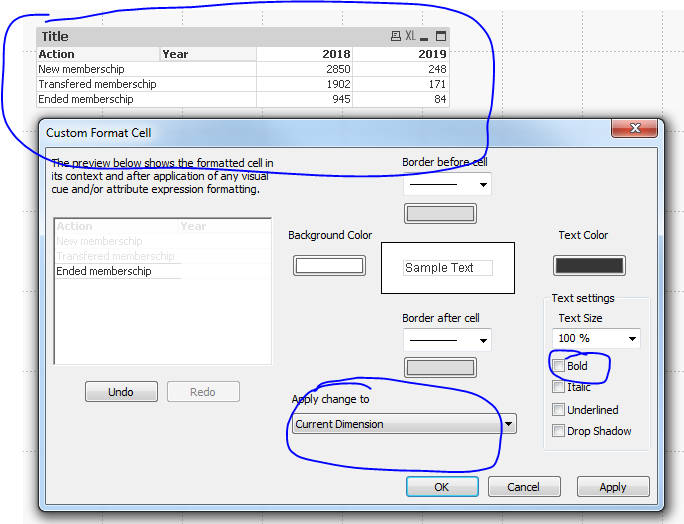
and right click the value header

and select Custom Format Cell

and check the Bold checkbox

But the result is wrong: the values in an other column are Bold

How can i make the date value bold?
Thanks
R.W.
991 Views
2 Replies

 pradosh_thakur
Master II
2019-01-30
09:54 AM
- Mark as New
- Bookmark
- Subscribe
- Mute
- Subscribe to RSS Feed
- Permalink
- Report Inappropriate Content
Sorry can't open the qvw . Try the below
Check the dimensionality and accordingly use <'b'> in the formating to make the date bold.
Check the dimensionality and accordingly use <'b'> in the formating to make the date bold.
Learning never stops.

 sunny_talwar
MVP
2019-01-30
09:59 AM
- Mark as New
- Bookmark
- Subscribe
- Mute
- Subscribe to RSS Feed
- Permalink
- Report Inappropriate Content
This seems like a hack, but it worked

1st step - Apply Bold to All Dimensions
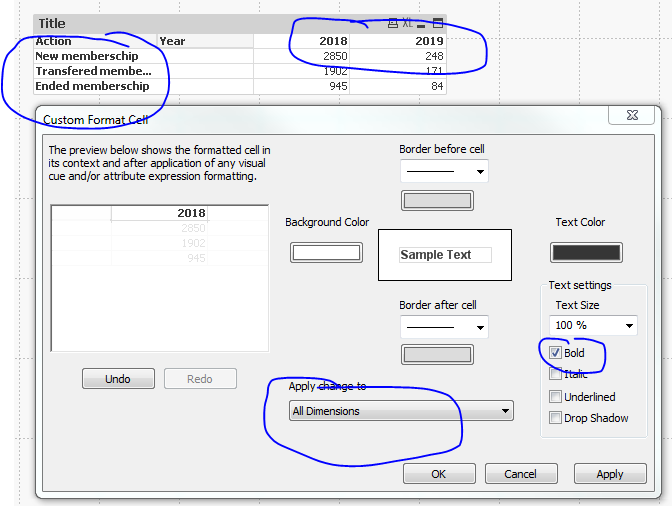
2nd Step - Uncheck Bold for Action dimension