Unlock a world of possibilities! Login now and discover the exclusive benefits awaiting you.

- Qlik Community
- :
- All Forums
- :
- QlikView
- :
- Re: How to pick ?
- Subscribe to RSS Feed
- Mark Topic as New
- Mark Topic as Read
- Float this Topic for Current User
- Bookmark
- Subscribe
- Mute
- Printer Friendly Page

 subbareddykm
- Mark as New
- Bookmark
- Subscribe
- Mute
- Subscribe to RSS Feed
- Permalink
- Report Inappropriate Content
How to pick ?
Hi,
| PR | PO | Date_A3 | Date_A4 | Date_A5 | PH | PB |
| 10071 | 1 | |||||
| 10072 | ||||||
| 10073 | 3 | |||||
| 10074 | ||||||
| 10075 | 5 | |||||
| 10076 | 6 | |||||
| 10077 | ||||||
| 10078 | 8 | |||||
| 10079 |
I want to create logic like , I have a PR ,PO, Dates.
Logic is :
If my PR have PO i have to pick Date_A3,if my PR do not have PO i have to check Date_A4 and Date_A5.
How to achieve this ?
Accepted Solutions

 trdandamudi
- Mark as New
- Bookmark
- Subscribe
- Mute
- Subscribe to RSS Feed
- Permalink
- Report Inappropriate Content
Yes, that is how it works now. So for 10072 if you have date in Date_A4 it will pick only Date_A4 and it will not pick the date in Date_A5. Try it out and let e know.
For the front end you can use as below:
If(Len(Trim(PO))>0,Date_A3,Alt(Date_A4,Date_A5))
Hope this helps....


- Mark as New
- Bookmark
- Subscribe
- Mute
- Subscribe to RSS Feed
- Permalink
- Report Inappropriate Content
Perhaps This
If(PR = PO, Pick(Match(Date_A3,PR)), If(PR <> PO, Pick(Match(Date_A4,PR),Date_A5)))
trdandamudi
- Mark as New
- Bookmark
- Subscribe
- Mute
- Subscribe to RSS Feed
- Permalink
- Report Inappropriate Content
See if the below solution works for you:
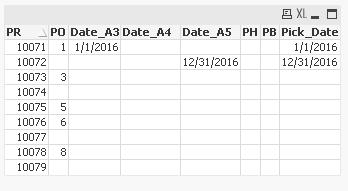
Note: When PR do not have a PO, it will pick the date from Date_A4. If Date_A4 is blank then it will pick from Date_A5.

- Mark as New
- Bookmark
- Subscribe
- Mute
- Subscribe to RSS Feed
- Permalink
- Report Inappropriate Content
Hi,
Could you have three dates completed?
If the answer is yes, then use this code:
Table:
Load
    PR,
    PO,
    Date_A3 as Date,
    PH,
    PB
RESIDENT YourTable
WHERE Not(IsNull(PO));
Table:
Load
    PR,
    PO,
    Date_A4 as Date,
    PH,
    PB
RESIDENT YourTable
WHERE IsNull(PO) and Not(IsNull(Date_A4));
Table:
Load
    PR,
    PO,
    Date_A5 as Date,
    PH,
    PB
RESIDENT YourTable
WHERE IsNull(PO) and Not(IsNull(Date_A5));
Table:
Load
    PR,
    PO,
    Null() as Date,
    PH,
    PB
RESIDENT YourTable
WHERE IsNull(PO) and IsNull(Date_A5) and IsNull(Date_A4);
If your answer is no, then use this code:
Table:
Load
    PR,
    PO,
    IF(IsNull(PO),Alt(Date_A4,Date_A5),Date_A3) as Date,
    Date_A3 as Date,
    PH,
    PB
RESIDENT YourTable;
Regards!!

 puttemans
- Mark as New
- Bookmark
- Subscribe
- Mute
- Subscribe to RSS Feed
- Permalink
- Report Inappropriate Content
Hi,
Could you get a correct input example and what you expect as a result? Right now, it's not completely clear what you'd need.
Regards
subbareddykm
- Mark as New
- Bookmark
- Subscribe
- Mute
- Subscribe to RSS Feed
- Permalink
- Report Inappropriate Content
Sorry For the late reply,
I want show pick date
1.If My PR is haveing PO , I have to Pick Date_A3,
2.If My PR is do not have PO , I have to check Date_A4(Note: if i do not have Date_A4, go to Date_A5. Iwant it in Front End)
I hope u inderstand .
Thankx i Adv
subbareddykm
- Mark as New
- Bookmark
- Subscribe
- Mute
- Subscribe to RSS Feed
- Permalink
- Report Inappropriate Content
Hi,
You right, But i your data againist 10072 if date in Date_A4 it should not go to Date_A5.
The same thing , Can u tell me how to get it Front End
subbareddykm
- Mark as New
- Bookmark
- Subscribe
- Mute
- Subscribe to RSS Feed
- Permalink
- Report Inappropriate Content
| PR | PO | Date_A3 | Date_A4 | Date_A5 | PH | PB |
| 10071 | 1 | 1/1/2016 | 6/1/2016 | |||
| 10072 | 4/1/2016 | 6/2/2016 | ||||
| 10073 | 3 | 1/2/1900 | 6/3/2016 | |||
| 10074 | 4/3/2016 | 6/4/2016 | ||||
| 10075 | 5 | 1/4/1900 | 6/5/2016 | |||
| 10076 | 6 | 4/5/2016 | 6/6/2016 | |||
| 10077 | 1/6/1900 | 6/7/2016 | ||||
| 10078 | 8 | 4/7/2016 | 6/8/2016 | |||
| 10079 | 1/7/1900 | 6/9/2016 |
- Mark as New
- Bookmark
- Subscribe
- Mute
- Subscribe to RSS Feed
- Permalink
- Report Inappropriate Content
For front end:
IF(IsNull(PO),Alt(Date_A4,Date_A5),Date_A3)
Regards!
trdandamudi
- Mark as New
- Bookmark
- Subscribe
- Mute
- Subscribe to RSS Feed
- Permalink
- Report Inappropriate Content
Yes, that is how it works now. So for 10072 if you have date in Date_A4 it will pick only Date_A4 and it will not pick the date in Date_A5. Try it out and let e know.
For the front end you can use as below:
If(Len(Trim(PO))>0,Date_A3,Alt(Date_A4,Date_A5))
Hope this helps....