Unlock a world of possibilities! Login now and discover the exclusive benefits awaiting you.

- Qlik Community
- :
- All Forums
- :
- QlikView
- :
- How to pull data from multiple excel files from Sh...
- Subscribe to RSS Feed
- Mark Topic as New
- Mark Topic as Read
- Float this Topic for Current User
- Bookmark
- Subscribe
- Mute
- Printer Friendly Page

 apoorvasd
- Mark as New
- Bookmark
- Subscribe
- Mute
- Subscribe to RSS Feed
- Permalink
- Report Inappropriate Content
How to pull data from multiple excel files from SharePoint document library using loops
Hello Everyone,
I am trying to pull data from excel files which are stored in SharePoint document library. There are multiple excel files in this site and I would want to pull data from all these files at one go. How can I do this?
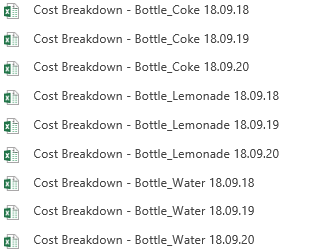
Thought of using a for loop and a variable which holds the text that is after "Cost Breakdown". But there will be more files added to this library and I can't predict what could be the date in the date part of the file name. Hence not sure how to pull data from these files.
Any help on this?
Thank you.

 niclaz79
- Mark as New
- Bookmark
- Subscribe
- Mute
- Subscribe to RSS Feed
- Permalink
- Report Inappropriate Content
Hi,
I normally use the following way of looping a Sharepoint-folder for specific files. Obviously you will need to replace parts of it to fit your specific excel files.
tempFileList:
LOAD
PurgeChar(trim([Name ]), chr(160)) as rawFileName,
right(purgeChar(trim([Name ]), chr(160)),8) as sortOrder
FROM
[$(DataFolder)]
(html, unicode, embedded labels, table is @5);
Filelist:
LOAD
concat(chr(39) & rawFileName & chr(39), ',', -sortOrder) as Filename
Resident tempFileList
where rawFileName = Condition;
Drop table tempFileList;
LET vFileList = peek('Filename',-1);
Drop table Filelist;
for each vFile in $(vFileList)
LET vFileFormatted = Replace('$(vFile)', ' ', '%20');
LET vTmpFileName = '[$(vDataFolder)$(vFileFormatted)' & '.xlsm] (ooxml, embedded labels, header is 1 lines, table is [TabName])';
Temp:
LOAD
FileName() as FileName,
*
FROM
$(vTmpFileName);
apoorvasd
- Mark as New
- Bookmark
- Subscribe
- Mute
- Subscribe to RSS Feed
- Permalink
- Report Inappropriate Content
Hi Niclas,
Thanks for your suggestion. I have couple of questions as mentioned in the comments below.
tempFileList:
LOAD
PurgeChar(trim([Name ]), chr(160)) as rawFileName, //"Name" - does it mean name of the file?
right(purgeChar(trim([Name ]), chr(160)),8) as sortOrder
FROM
[$(DataFolder)] //How do I get the link to a SharePoint folder?
(html, unicode, embedded labels, table is @5);
Thank you.
apoorvasd
- Mark as New
- Bookmark
- Subscribe
- Mute
- Subscribe to RSS Feed
- Permalink
- Report Inappropriate Content
Hi Niclas,
Did you get a chance to look into my questions?
