Unlock a world of possibilities! Login now and discover the exclusive benefits awaiting you.

Announcements
Want to see what's currently in public preview? We've pulled it all together in one place. Check it out here
- Qlik Community
- :
- All Forums
- :
- QlikView
- :
- Re: How to remove zero value in straight table?
Options
- Subscribe to RSS Feed
- Mark Topic as New
- Mark Topic as Read
- Float this Topic for Current User
- Bookmark
- Subscribe
- Mute
- Printer Friendly Page
Turn on suggestions
Auto-suggest helps you quickly narrow down your search results by suggesting possible matches as you type.
Showing results for

Not applicable
2014-08-11
10:08 AM
- Mark as New
- Bookmark
- Subscribe
- Mute
- Subscribe to RSS Feed
- Permalink
- Report Inappropriate Content
How to remove zero value in straight table?
Hi,
emp id sal
0
a 1 3
b 2 5
c 3 7
i used straight table
iam getting 0 in first column
i user suppress ,missing values in property tab but still iam getting 0
please help
2,673 Views
4 Replies

 ashfaq_haseeb
Champion III
2014-08-11
10:10 AM
- Mark as New
- Bookmark
- Subscribe
- Mute
- Subscribe to RSS Feed
- Permalink
- Report Inappropriate Content
In your expression
Try below
If(sum(sal)>0,sum(sal))
Regards
ASHFAQ
 its_anandrjs
Champion III
2014-08-11
10:10 AM
- Mark as New
- Bookmark
- Subscribe
- Mute
- Subscribe to RSS Feed
- Permalink
- Report Inappropriate Content
Can you explain what expression you use.
1,446 Views

 hannan_t
Partner - Contributor III
2014-08-11
10:11 AM
- Mark as New
- Bookmark
- Subscribe
- Mute
- Subscribe to RSS Feed
- Permalink
- Report Inappropriate Content
In dimension tab check the box "Suppress where the values are null"
1,446 Views
its_anandrjs
Champion III
2014-08-11
10:12 AM
- Mark as New
- Bookmark
- Subscribe
- Mute
- Subscribe to RSS Feed
- Permalink
- Report Inappropriate Content
Try with
If( sal > 0 , Sum(sal))
Or
If(Sum(sal) > 0 , Sum(sal))
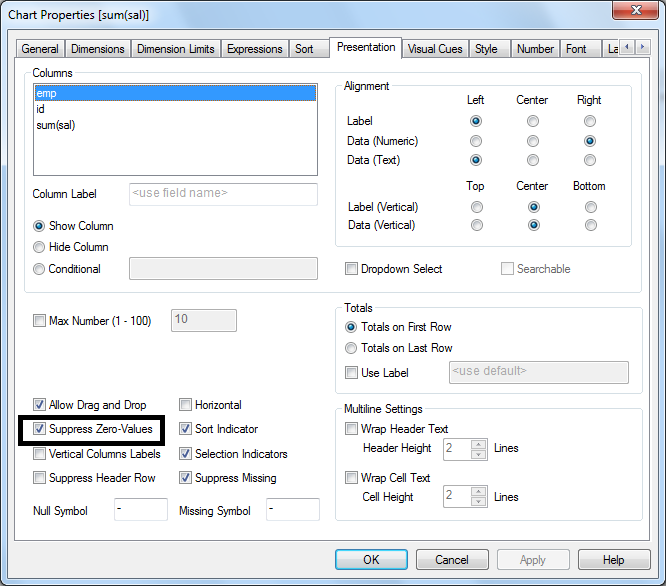
Or you can try with suppress values form option chart properties >> Presentation >> Suppress Zero-Values